
MCP server · Finance and crypto
Blank Invoice Maker MCP server
by InnarM
Ask your AI to build an invoice and get a ready-to-review link that downloads as a PDF.
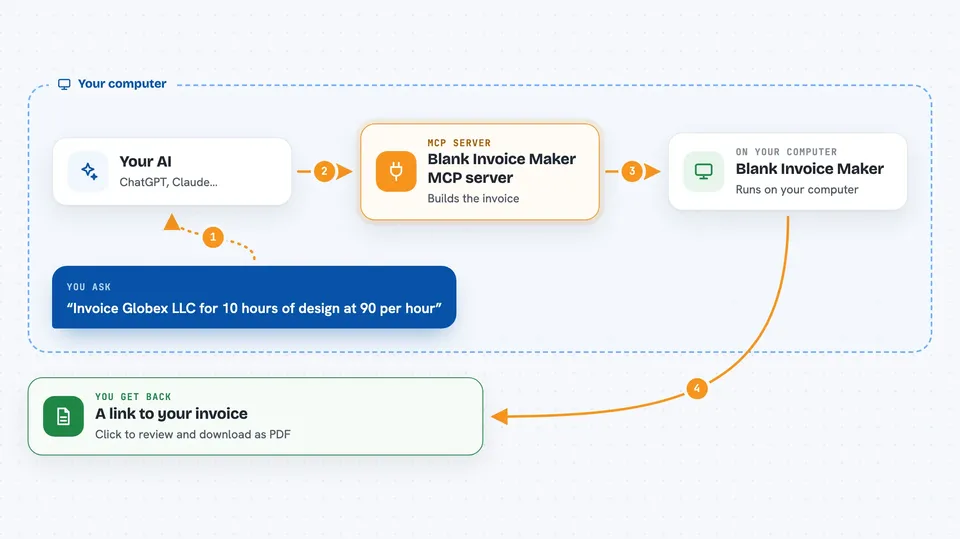
This is a small helper that lets your AI assistant create invoices for you using Blank Invoice Maker, a free invoice site that needs no signup. You describe the job and the amount in plain words, and you get back a link that opens the invoice already filled in. It is handy for freelancers, small studios, and anyone who sends the occasional bill.
What is an MCP server? The 30-second version
On its own, your AI can only chat with you. An MCP server is a small helper program that gives your AI a new skill or a connection to a service. This one connects your AI to Blank Invoice Maker, so when you ask for an invoice, the AI can actually build one and hand you a link. You still review and download it yourself, in your own browser.
What this MCP server does
You tell your AI who the invoice is for, what you did, and how much to charge. The AI uses this helper to turn those details into an invoice, matching the format the Blank Invoice Maker site expects. The helper then packs that invoice into a web link and gives the link back to you. You click it, the site opens with everything already filled in, and you check it over and download the PDF. Nothing is uploaded anywhere; the invoice details travel inside the link itself and are read in your browser.
 Click to zoom
What you can do with it
- Create an invoice from a plain description of the work and price
- Pick a currency and payment terms like Net 14
- See the list of industry invoice templates you can use
- Get a link that opens the invoice pre-filled for review
- Download the finished invoice as a PDF from the site
- Keep your invoice details private, since nothing is stored on a server
Try asking your AI
- “Invoice Globex LLC for 10 hours of design at 90 per hour and one 120 hosting setup, net 14, in GBP”
- “Make an invoice for a wedding photography job, 800 total, due in 30 days, in euros”
- “Create an invoice for my client Acme Corp for 3 consulting sessions at 250 each”
- “Show me the invoice templates available on Blank Invoice Maker”
What it gives back to you
You get back a link that starts with blankinvoicemaker.com and opens the invoice editor already filled in. When you ask for templates, you get a list of names, short descriptions, and links. The chat shows these as text you can click or copy. The actual PDF is created by the site when you open the link and download it.
Before you start
What you need
- Node.js 18 or newer installed on your computer
- An MCP client such as the Claude desktop app
- A web browser to open the invoice link and download the PDF
Good to know
Always open the link and check the invoice before sending it to a client, since the AI fills in the numbers from what you told it.
Install it with your AI
Add Blank Invoice Maker MCP server to your AI, no technical skills needed
You don't install anything by hand. You copy one prompt, paste it into an AI that can work on your computer, and it checks, installs and connects the server for you, asking you when it needs something.
Sign in to get the install prompt
Members get a ready-made prompt that lets the Claude desktop app check Blank Invoice Maker MCP server, install it and connect it for them, step by step. You don't need any technical skills: you copy, paste and answer a few questions. Your connected AI can also find and install any of the 4,361 MCP servers here for you.
Who it's for
Freelancers, consultants, and small business owners who send invoices now and then and want to skip the typing.




