MCP server · Productivity
ProposalCraft MCP server
by jabbawocky
Your AI can draft client proposals in your voice from your past winning work.
ProposalCraft is a helper that lets your AI write client proposals for you, based on proposals you have already written and saved. You paste in a new client brief, and it gives you a draft that sounds like you. It is made for freelancers and consultants who spend hours writing pitches.
What is an MCP server? The 30-second version
On its own, your AI can only chat with you. An MCP server is a small helper program that gives your AI a new skill or a connection to an app or service. This one connects your AI to ProposalCraft, a local tool that stores your past proposals and uses them as a style guide. When you ask for a proposal, the AI uses this helper to look at your saved examples and write a draft in your voice.
What this MCP server does
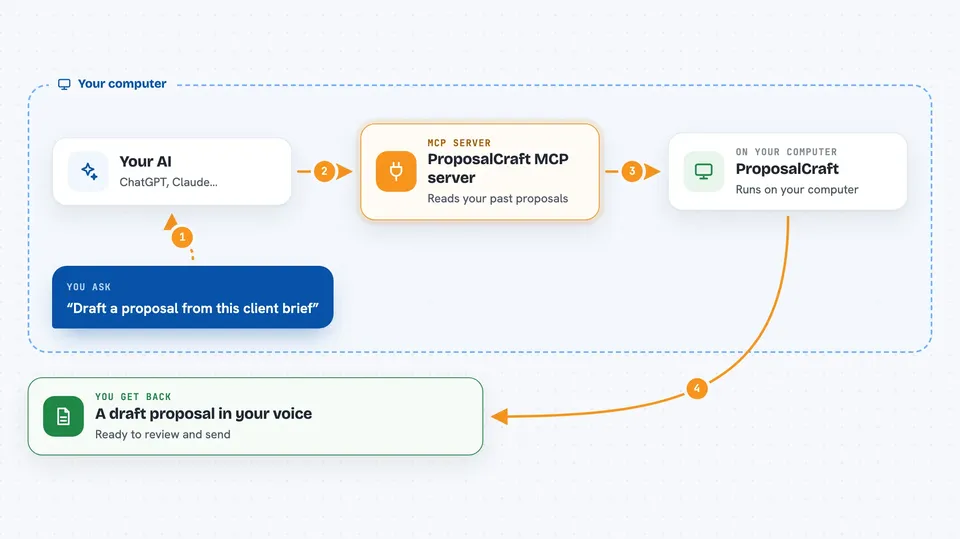
You paste a client brief into your chat and ask for a proposal. Your AI passes the brief to ProposalCraft, which looks at your saved past proposals to learn your voice and style. It then writes a draft proposal and hands it back to your AI. You see the finished draft in the chat, ready to review and send. It can also analyze the brief first to spot budget signals, red flags, and questions to ask before you quote.
 Click to zoom
What you can do with it
- Draft a full client proposal from a brief in your own voice
- Analyze a brief for budget signals, red flags, and scope risks
- Turn a proposal into a short pitch email with a subject line
- Write a statement of work from an accepted proposal
- Save your winning proposals to a local library for future drafts
- Write follow-up emails, change orders, and invoice reminders
- Generate plain-English contracts and NDAs
Try asking your AI
- “Here is a client brief for a website redesign. Can you analyze it and draft a proposal?”
- “Write a retainer proposal for a monthly social media client based on my saved proposals.”
- “Turn this proposal into a short pitch email I can send to the client.”
- “Write a follow-up email for a proposal I sent two weeks ago that got no reply.”
What it gives back to you
You get a full draft proposal in the chat, written in your voice and based on your saved examples. It can also return an analysis of the brief with budget signals, red flags, and clarifying questions. Other tools return emails, statements of work, contracts, or lists of your saved proposals. Everything appears as text you can copy and edit.
Before you start
What you need
- The Claude desktop app or another MCP-compatible client
- Node.js installed on your computer (the free installer from nodejs.org)
- A few past proposals saved in ProposalCraft to learn your voice (optional; it comes with 12 industry templates to start)
Good to know
It stores your proposals locally on your computer, so keep that in mind if you share your device, and always review the draft before sending it to a client.
Install it with your AI
Add ProposalCraft MCP server to your AI, no technical skills needed
You don't install anything by hand. You copy one prompt, paste it into an AI that can work on your computer, and it checks, installs and connects the server for you, asking you when it needs something.
Sign in to get the install prompt
Members get a ready-made prompt that lets the Claude desktop app check ProposalCraft MCP server, install it and connect it for them, step by step. You don't need any technical skills: you copy, paste and answer a few questions. Your connected AI can also find and install any of the 4,361 MCP servers here for you.
Who it's for
Freelancers, consultants, and small agency owners who write client proposals and pitches regularly.