
MCP server · Developer tools
Nexus-MCP code search server
Lets your AI search and understand your codebase locally, saving tokens and time.
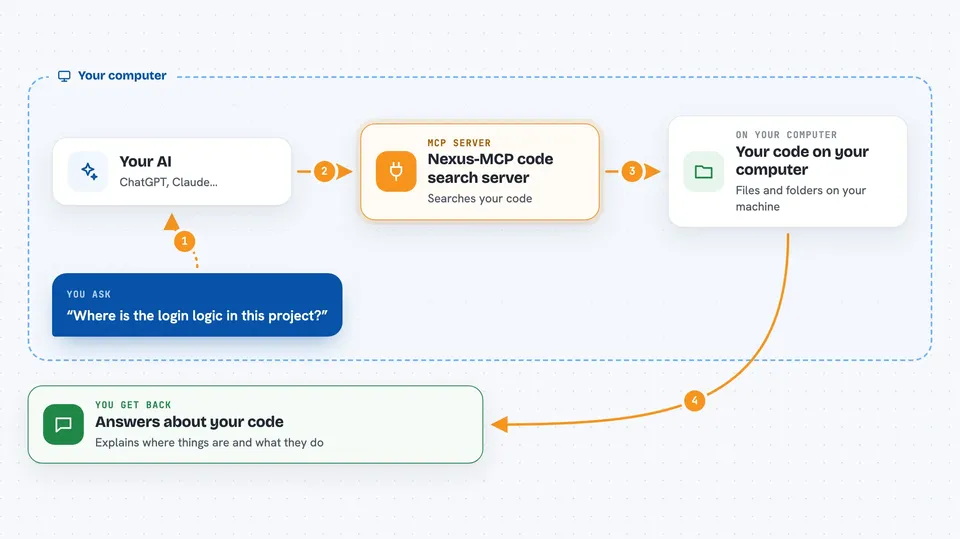
Nexus-MCP is a helper that gives your AI assistant a smart way to look through your code. Instead of reading whole files, it finds the exact functions and classes you care about. It is handy for developers who use AI to write or review code and want faster, cheaper answers.
What is an MCP server? The 30-second version
On its own, your AI can only chat with you. An MCP server is a small helper program that gives your AI a new skill or a connection to an app or service. This one connects your AI to your own code on your computer, so it can search and understand your files when you ask. Everything stays local, so no code leaves your machine.
What this MCP server does
You ask your AI a question about your code, like where a function is used. The AI sends that question to Nexus-MCP. Nexus-MCP looks through an index of your code using three methods: meaning-based search, keyword search, and a map of how pieces connect. It sends back the most relevant pieces, and your AI explains them to you. It can also remember notes across sessions.
 Click to zoom
What you can do with it
- Search your codebase by meaning, not just exact words
- Explain what a function or class does without reading the whole file
- Show which files and modules make up your project
- Find where a symbol is defined
- Analyze code quality like complexity and smells
- Store and recall notes or decisions across chats
- Check if your code index is up to date
Try asking your AI
- “Where is the login logic in this project?”
- “Explain what verify_credentials does.”
- “Show me the main modules and how they connect.”
- “Remember that we decided to use JWT for auth.”
What it gives back to you
You get back short, focused answers in the chat. For a search, you see a list of relevant code chunks with file names and line numbers. For an explain request, you get a summary of the symbol, its relationships, and quality metrics. Notes you store come back when you ask for them later.
Before you start
What you need
- Python 3.10 to 3.12 installed
- The pip package nexus-mcp-ci installed
- An MCP client like Claude Code or Claude Desktop
Good to know
It reads your code files, so make sure you are okay with your AI assistant seeing that code. It does not send your code to the cloud.
Install it with your AI
Add Nexus-MCP code search server to your AI, no technical skills needed
You don't install anything by hand. You copy one prompt, paste it into an AI that can work on your computer, and it checks, installs and connects the server for you, asking you when it needs something.
Sign in to get the install prompt
Members get a ready-made prompt that lets the Claude desktop app check Nexus-MCP code search server, install it and connect it for them, step by step. You don't need any technical skills: you copy, paste and answer a few questions. Your connected AI can also find and install any of the 4,609 MCP servers here for you.
Who it's for
Developers and technical teams who use AI coding assistants and want faster, more accurate code understanding.




