MCP server · Customer communication
WhatsApp Messaging MCP server
by jevil25
Let your AI send WhatsApp texts, images and files from a linked number, and check session status.
This is a small helper that connects your AI assistant to a WhatsApp messaging service. Once it is set up, you can ask your AI to send a WhatsApp message, picture or file to a contact or group. It is handy for anyone who wants to send WhatsApp messages without clicking around, and without a Meta Business account.
What is an MCP server? The 30-second version
On its own, your AI can only chat with you. An MCP server is a small helper program that gives your AI a new skill or a connection to an app or service. This one connects your AI to the WhatsApp Messaging API by Retention Stack, so it can send messages and check sessions for you. You just ask in plain words, and the helper does the talking to WhatsApp behind the scenes.
What this MCP server does
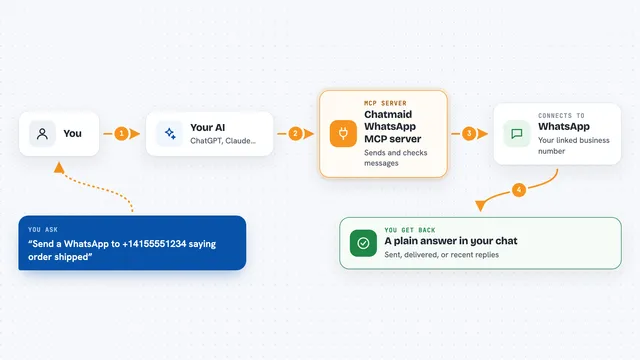
You ask your AI something like send this text to a number, or show me the QR code for my session. The AI passes your request to this helper program. The helper talks to the WhatsApp Messaging API, which is linked to a WhatsApp number you set up by scanning a QR code or using a pairing code. Then it brings back the result, like a confirmation that the message went out, or the QR code image for you to scan. Sessions stay logged in between uses, so you only link a number once.
What you can do with it
- Create a new WhatsApp session and show you the QR code to scan
- Check whether a phone number is on WhatsApp before sending
- Send a text message to a contact or group
- Send an image by giving a link to the picture
- Send a file such as a PDF by giving a link to it
- Check the status of your sessions
- Request an 8-digit pairing code instead of a QR code
Try asking your AI
- “Create a new WhatsApp session and show me the QR code”
- “Check if this number is on WhatsApp: +1 555 123 4567”
- “Send a text to +1 555 123 4567 saying I will be late by ten minutes”
- “Send this image to the team group: https://example.com/photo.jpg”
What it gives back to you
You get back short answers in the chat. For example, a list of your sessions with their status, a QR code image to scan, or a confirmation that a message was sent. If something goes wrong, like the number not being on WhatsApp, it tells you that instead.
Before you start
What you need
- A free account at whatsapp-messaging.retentionstack.agency (no credit card needed)
- An API key from their console: a session token (ch_live_...) for one number, or an account key (ak_live_...) for all your numbers
- An MCP client such as Claude Desktop or Cursor
- Node.js installed on your computer so the npx command works
Good to know
It can send real WhatsApp messages from your linked number, so check the number, recipient and wording before you let your AI send anything.
Install it with your AI
Add WhatsApp Messaging MCP server to your AI, no technical skills needed
You don't install anything by hand. You copy one prompt, paste it into an AI that can work on your computer, and it checks, installs and connects the server for you, asking you when it needs something.
Sign in to get the install prompt
Members get a ready-made prompt that lets the Claude desktop app check WhatsApp Messaging MCP server, install it and connect it for them, step by step. You don't need any technical skills: you copy, paste and answer a few questions. Your connected AI can also find and install any of the 4,960 MCP servers here for you.
Who it's for
People who send WhatsApp messages for work, like small teams, customer support staff, or anyone who wants their AI to handle routine WhatsApp sending.