
MCP server · Notes
BovedIA memory server
by jmpdsevilla
Give your AI a personal memory kept as plain Markdown notes on your own disk.
BovedIA is a helper that gives your AI a lasting memory, stored as simple text notes in a folder you own. Your notes stay as ordinary .md files on your computer, so you can open and edit them in any text editor. It is handy if you use Claude Code often and are tired of repeating the same background every time.
What is an MCP server? The 30-second version
On its own, your AI can only chat with you in the moment. It forgets everything once the conversation ends. An MCP server is a small helper program that gives your AI a new skill, and here that skill is a connection to your own notes folder. So when you ask about a project or a client, the AI can go look it up in your notes and answer with real context.
What this MCP server does
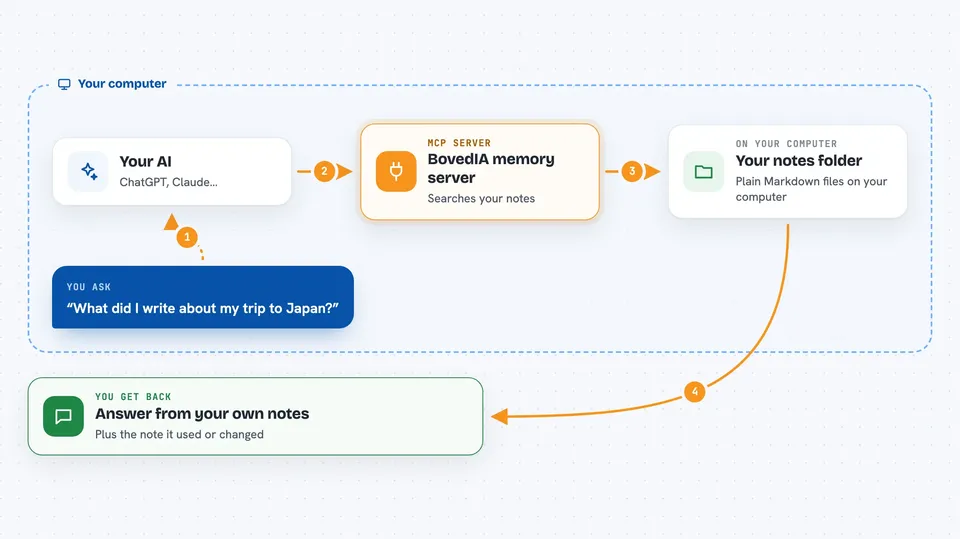
You ask your AI something, and if it needs background it uses BovedIA to look in your notes folder. BovedIA reads, searches, or writes Markdown files there and hands the result back to the AI. The AI then answers you or saves something new for later. It also keeps a starting note called the router, which decides what to load and when, so the AI does not drag in everything at once. Everything lives in plain files on your disk, so nothing is locked inside a database.
 Click to zoom
What you can do with it
- Save a new note about a project, client, or solved problem
- Search your notes by keyword to find something you wrote before
- Read a single note or just one section of it
- List notes by category or tag
- Link notes together with simple [[wikilinks]] and find broken ones
- Check which scheduled notes are due today
- Make a full backup of your notes folder and restore it later
What it gives back to you
You get answers in the chat, drawn from your own notes. It can also give you lists, like all notes in a category, all tags, or the notes that are due today. When it saves or edits something, it tells you which note it changed. You can always open that note yourself and see exactly what is there.
Before you start
What you need
- Node.js 18 or newer installed on your computer
- A folder for your notes, ideally in iCloud, OneDrive, Google Drive, or Dropbox
- The Claude Code app or another app that supports MCP servers
- The full path to that notes folder, written into the settings
Good to know
It can create, change, and delete notes in your folder, so keep backups and check before letting it remove anything.
Install it with your AI
Add BovedIA memory server to your AI, no technical skills needed
You don't install anything by hand. You copy one prompt, paste it into an AI that can work on your computer, and it checks, installs and connects the server for you, asking you when it needs something.
Sign in to get the install prompt
Members get a ready-made prompt that lets the Claude desktop app check BovedIA memory server, install it and connect it for them, step by step. You don't need any technical skills: you copy, paste and answer a few questions. Your connected AI can also find and install any of the 4,066 MCP servers here for you.
Who it's for
People who use Claude Code daily and want their AI to remember projects, clients, and past solutions without retyping everything.




