
MCP server · Research
Stocky stock photo MCP server
by joelio
Search and download free stock photos from Pexels and Unsplash right from your AI chat.
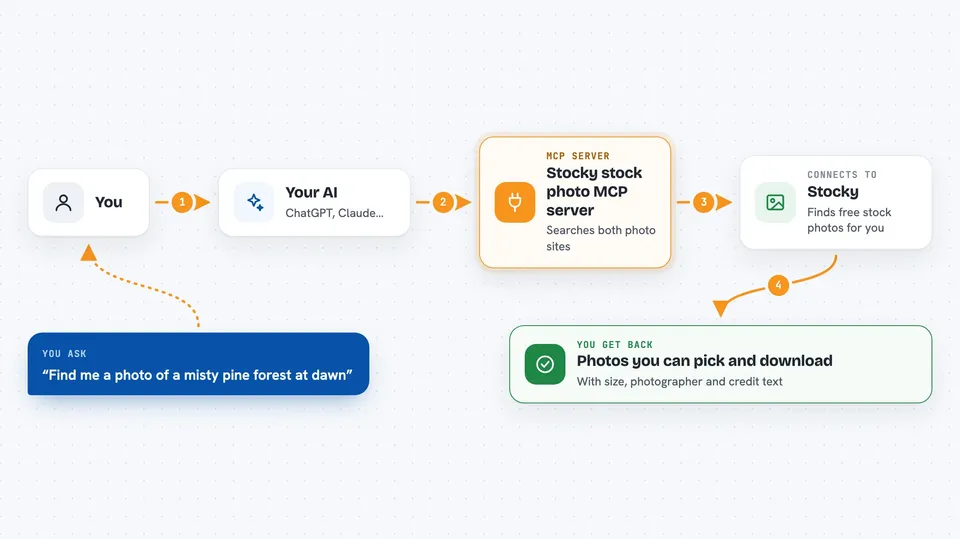
Stocky is a small helper that connects your AI assistant to two big free photo libraries, Pexels and Unsplash. You ask for a kind of picture in plain words, and your AI goes and finds matching photos for you. It is handy for anyone who needs images for slides, documents, or a website and does not want to hunt through stock sites by hand.
What is an MCP server? The 30-second version
On its own, your AI can only chat with you. An MCP server is a small helper program that gives your AI one new skill or one new connection. Stocky is that helper, and the connection it adds is to Pexels and Unsplash, two websites full of free photos. Once it is set up, your AI can search those sites and pull images back for you when you ask.
What this MCP server does
You type a request like find a photo of a misty forest at dawn. Your AI passes that request to Stocky, which sends it to Pexels and Unsplash at the same time. Those sites send back a list of matching photos with details like size, photographer, and tags. Stocky hands that list back to your AI, which shows it to you in the chat. If you like one, you can ask your AI to download it at a size you choose.
 Click to zoom
What you can do with it
- Search Pexels and Unsplash at the same time with one request
- Filter results by orientation, such as landscape, portrait, or square
- Filter by colour, and on Pexels even by a hex code
- See full details for a photo, including dimensions, photographer, and tags
- Download a photo at thumbnail, small, medium, large, or original size
- Get ready-made attribution text and links for each photo
- Sort Unsplash results by relevance or by newest
Try asking your AI
- “Find me a photo of a misty pine forest at dawn”
- “Show 30 landscape mountain photos from Pexels”
- “Get the details for pexels_123456”
- “Download pexels_123456 at medium size to my Pictures folder”
What it gives back to you
You get a list of matching photos grouped by which site they came from, with details like size, photographer, and tags for each one. If you asked for attribution, each result also includes ready-made credit text and a link. When you download a photo, you either get a file saved where you asked or the image data itself. If one of the two sites had a problem, you also see a short note saying which one failed and why.
Before you start
What you need
- A free Pexels API key from pexels.com/api (a kind of password for apps; the site gives you one for free)
- A free Unsplash access key from unsplash.com/developers (also free, and you only need one of the two keys to start)
- An MCP client like the Claude desktop app, with the Stocky config added
Good to know
Both photo sites require you to credit the photographer and the site wherever you use the images, so turn on attribution and keep those credits visible. Downloads also write files to your computer, so set STOCKY_DOWNLOAD_ROOT to keep them in one folder.
Install it with your AI
Add Stocky stock photo MCP server to your AI, no technical skills needed
You don't install anything by hand. You copy one prompt, paste it into an AI that can work on your computer, and it checks, installs and connects the server for you, asking you when it needs something.
Sign in to get the install prompt
Members get a ready-made prompt that lets the Claude desktop app check Stocky stock photo MCP server, install it and connect it for them, step by step. You don't need any technical skills: you copy, paste and answer a few questions. Your connected AI can also find and install any of the 4,361 MCP servers here for you.
Who it's for
Anyone who needs free photos for slides, documents, or websites, like office workers, marketers, teachers, and bloggers.


