MCP server · Finance and crypto
CortexCloud MCP server
by jonahthan433
Lets your AI run AI, search, market and blockchain tasks and pay for each one in crypto.
CortexCloud is a helper that connects your AI assistant to a paid online service. Every time your AI uses it, a small payment in USDC (a type of digital dollar) is sent from a wallet you control. It is handy if you want AI, search, market data or blockchain lookups without signing up for accounts or subscriptions.
What is an MCP server? The 30-second version
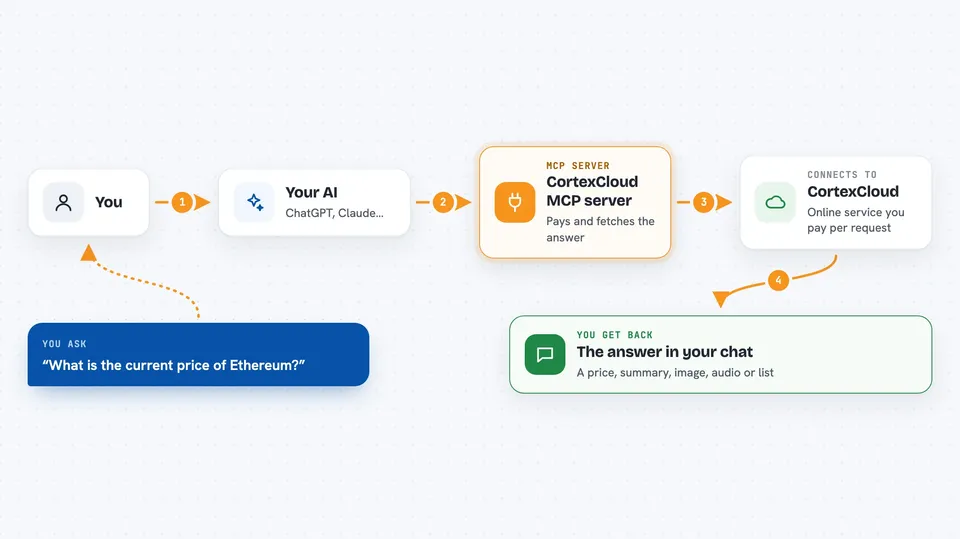
On its own, your AI can only chat with you. An MCP server is a small helper program that gives your AI a new skill or a connection to another service. This one connects your AI to CortexCloud, an online service that can generate text and images, search the web, fetch market data and talk to blockchains. When you ask for something, your AI passes the request to this helper, the helper pays CortexCloud from your wallet, and the answer comes back into your chat.
What this MCP server does
You type a request in plain words, like asking for the price of Bitcoin or a summary of today's news. Your AI sends that request to this helper. The helper talks to the CortexCloud service over the internet. CortexCloud asks for a small payment in USDC, and the helper signs that payment from a wallet you set up. Once paid, CortexCloud sends back the answer, and your AI shows it to you in the chat.
 Click to zoom
What you can do with it
- Ask AI models to write text or answer questions
- Generate images from a description
- Turn text into spoken audio
- Search the web and read page contents
- Get the latest news
- Look up crypto prices and market history
- Check wallet balances and blockchain data
Try asking your AI
- “What is the current price of Ethereum?”
- “Search the web for recent news about electric cars and summarize it”
- “Generate an image of a cat wearing a hat”
- “What is the balance of this Base wallet address 0x1234...?”
What it gives back to you
You get back whatever you asked for: a written answer, a list of search results, a news summary, a price number, a chart of past prices, an image, or an audio file. The answer appears in your chat like a normal reply from your AI. For blockchain lookups, you get numbers like balances or token amounts.
Before you start
What you need
- An MCP client that supports x402 payments, like Claude Desktop with the right setup
- A crypto wallet with some USDC on the Base network to pay for calls
- The wallet's private key (a long secret code) if you run the server yourself
Good to know
Each call costs real money in USDC from your wallet, so keep an eye on how much you spend and keep your wallet's private key safe.
Install it with your AI
Add CortexCloud MCP server to your AI, no technical skills needed
You don't install anything by hand. You copy one prompt, paste it into an AI that can work on your computer, and it checks, installs and connects the server for you, asking you when it needs something.
Sign in to get the install prompt
Members get a ready-made prompt that lets the Claude desktop app check CortexCloud MCP server, install it and connect it for them, step by step. You don't need any technical skills: you copy, paste and answer a few questions. Your connected AI can also find and install any of the 4,066 MCP servers here for you.
Who it's for
People who want to try AI, search, market data or blockchain tools without creating accounts, and who are comfortable using a crypto wallet.