MCP server · Research
World Cup 2026 MCP server
by jordanlyall
Ask your AI about the 2026 World Cup and get real answers on matches, teams, cities, visas and more.
This is a small helper that gives your AI a big pile of World Cup 2026 knowledge. It covers matches, teams, stadiums, host city guides, fan zones, visa rules, injuries, odds and the knockout bracket. It is handy if you are following the tournament, planning a trip to a host city, or just curious about a team.
What is an MCP server? The 30-second version
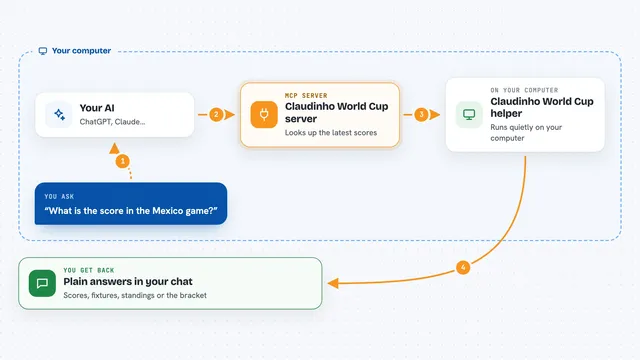
On its own, your AI can only chat with you using what it already learned. An MCP server is a small helper program that gives your AI a new skill or a connection to something useful. This one connects your AI to a ready-made World Cup 2026 dataset that ships with the package. So when you ask about a match or a city, the AI can look it up here instead of guessing.
What this MCP server does
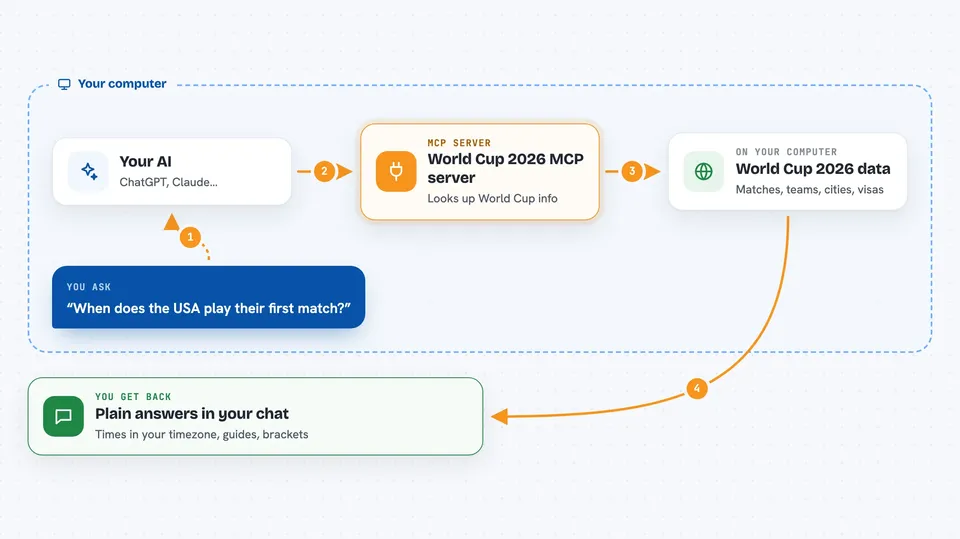
You ask your AI a question about the 2026 World Cup, like when a team plays or what a host city is like. The AI passes that question to this helper. The helper looks through its built-in World Cup data, which includes matches, teams, venues, city guides, fan zones, visa info, news, injuries, odds and standings. It sends the answer back, and the AI writes it up for you in the chat, often with timezone conversion so times match your local clock.
 Click to zoom
What you can do with it
- Get a quick briefing on what matters in the tournament right now
- Look up any team's coach, key players, style and World Cup history
- Find match dates and times converted to your timezone
- Read a travel guide for any host city, with transit, food and tips
- Check visa or entry rules for fans travelling to the host countries
- Compare two teams side by side before a big match
- See the knockout bracket from the round of 32 to the final
Try asking your AI
- “Brief me on the World Cup”
- “When does the USA play their first match?”
- “Give me a city guide for Dallas”
- “Do Iranian fans need a visa to attend matches in the US?”
What it gives back to you
You get answers written in plain language in your chat. Depending on what you ask, that can be a list of matches with local times, a team profile, a city guide, a head-to-head history, a bracket view, or a short news roundup. It can also give you odds, standings and injury updates. Everything comes back as readable text, not files.
Before you start
What you need
- An MCP client such as Claude Desktop, Claude Code, Cursor or Windsurf
- Node.js installed on your computer (the helper runs through npx)
Good to know
The data ships with the package and some of it is predictions, odds or daily news, so treat those parts as estimates rather than official facts.
Install it with your AI
Add World Cup 2026 MCP server to your AI, no technical skills needed
You don't install anything by hand. You copy one prompt, paste it into an AI that can work on your computer, and it checks, installs and connects the server for you, asking you when it needs something.
Sign in to get the install prompt
Members get a ready-made prompt that lets the Claude desktop app check World Cup 2026 MCP server, install it and connect it for them, step by step. You don't need any technical skills: you copy, paste and answer a few questions. Your connected AI can also find and install any of the 4,609 MCP servers here for you.
Who it's for
Football fans, travellers heading to a host city, and anyone who wants quick, grounded answers about the 2026 World Cup.