MCP server · Meetings
Smitline MCP server
by kaelorlabs
Let your AI make real phone calls and sit in on Zoom, Teams and Google Meet meetings for you.
Smitline gives your AI assistant a phone line and a seat in online meetings. You ask it to call a restaurant, a plumber or a colleague, and it actually talks to the person on the other end, then tells you what happened. It is handy if you spend your day making small calls or sitting in meetings you only need notes from.
What is an MCP server? The 30-second version
On its own, your AI can only chat with you in a text box. An MCP server is a small helper program that gives your AI a new skill or a connection to an app or service. Smitline is that helper here: it connects your AI to real phone calls and to Zoom, Microsoft Teams and Google Meet. So when you ask your AI to make a call or join a meeting, it can actually do it and report back to you.
What this MCP server does
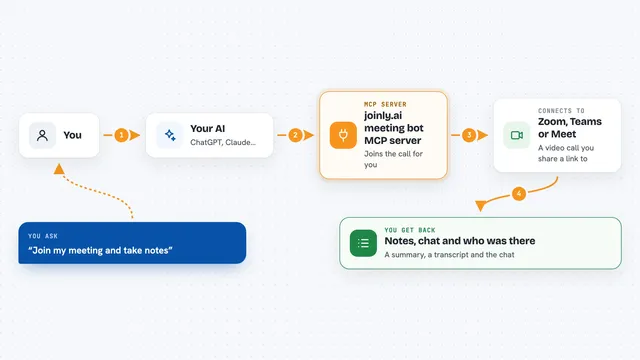
You ask your AI in plain words, like call this number and book a table for four at seven. Your AI writes a short brief with the goal, what it may agree to and what to keep private. Smitline then makes the call or joins the meeting, talks with the person in a natural voice, and stays inside that brief. When it is done, the result comes back to your chat: what happened, the details you need, action items, the transcript and the cost.
What you can do with it
- Call a restaurant and book a table
- Call a plumber or repair shop and ask if they can come today
- Join a Zoom, Teams or Google Meet meeting and take notes
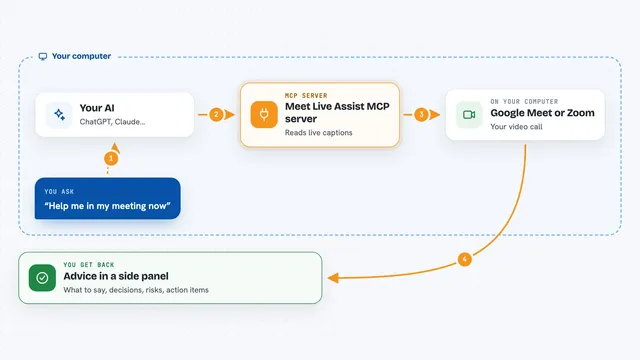
- Ask questions during a call and bring answers back to you
- Follow a budget you set, like do not agree to more than $150
- Listen in on the live transcript and take over the call on your own phone
- Get a summary with times, prices and confirmation numbers after the call
What it gives back to you
You get a short report in your chat: what happened, the details you asked for like times, prices and confirmation numbers, and any action items. You also get the full transcript of the call or meeting and what it cost. If something came up that was outside your brief, Smitline brings it back to you instead of deciding on its own.
Before you start
What you need
- Docker Desktop on Mac or Windows (4.34 or newer, signed in), or Docker Engine on Linux (26 or newer for meetings)
- An OpenAI API key with access to GPT-Live and billing turned on
- For phone calls: a SignalWire account or a funded Twilio account
- About 600 MB of disk space, plus 1.8 GB the first time it joins a meeting
Good to know
It can make real phone calls and join real meetings on your behalf, which can cost money and may share information you did not mean to share, so set a clear brief and a budget before letting it call.
Install it with your AI
Add Smitline MCP server to your AI, no technical skills needed
You don't install anything by hand. You copy one prompt, paste it into an AI that can work on your computer, and it checks, installs and connects the server for you, asking you when it needs something.
Sign in to get the install prompt
Members get a ready-made prompt that lets the Claude desktop app check Smitline MCP server, install it and connect it for them, step by step. You don't need any technical skills: you copy, paste and answer a few questions. Your connected AI can also find and install any of the 4,960 MCP servers here for you.
Who it's for
People who make a lot of small phone calls or sit in meetings just to take notes, like assistants, founders, freelancers and busy office workers.