
MCP server · Research
JSON MCP Filter server
by kehvinbehvin
Lets your AI read a JSON file or web link and pull out only the few fields you care about.
This is a small helper that connects your AI to JSON data. JSON is just a common way computers store information in a text file, like a tidy list of names, prices, or dates. If you often deal with big data files or web links that return lots of fields, this makes your AI's answers shorter and more focused.
What is an MCP server? The 30-second version
On its own, your AI can only chat with you. An MCP server is a small helper program that gives your AI one new skill. This helper connects your AI to JSON files and JSON web links, so it can open them, look inside, and pick out just the parts you asked for. You stay in the chat; the helper does the fetching and sorting behind the scenes.
What this MCP server does
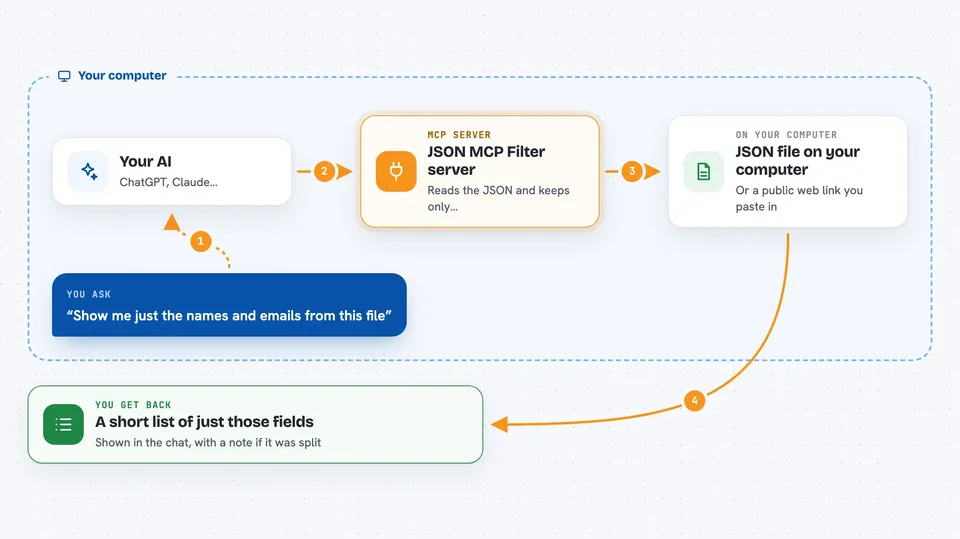
You ask your AI something like "show me just the names and emails from this file". The AI passes your request to this helper. The helper opens the file, or downloads it from the web link you gave, and reads the JSON inside. It keeps only the fields you asked for and hands them back to the AI. The AI then shows you the trimmed result in the chat, without all the extra noise.
 Click to zoom
What you can do with it
- Pull only the fields you care about from a big JSON file
- Read from a public web link or API address
- Check how big a file is before pulling data from it
- Split a very large file into smaller pieces you can read one at a time
- Turn a JSON sample into a TypeScript description of its shape
- Skip downloading files that are too large to handle safely
Try asking your AI
- “From this file, show me only the name and email of each user”
- “Fetch this public API link and give me just the city and temperature for each entry”
- “How big is this JSON file, and how many chunks would it take to read it?”
- “Look at this JSON sample and describe the fields it contains”
What it gives back to you
You get back a trimmed version of the data, usually a short list or a small table of just the fields you asked for. If the file is big, you also get a note telling you how many pieces it was split into and which piece you are looking at. For the schema tool, you get a plain description of what fields the JSON has and what type each one is. Everything shows up right in the chat as text.
Before you start
What you need
- The Claude desktop app or Claude Code, with MCP servers enabled
- Node.js installed on your computer (the free program that runs this helper)
- The file path or web link to the JSON you want to look at
Good to know
It can open files on your computer and download data from any web link you give it, so only point it at files and public links you trust.
Install it with your AI
Add JSON MCP Filter server to your AI, no technical skills needed
You don't install anything by hand. You copy one prompt, paste it into an AI that can work on your computer, and it checks, installs and connects the server for you, asking you when it needs something.
Sign in to get the install prompt
Members get a ready-made prompt that lets the Claude desktop app check JSON MCP Filter server, install it and connect it for them, step by step. You don't need any technical skills: you copy, paste and answer a few questions. Your connected AI can also find and install any of the 4,609 MCP servers here for you.
Who it's for
Anyone who deals with large JSON files or web data and wants their AI to summarize just the useful parts, like analysts, support staff, and people working with reports.


