MCP server · Privacy
Kut personal CRM MCP server
by koraykutlu
Let your AI look up your Kut contacts, weekly follow-ups, past conversations and meeting briefs from your own files.
Kut is a personal contact book that lives on your own computer. It keeps every person you know as a simple Markdown file, with notes, promises and when you last spoke. This MCP server lets your AI helper read those files when you ask about someone. It is handy if you use Kut and want your AI to help prepare for a call or remember who to contact this week.
What is an MCP server? The 30-second version
On its own, your AI can only chat. It cannot see your Kut contacts or files. An MCP server is a small helper program that gives your AI a new skill. This one connects your AI to Kut, so when you ask about a person or your week, the AI can look it up and answer.
What this MCP server does
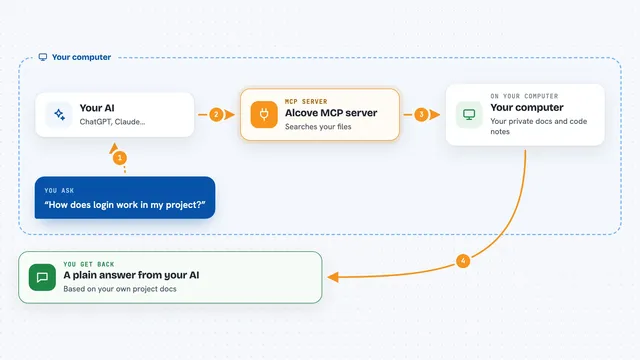
You ask your AI a question about your contacts, like who to reach out to this week or what you talked about with someone. The AI sends that question to the Kut helper program running on your own computer. The helper opens your Kut data and looks for the answer. Then the AI gets the result and tells you in plain words: a list of names, a short summary, a meeting brief, or recent conversations. It only reads. It never changes your files.
What you can do with it
- Search your contacts by name or keyword
- Open a person's contact card to see details
- See who you should reach out to this week
- Read recent conversations with someone
- Get a one-page meeting brief before a call or meeting
- Check your open promises to and from people
Try asking your AI
- “Who should I reach out to this week?”
- “Show me my contact card for Ayşe.”
- “What did I talk about with Mehmet last time?”
- “Give me a meeting brief for Selin before our call tomorrow.”
What it gives back to you
You get answers in the chat, in plain words. For a search, you get a list of names with short details. For a weekly check, you get the people who need attention and why. For a person, you get their card: role, why they matter, and recent conversations. For a brief, you get a short summary you can read before a meeting.
Before you start
What you need
- Kut installed on your computer with some contacts
- Kut running in the background with MCP mode turned on (kut.pyw --mcp)
- An AI helper that supports MCP, like Claude Desktop
Good to know
This server only reads your Kut data. It cannot change or delete anything. Contacts you marked private stay hidden, and phone numbers and emails are never sent.
Install it with your AI
Add Kut personal CRM MCP server to your AI, no technical skills needed
You don't install anything by hand. You copy one prompt, paste it into an AI that can work on your computer, and it checks, installs and connects the server for you, asking you when it needs something.
Sign in to get the install prompt
Members get a ready-made prompt that lets the Claude desktop app check Kut personal CRM MCP server, install it and connect it for them, step by step. You don't need any technical skills: you copy, paste and answer a few questions. Your connected AI can also find and install any of the 4,611 MCP servers here for you.
Who it's for
Anyone who uses Kut to manage their personal and work contacts and wants their AI to help prepare for calls and keep track of who to follow up with.