
MCP server · Notes
echocache MCP server
by kskurtveit
Lets your AI save its own answers and reuse them later instead of working them out again.
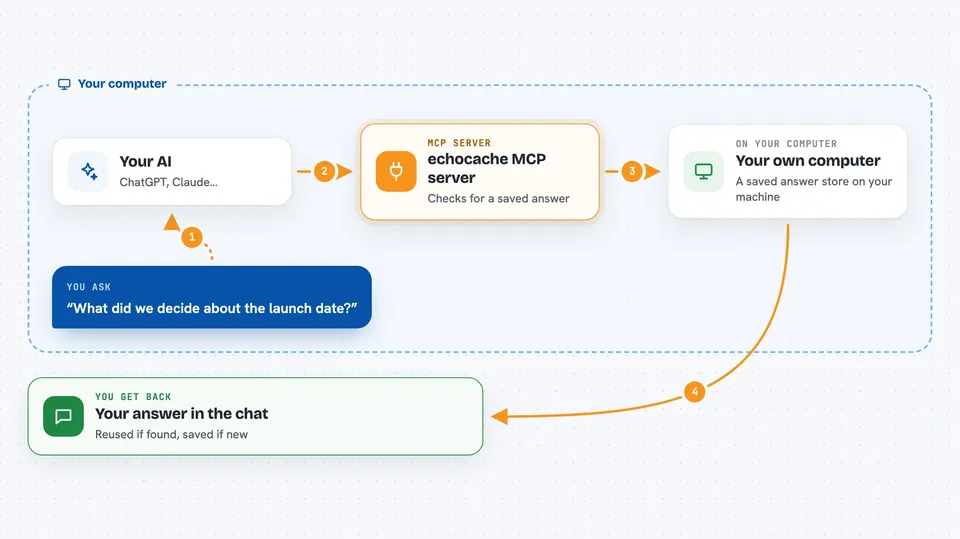
echocache is a memory box for your AI's answers. When your AI figures something out after a lot of work, this helper stores that answer so a later chat can pull it back instead of starting over. It is handy if you use your AI for research or long thinking tasks and keep asking similar questions.
What is an MCP server? The 30-second version
On its own, your AI can only chat. It cannot remember anything between conversations unless something gives it a place to store things. An MCP server is a small helper program that gives your AI a new skill, and here that skill is a shared cache: a place to save finished answers and look them up again. Once it is connected, your AI can quietly check this cache before doing expensive work, and save the result when it is done.
What this MCP server does
You ask your AI something. Before answering, your AI can ask echocache whether a similar answer already exists. echocache looks in its database, both for an exact match and for entries that mean something similar, and hands back what it finds. If nothing is there, your AI does the work and then saves the result into echocache for next time. You just see the answer in the chat.
 Click to zoom
What you can do with it
- Save a finished answer so it can be reused later
- Look up a saved answer by the exact same question
- Search saved answers by meaning, even if the wording is different
- See which saved answers are related to each other
- Delete a saved answer, and optionally the ones that were built on it
- Check how often the cache is being used and how many tokens it saved
What it gives back to you
You get answers, not files. Usually your AI just uses what it found and replies to you in normal words. If you ask directly, it can also show you a list of related saved entries, or numbers like how many lookups hit and how many tokens were served from the cache.
Before you start
What you need
- Node.js installed on your computer (the free version from nodejs.org)
- An MCP-capable app like Claude Desktop, Cursor, or VS Code
Good to know
It stores your AI's answers in a file on your computer, so avoid caching anything private or sensitive unless you turn on the encryption key.
Install it with your AI
Add echocache MCP server to your AI, no technical skills needed
You don't install anything by hand. You copy one prompt, paste it into an AI that can work on your computer, and it checks, installs and connects the server for you, asking you when it needs something.
Sign in to get the install prompt
Members get a ready-made prompt that lets the Claude desktop app check echocache MCP server, install it and connect it for them, step by step. You don't need any technical skills: you copy, paste and answer a few questions. Your connected AI can also find and install any of the 4,066 MCP servers here for you.
Who it's for
People who use their AI for long research or judgment tasks and want it to stop repeating work it already did.




