
MCP server · Email
Qorami email check MCP server
Let your AI check an email before it sends it, and pause for a human when the email looks risky.
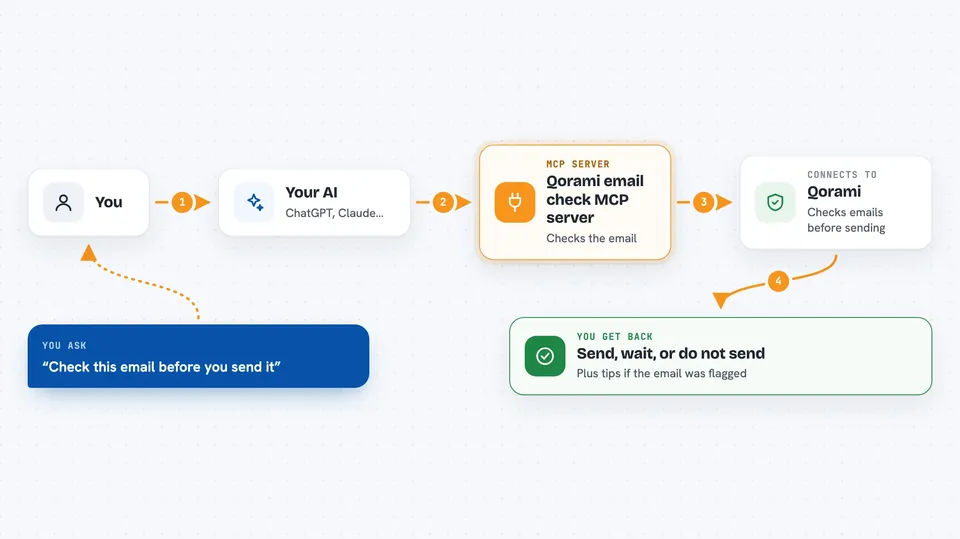
Qorami is a safety check for emails written by AI. You connect it to your AI assistant, and before the assistant sends anything, it asks Qorami whether the email is safe to send, needs a human to look at it, or should not be sent at all. It is handy for anyone who lets an AI draft or send emails on their behalf.
What is an MCP server? The 30-second version
On its own, your AI can only chat with you. An MCP server is a small helper program that gives your AI a new skill or a connection to another service. This one connects your AI to Qorami, an email safety service. Once it is connected, your AI can ask Qorami to review an email before sending it, and Qorami answers with a clear decision.
What this MCP server does
You ask your AI to write and send an email. Before sending, the AI calls this helper, and the helper sends the email text to Qorami. Qorami looks at it and replies with one of three answers: send it, do not send it, or wait for a human to approve. If the answer is wait, the AI pauses and checks back until a person approves or blocks the email in the Qorami dashboard. Then the AI acts on that final answer.
 Click to zoom
What you can do with it
- Check an email before your AI sends it
- Get a clear decision: send, ask a human, or do not send
- See suggestions for improving an email that was flagged
- Pause risky emails and wait for a human to approve them
- Check your remaining Qorami credits without spending one
- Catch prompt-injection attempts hidden in email content
Try asking your AI
- “Before you send that email to the client, run it through Qorami and tell me the decision.”
- “Draft a follow-up email to Sarah, then verify it with Qorami and only send if it says send.”
- “Check whether this email looks like a phishing attempt before you send it.”
- “Run qorami_health so I can see if Qorami is connected and how many credits I have left.”
What it gives back to you
You get a short answer in the chat: send, do not send, or wait for a human. If the email was flagged, you also see suggestions for what to change. If a human needs to approve it, the AI tells you it is waiting and checks back until the decision is final. The health check returns your remaining credit balance.
Before you start
What you need
- A Qorami account and an API key from the Qorami dashboard (a kind of password for apps; the site gives you one)
- Node.js 18 or newer if you run it with npx or from a local copy
- Docker if you prefer to run it in a container
- An MCP-compatible app such as Claude Desktop, Cursor, or Windsurf
Good to know
Each verification costs 1 credit, and if your credits run out the check fails, so make sure your AI treats a failed check as cannot send rather than sending anyway.
Install it with your AI
Add Qorami email check MCP server to your AI, no technical skills needed
You don't install anything by hand. You copy one prompt, paste it into an AI that can work on your computer, and it checks, installs and connects the server for you, asking you when it needs something.
Sign in to get the install prompt
Members get a ready-made prompt that lets the Claude desktop app check Qorami email check MCP server, install it and connect it for them, step by step. You don't need any technical skills: you copy, paste and answer a few questions. Your connected AI can also find and install any of the 4,609 MCP servers here for you.
Who it's for
Anyone who lets an AI assistant write or send emails, especially support, sales, and operations teams that want a human check on risky messages.





