
MCP server · Developer tools
Lynx MCP server
Search your code by meaning and see what calls what, all on your own machine.
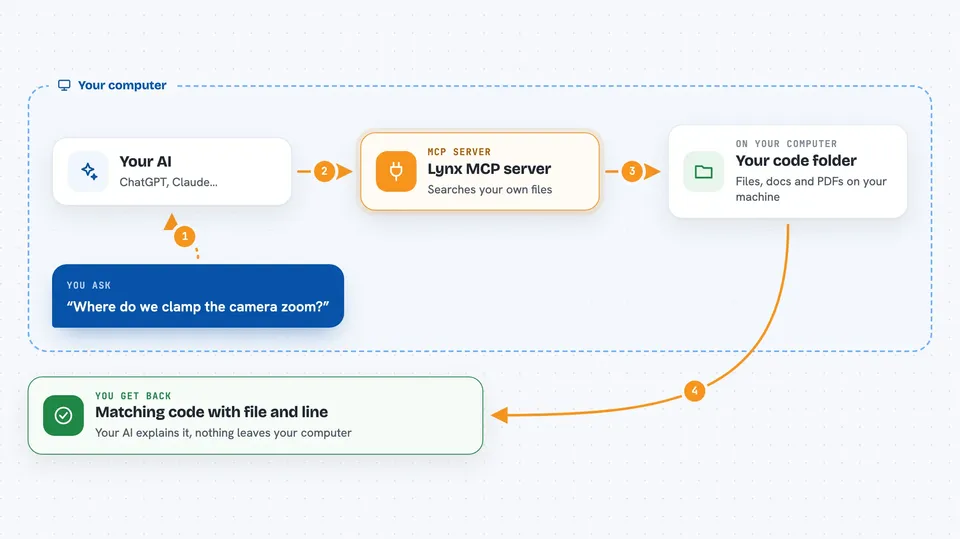
Lynx is a helper that lets your AI search through your code by what it does, not just by the exact name you type. It also maps out how your code is connected, so it can tell you what calls a function and what might break if you change it. It is handy if you work in a big codebase and keep asking your AI questions like "where do we handle this?".
What is an MCP server? The 30-second version
On its own, your AI can only chat with you using what it already knows. An MCP server is a small helper program that gives your AI a new skill or a connection to something, here to your own code and documents. Once Lynx is connected, your AI can look things up in your project and answer with real file names and line numbers. You ask in plain words, and Lynx does the searching behind the scenes.
What this MCP server does
You point Lynx at a folder of code, docs or PDFs, and it builds an index of what is inside. When you ask your AI a question, the AI sends it to Lynx, which searches that index in two ways at once: by meaning and by exact words. Lynx hands back the matching pieces of code with the file and line, so your AI can explain them to you. If you turn on the extra graph feature, Lynx also knows which functions call which, so it can answer questions about connections. Everything stays on your computer.
 Click to zoom
What you can do with it
- Find code by describing what it does, even when you do not know the name
- See who calls a function and what it calls
- Check what might break if you change a function
- Find where a symbol is defined and every place it is used
- Search only the files you changed, useful for reviewing a pull request
- Search your framework docs and PDFs alongside your code
- Get a quick overview of what a project is and where to start
Try asking your AI
- “Where do we clamp the camera zoom?”
- “What breaks if I change ApplyDamage?”
- “Show me everything that inherits from Field in this project”
- “How does this API behave in the version we ship?”
What it gives back to you
You get back a short ranked list of code pieces, each with the file path, the line number, the symbol name and a score. Often it is the whole function, not just a matching line, so your AI has enough to explain it. For graph questions you get a list of callers or subclasses with the file and line for each. You can also export a graph view as a single file to share.
Before you start
What you need
- Python installed on your computer
- The lynx-mcp tool installed (one command, shown in the README)
- An MCP client like Claude Code, Cursor or Windsurf
- About 460 MB of disk space, plus a 130 MB model download on first run
Good to know
It reads your code and documents, so make sure you are comfortable indexing those folders; it stays on your machine and does not upload anything.
Install it with your AI
Add Lynx MCP server to your AI, no technical skills needed
You don't install anything by hand. You copy one prompt, paste it into an AI that can work on your computer, and it checks, installs and connects the server for you, asking you when it needs something.
Sign in to get the install prompt
Members get a ready-made prompt that lets the Claude desktop app check Lynx MCP server, install it and connect it for them, step by step. You don't need any technical skills: you copy, paste and answer a few questions. Your connected AI can also find and install any of the 4,361 MCP servers here for you.
Who it's for
Developers and anyone who works in a large codebase and wants their AI to answer questions about the code accurately.





