MCP server · Productivity
GPTZero MCP server
by louis030195
Ask your AI to check whether a piece of text was written by a person or by an AI.

This is a small helper that connects your AI assistant to GPTZero, a service that guesses whether text was written by a human or by an AI. Once it is set up, you can paste any text into your chat and ask your assistant to run it through GPTZero. It is handy for teachers, editors, recruiters, or anyone who receives writing and wants a second opinion.
What is an MCP server? The 30-second version
On its own, your AI can only chat with you using what it already knows. An MCP server is a small helper program that gives your AI a new skill or a connection to another service. This one connects your AI to GPTZero, so when you ask about a piece of text, your AI can send it to GPTZero and bring the answer back to you. You do not need to understand how it works inside; you just ask in normal words.
What this MCP server does
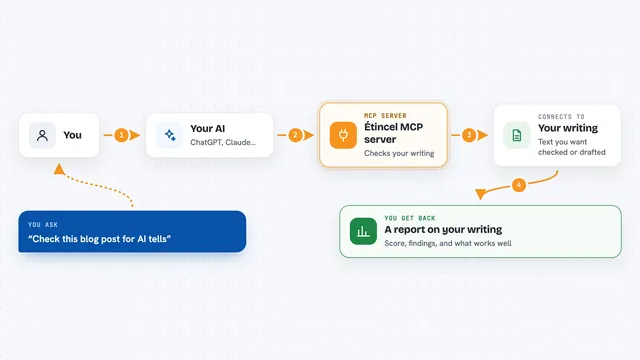
You paste some text into your chat and ask your AI to check it. Your AI passes that text to this helper, which sends it to the GPTZero service. GPTZero looks at the writing and comes back with a guess: AI, human, or mixed. The helper hands that result back to your AI, and your AI explains it to you in the chat. If you turn on the multilingual option, it can also handle French and Spanish text.
 Click to zoom
What you can do with it
- Check whether a paragraph or document looks AI-written
- See a confidence level (high, medium, or low) for the result
- Get a breakdown of the probability for AI, human, and mixed
- Analyze French or Spanish text with the multilingual option
- Look up which GPTZero model versions are available
- Compare several pieces of writing by asking one after another
Try asking your AI
- “Check if this text is AI-generated: [paste your text]”
- “What is the probability this paragraph was written by AI?”
- “Analyze this document for AI detection”
- “Is this French email human or AI written?”
What it gives back to you
You get an answer in the chat that says whether the text looks AI, human, or mixed, along with a confidence level like high, medium, or low. It also shows probability scores for each of those three categories, so you can see how close the call was. Some results include a sentence-by-sentence view, which can help you spot the parts that pushed the score one way or the other.
Before you start
What you need
- A GPTZero account and an API key (a kind of password for apps; you get it free from the GPTZero website after signing up)
- The Claude desktop app or Claude Code, or another AI tool that supports MCP servers
- Node.js installed on your computer (the setup uses a tool called npx)
Good to know
GPTZero gives a guess, not a proof, so treat the result as one clue among many and do not use it alone to accuse someone of using AI.
Install it with your AI
Add GPTZero MCP server to your AI, no technical skills needed
You don't install anything by hand. You copy one prompt, paste it into an AI that can work on your computer, and it checks, installs and connects the server for you, asking you when it needs something.
Sign in to get the install prompt
Members get a ready-made prompt that lets the Claude desktop app check GPTZero MCP server, install it and connect it for them, step by step. You don't need any technical skills: you copy, paste and answer a few questions. Your connected AI can also find and install any of the 4,361 MCP servers here for you.
Who it's for
Teachers, editors, recruiters, and anyone who reads a lot of submitted writing and wants a quick second opinion on whether it was written by a person or an AI.