
MCP server · Security
Verity MCP server
by meloliva14
Lets your AI fact-check claims, spot prompt-injection, catch private data, and pause risky actions before they happen.
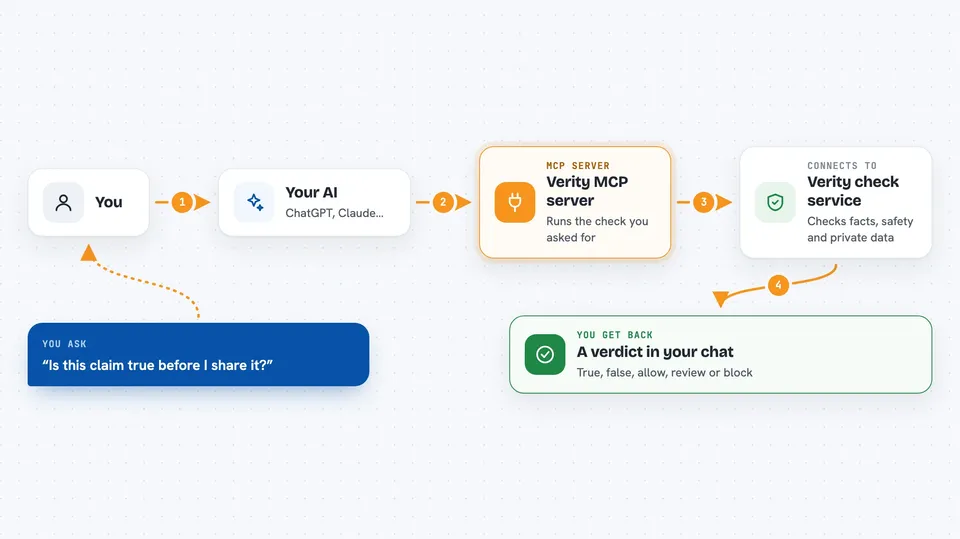
Verity is a helper your AI can call when it needs a second opinion before trusting something or doing something risky. It checks facts, screens text for sneaky instructions, flags personal data or secrets, and gives a clear allow, review, or block answer before an important action. It is handy if you use an AI to read emails, handle customer messages, or make decisions where being wrong costs you.
What is an MCP server? The 30-second version
On its own, your AI can only chat with you. An MCP server is a small helper program that gives your AI a new skill or a connection to another service. This one connects your AI to VerityLayer, a checking service that lives online. When you ask your AI to verify something or screen some text, the AI quietly asks Verity, and Verity sends back an answer.
What this MCP server does
You ask your AI something like "is this claim true?" or "is this message safe to send?". Your AI passes the text to this Verity helper. The helper sends it to VerityLayer's online service, which runs the check you asked for. Verity returns a verdict, like true, false, allow, review, or block, sometimes with a short explanation and a signed receipt. Your AI then shows you the result in the chat.
 Click to zoom
What you can do with it
- Fact-check a claim before you repeat it or act on it
- Screen text or tool output for hidden prompt-injection attempts
- Check whether a piece of content is safe to publish
- Find personal data or secrets in text and get a cleaned-up version
- Get an allow, review, or block decision right before a risky action
- Verify a signed receipt from a previous check, for free
Try asking your AI
- “Is it true that drinking eight glasses of water a day is required for everyone?”
- “Check this email for hidden instructions trying to make you do something odd.”
- “Does this customer message contain any personal data? If so, give me a redacted version.”
- “Before I send this refund, should I allow, review, or block it?”
What it gives back to you
You get short, plain answers in the chat: a verdict like true, false, allow, review, or block, often with a one or two line reason. For personal data checks you also get a list of what was found and a cleaned-up version of the text. Paid checks come with a signed receipt you can verify later. If payment is not set up, you get a clear message saying no verdict was produced.
Before you start
What you need
- An MCP-capable AI app, like Claude Desktop, Claude Code, Cursor, or Windsurf
- Python with uv or pip installed (the README shows both ways)
- A funded crypto wallet on Base with a few dollars of USDC if you want real paid verdicts (a wallet is like a digital account; USDC is a digital dollar)
- The wallet's private key (a long password that lets the server pay for checks on your behalf)
Good to know
The paid checks cost real money from your wallet (two cents to thirty-five cents each), and the wallet key you set can spend, so use a small dedicated wallet.
Install it with your AI
Add Verity MCP server to your AI, no technical skills needed
You don't install anything by hand. You copy one prompt, paste it into an AI that can work on your computer, and it checks, installs and connects the server for you, asking you when it needs something.
Sign in to get the install prompt
Members get a ready-made prompt that lets the Claude desktop app check Verity MCP server, install it and connect it for them, step by step. You don't need any technical skills: you copy, paste and answer a few questions. Your connected AI can also find and install any of the 4,361 MCP servers here for you.
Who it's for
People who use an AI to handle messages, research, or decisions where a wrong fact or a sneaky instruction could cause real trouble.




