
MCP server · Notes
Mnemoverse Memory MCP server
by mnemoverse
Give your AI a lasting memory that follows you across tools and learns from your feedback.
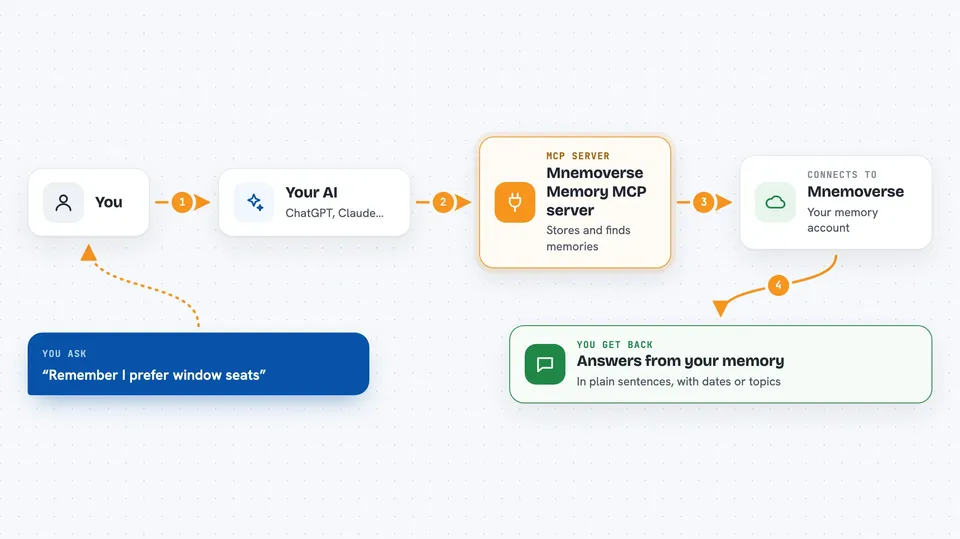
Mnemoverse is a memory service for your AI assistant. Instead of repeating the same context in every new chat, your AI can save what it learns and bring it back later, in Claude Code, Cursor, VS Code or ChatGPT. It is handy if you work with AI every day and are tired of re-explaining your preferences and past decisions.
What is an MCP server? The 30-second version
On its own, your AI can only chat with what is in front of it, and it forgets everything when the session ends. An MCP server is a small helper program that gives your AI a new skill or a connection to a service. This one connects your AI to Mnemoverse, a hosted memory service, so it can save notes and look them up again when you ask. You do not need to understand how it works inside; you just connect it once and your AI gains a memory.
What this MCP server does
You tell your AI something worth keeping, like a preference or a lesson learned, and it uses this helper to store it in your Mnemoverse account. Later, in a new chat or a different tool, you ask a question and the AI uses the helper to search your saved memories and answer with what it finds. You can also mark a memory as helpful or misleading, and that feedback changes which memories come back first next time. Everything lives in your Mnemoverse account, so the same memory is available wherever you connect it.
 Click to zoom
What you can do with it
- Save preferences, decisions and lessons your AI should remember
- Search your saved memories with a normal question
- List your newest memories without searching
- Rate a memory as helpful or misleading to improve future recall
- Check how many memories you have and which topics they cover
- Create a shared room so several people or agents work from one memory
- Invite someone to a room with a code or link
What it gives back to you
You get answers in the chat, written in normal sentences, based on what was found in your memory. When you save something, the AI confirms what was stored. When you search, it shows the matching memories, sometimes with dates or topics. Feedback and stats come back as short confirmations or simple numbers.
Before you start
What you need
- A free Mnemoverse account (no credit card, made in about 30 seconds)
- An API key from the Mnemoverse console, or an OAuth sign-in for the hosted endpoint
- Node.js installed on your computer if you use the local server option
- An AI tool that supports MCP, such as Claude Code, Cursor, VS Code or ChatGPT
Good to know
Your memories are stored on Mnemoverse's hosted service, so do not save passwords, private keys or sensitive personal data there, and treat a shared room as visible to everyone you invite.
Install it with your AI
Add Mnemoverse Memory MCP server to your AI, no technical skills needed
You don't install anything by hand. You copy one prompt, paste it into an AI that can work on your computer, and it checks, installs and connects the server for you, asking you when it needs something.
Sign in to get the install prompt
Members get a ready-made prompt that lets the Claude desktop app check Mnemoverse Memory MCP server, install it and connect it for them, step by step. You don't need any technical skills: you copy, paste and answer a few questions. Your connected AI can also find and install any of the 4,066 MCP servers here for you.
Who it's for
People who use AI assistants daily for coding, writing or planning and want their context to carry over between sessions and tools.




