
MCP server · Research
Fetch MCP server
Lets your AI open a web page for you and read it back as clean text.
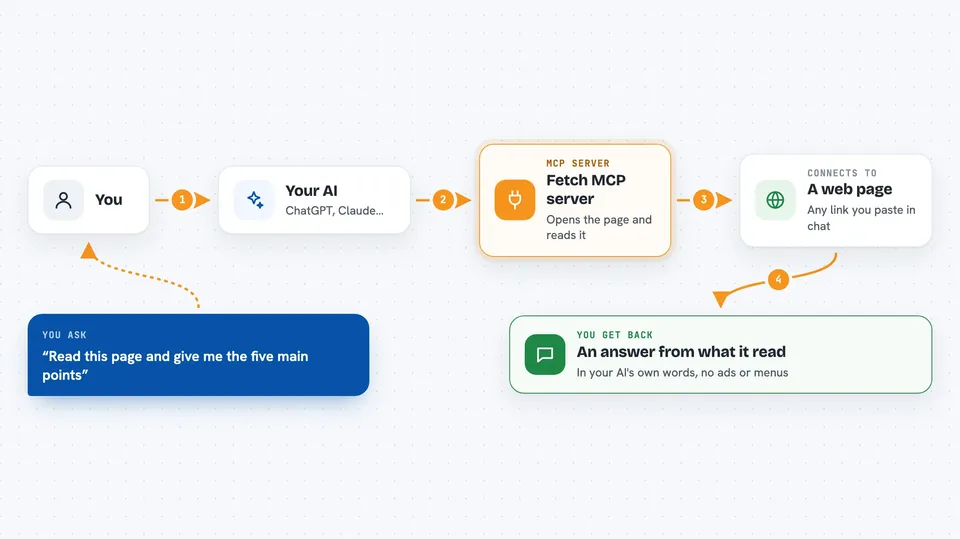
This is a small helper that lets your AI go and read a web page. Normally your AI can only talk about things it already learned, but with this connected it can actually open a link you give it and pull out the words on the page. It is handy for anyone who reads a lot of articles, help pages, or company documents online and wants a quick summary.
What is an MCP server? The 30-second version
On its own, your AI can only chat with you using what it already knows. An MCP server is a small helper program that gives your AI one new skill or one new connection. This helper connects your AI to the web, so when you paste a link, the AI can go fetch that page and read it. You do not have to copy and paste the article text yourself anymore.
What this MCP server does
You paste a web address into your chat and ask your AI to look at it. Your AI passes that address to this helper program. The helper goes out to the internet, opens the page, and turns the messy web page code into plain readable text. Then it hands that text back to your AI, and your AI answers your question using what it just read. If the page is very long, the helper can send it in pieces so your AI can read through it step by step.
 Click to zoom
What you can do with it
- Read a web page and summarize it for you
- Pull the main points out of a long article
- Answer a question using the contents of a link you paste
- Read a page in chunks when it is too long to send all at once
- Get the plain text of a page without the ads and menus
- Check what a page says before you share it with someone
Try asking your AI
- “Read this page and give me the five main points: https://example.com/article”
- “What does this help page say about resetting a password? https://example.com/help”
- “Summarize this news story in three sentences: https://example.com/news”
- “Does this page mention any deadlines? https://example.com/policy”
What it gives back to you
You get an answer in the chat, written in your AI's own words, based on what it read on the page. If you just want the page itself, your AI can show you the text it pulled out, cleaned up without the ads and menus. Very long pages come back in pieces, so your AI may read a bit, then read more, and then answer. You never see the raw web code unless you ask for it.
Before you start
What you need
- The Claude desktop app or another app that supports MCP servers
- uv (a free tool that runs this helper for you) or Docker, or Python with pip
- Node.js if you want the better page cleaner (optional)
Good to know
This helper can reach local and internal web addresses, so be careful not to point it at private pages or sensitive internal sites.
Install it with your AI
Add Fetch MCP server to your AI, no technical skills needed
You don't install anything by hand. You copy one prompt, paste it into an AI that can work on your computer, and it checks, installs and connects the server for you, asking you when it needs something.
Sign in to get the install prompt
Members get a ready-made prompt that lets the Claude desktop app check Fetch MCP server, install it and connect it for them, step by step. You don't need any technical skills: you copy, paste and answer a few questions. Your connected AI can also find and install any of the 4,361 MCP servers here for you.
Who it's for
Anyone who reads a lot online and wants quick summaries, like researchers, analysts, writers, and office workers checking pages and policies.


