
MCP server · Privacy
PrivacyScrubber MCP server
by moxno
Your AI can read your files and logs with emails, keys, and passwords hidden first.
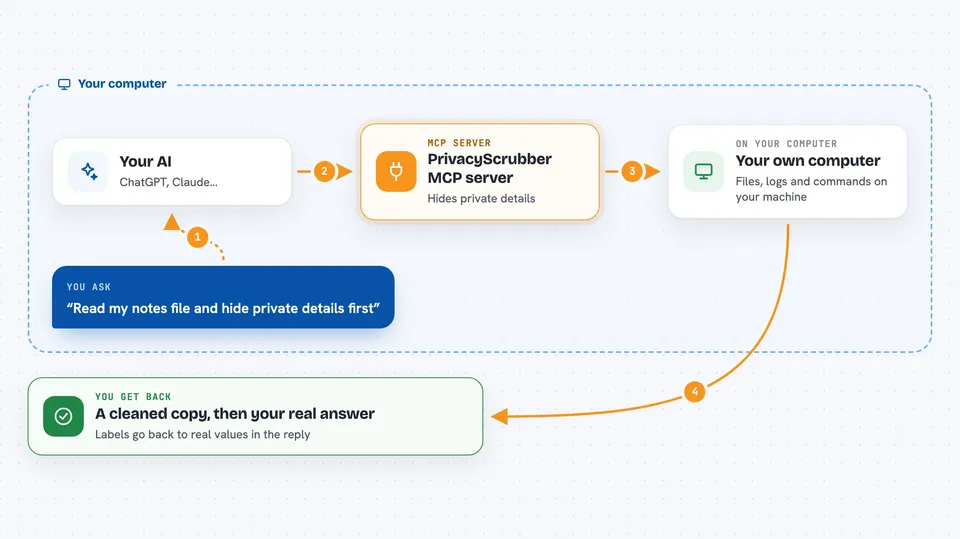
PrivacyScrubber is a small helper that hides private details like email addresses, passwords, and API keys before they reach your AI. It runs only on your own computer, and it puts the real values back when the answer comes home. It is handy for anyone who pastes work files, logs, or code into ChatGPT, Claude, or Cursor and worries about what leaves the building.
What is an MCP server? The 30-second version
On its own, your AI can only chat with what you type. An MCP server is a small helper program that gives your AI a new skill or a connection to something, and here it connects your AI to a local privacy filter. When you ask your AI to look at a file or run a command, this helper steps in first, swaps the sensitive parts for plain labels like [EMAIL_1], and only then lets the text go to the AI. When the AI answers, the helper swaps the real values back, so you see the full picture and the AI never saw it.
What this MCP server does
You ask your AI to read a file, check some text, or run a command. The AI passes that request to this helper, which runs on your machine. The helper finds private things like emails, passwords, keys, and database addresses, and replaces each one with a simple label. That cleaned-up text goes to the AI, and the AI works on it. When the answer comes back, the helper puts your real values back in, so the reply in your chat looks normal.
 Click to zoom
What you can do with it
- Hide emails, names, and phone numbers in a block of text before your AI sees it
- Mask API keys, passwords, and database connection strings in your files
- Read a local text file or Word document and hand your AI a cleaned copy
- Run a terminal command and hide secrets in its output before the AI reads it
- Pick a profile like Dev, Medical, Legal, or Compliance for the kind of data you have
- Put the real values back into the AI's answer so you can read it normally
Try asking your AI
- “Sanitize this log file before you look at it: /Users/me/logs/app.log”
- “Run git diff and hide any keys or passwords in the output”
- “Here is a customer email, mask the personal details and then summarize it”
- “Read my notes.docx with the Medical profile and tell me what is in it”
What it gives back to you
You get your text or file back with the private parts replaced by short labels like [EMAIL_1] or [SECRET_1], right in the chat. When the AI replies using those labels, the helper turns them back into the real values, so the final answer reads normally. For commands, you get the command output with secrets hidden, plus a short audit note. Nothing is saved to a file; the mapping lives only in memory while your session is open.
Before you start
What you need
- The Claude desktop app, Cursor, Windsurf, Cline, or another app that supports MCP servers
- Node.js installed on your computer so the npx command can run
- A PrivacyScrubber license key only if you want the paid Pro profiles; the basic use works without one
Good to know
It can run terminal commands on your computer and read local files you point it at, so only use it with files and commands you are comfortable sharing, and remember the masking only lasts for your current session.
Install it with your AI
Add PrivacyScrubber MCP server to your AI, no technical skills needed
You don't install anything by hand. You copy one prompt, paste it into an AI that can work on your computer, and it checks, installs and connects the server for you, asking you when it needs something.
Sign in to get the install prompt
Members get a ready-made prompt that lets the Claude desktop app check PrivacyScrubber MCP server, install it and connect it for them, step by step. You don't need any technical skills: you copy, paste and answer a few questions. Your connected AI can also find and install any of the 4,361 MCP servers here for you.
Who it's for
Developers, support and ops people, and anyone in a regulated field who wants to use AI on real work files without leaking private data.





