MCP server · Analytics
Rigor statistics MCP server
by mrnh
Lets your AI run real statistical tests, sample size math, and corrections instead of guessing numbers.
Rigor is a small helper program that gives your AI actual statistical math. Instead of your AI recalling a half-remembered number from training, it computes the test, checks the assumptions, and hands back a cited answer. It is handy for anyone who runs experiments, surveys, or A/B tests and needs numbers they can trust.
What is an MCP server? The 30-second version
On its own, your AI can only chat. It has no calculator it trusts and no way to run a real statistical test. An MCP server is a small helper program that gives your AI a new skill. Rigor is that helper for statistics: your AI asks it to run a test, and Rigor does the math and returns the result.
What this MCP server does
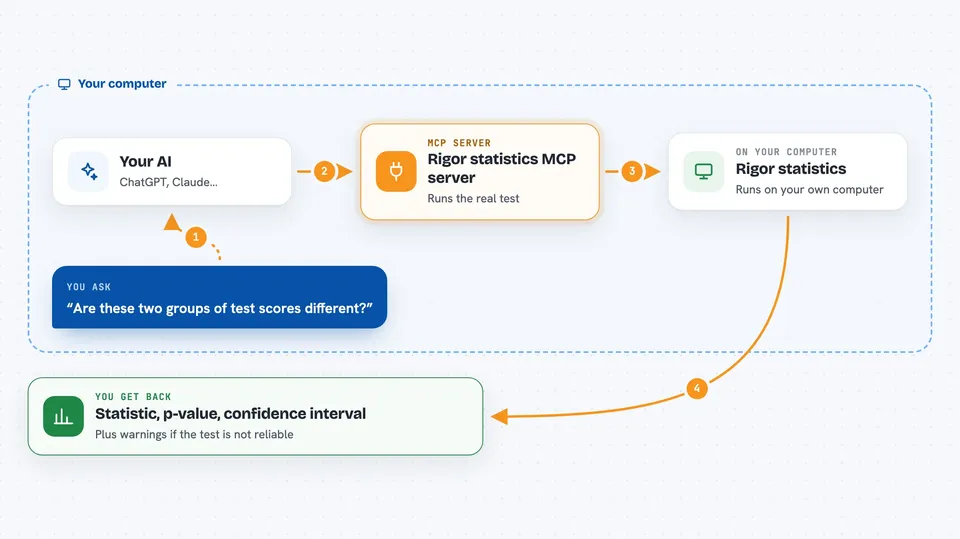
You ask your AI a statistics question in plain words, like whether two groups differ or how many people you need in a study. Your AI passes the numbers to Rigor. Rigor runs the actual test from scratch, checks the assumptions, and picks a citation. Then your AI shows you the result in the chat: the statistic, the p-value, a confidence interval, and any warnings.
 Click to zoom
What you can do with it
- Run t-tests, z-tests, chi-squared, Fisher's exact, McNemar, and ANOVA
- Run non-parametric tests like Mann-Whitney, Wilcoxon, and Kruskal-Wallis
- Compute effect sizes such as Cohen's d, Hedges' g, and Cramér's V
- Work out power and required sample size for a planned study
- Correct p-values for multiple comparisons with Bonferroni or Benjamini-Hochberg
- Run pairwise comparisons across many groups and correct the whole batch at once
- Check a running experiment repeatedly without inflating false positives
Try asking your AI
- “I have two groups of test scores, 12 people each. Are they significantly different?”
- “How many people per group do I need to detect an effect size of 0.46 with 85% power?”
- “Run a chi-squared test on this 2x3 table of survey answers and tell me if the rows are independent.”
- “I checked my A/B test dashboard 10 times and it just hit p=0.04. Is that real?”
What it gives back to you
You get back a clear answer in the chat: the test statistic, the p-value, a confidence interval, and a citation for the method used. Rigor also flags assumption warnings, like when a sample is too small for the test to be reliable. For sample size questions, you get a number to round up. For multiple comparisons, you get corrected p-values for each test.
Before you start
What you need
- Python installed on your computer
- The rigor-mcp package installed (pip install rigor-mcp)
- An MCP client like Claude Code or Claude Desktop
Good to know
Rigor computes and checks the statistics, but it cannot know whether your data was collected properly, so treat the assumptions warnings it gives you seriously.
Install it with your AI
Add Rigor statistics MCP server to your AI, no technical skills needed
You don't install anything by hand. You copy one prompt, paste it into an AI that can work on your computer, and it checks, installs and connects the server for you, asking you when it needs something.
Sign in to get the install prompt
Members get a ready-made prompt that lets the Claude desktop app check Rigor statistics MCP server, install it and connect it for them, step by step. You don't need any technical skills: you copy, paste and answer a few questions. Your connected AI can also find and install any of the 4,361 MCP servers here for you.
Who it's for
Researchers, analysts, product managers, and anyone who runs experiments or surveys and wants trustworthy statistics without doing the math by hand.