
MCP server · Notes
Mnemo MCP server
by n24q02m
Give your AI a long-term memory so it remembers facts, preferences and decisions across chats.
Mnemo is a memory helper for your AI. Normally your AI forgets everything once a chat ends. With Mnemo connected, it can save important things you tell it and bring them back later when they matter.
What is an MCP server? The 30-second version
On its own, your AI can only chat with what is in front of it right now. An MCP server is a small helper program that gives your AI a new skill or a connection to something. Mnemo is that helper for memory: it keeps a private store of notes on your own computer and lets your AI read from it and write to it when you ask. So instead of repeating yourself every time, your AI can look things up in its own notebook.
What this MCP server does
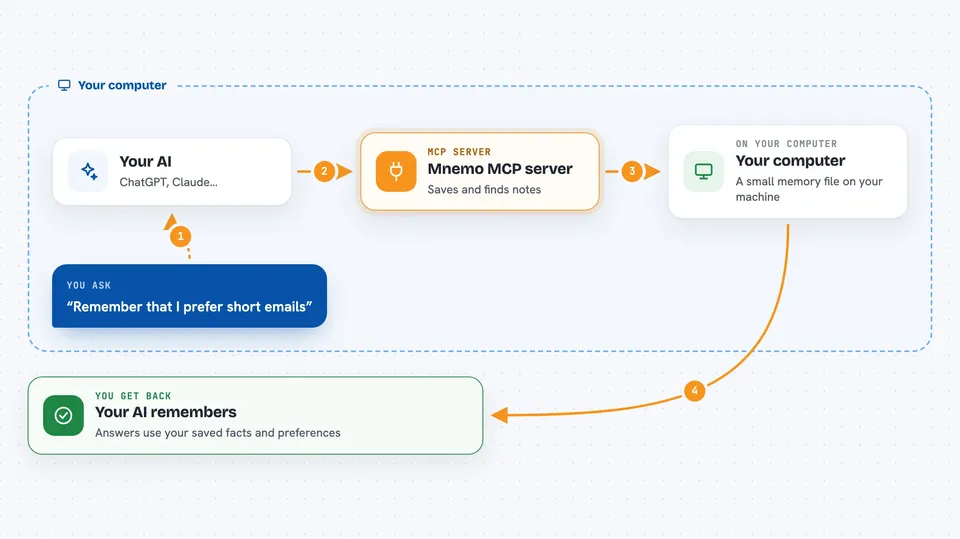
You tell your AI something worth remembering, like a preference or a decision. The AI sends that to Mnemo, which saves it in a small database file on your machine. Later, when you ask a question, the AI asks Mnemo to search that store and gets back the most relevant notes. Mnemo can also tidy up old notes, group related ones, and sync your memory to another computer through Google Drive if you want.
 Click to zoom
What you can do with it
- Save facts, preferences and decisions your AI should remember
- Search your saved memories by meaning, not just exact words
- List, update or delete memories you no longer want
- Export your memories to a file and import them back
- See stats about how many memories you have and how they are grouped
- Restore memories that were archived automatically
- Sync memories between your computers
Try asking your AI
- “Remember that I prefer short emails and always sign off with Best, Sam.”
- “What did I decide about the Q3 budget last month?”
- “Show me everything you know about our client Acme.”
- “Forget the note about the old office address.”
What it gives back to you
You get back plain answers in the chat: a list of matching memories, a short summary, or a confirmation that something was saved, updated or deleted. Stats come back as simple numbers, like how many memories you have. Exports give you a file you can keep or move to another computer.
Before you start
What you need
- The Claude desktop app or another AI app that supports MCP servers
- Python installed with the uvx tool (the README shows the exact command)
- Optional: a Google account if you want to sync memories between computers
Good to know
Your AI can add, change and delete memories, so review important notes before letting it clean up or consolidate them.
Install it with your AI
Add Mnemo MCP server to your AI, no technical skills needed
You don't install anything by hand. You copy one prompt, paste it into an AI that can work on your computer, and it checks, installs and connects the server for you, asking you when it needs something.
Sign in to get the install prompt
Members get a ready-made prompt that lets the Claude desktop app check Mnemo MCP server, install it and connect it for them, step by step. You don't need any technical skills: you copy, paste and answer a few questions. Your connected AI can also find and install any of the 4,066 MCP servers here for you.
Who it's for
Anyone who uses an AI assistant daily and is tired of repeating the same context, especially people juggling many projects or clients.




