
MCP server · Research
NewsAgent Data MCP server
Lets your AI pull scored, classified news from many countries and search it for you.
This is a small helper that connects your AI assistant to NewsAgent Data, a news service that already scores and sorts articles for you. Once it is set up, you can ask your AI for breaking news, search past articles, or compare how different outlets covered a story. It is handy if you follow news for work and want quick, filtered answers instead of scrolling through sites.
What is an MCP server? The 30-second version
On its own, your AI can only chat with you using what it already knows. An MCP server is a small helper program that gives your AI a new skill or a connection to an outside service. This one connects your AI to NewsAgent Data, so when you ask about the news, the AI can actually go look things up there and bring answers back. You do not need to understand how it works under the hood; you just ask in plain words.
What this MCP server does
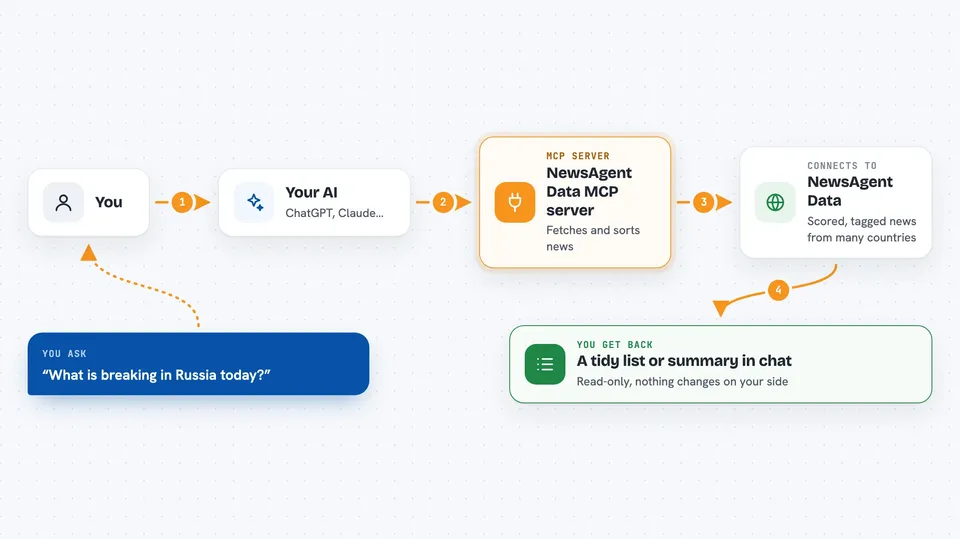
You ask your AI something like "what is breaking in Russia today?" The AI passes your request to this helper, which talks to the NewsAgent Data service. That service returns articles that are already scored for urgency, tagged by topic, country, language and political lean, and cleaned of duplicates. The AI then shows you a tidy list or summary in the chat. You never have to build any of that sorting yourself.
 Click to zoom
What you can do with it
- Pull a filtered news feed by country, topic, language or political lean
- Search the news archive with keywords
- Get recent high-urgency stories (scored 7 or higher by default)
- Check live coverage totals like how many articles, sources and countries are tracked
- Browse the list of news sources in the catalog (needs a paid Standard key)
- Compare how different outlets covered the same story
Try asking your AI
- “Get breaking sanctions news from Russia scored 7 or higher.”
- “Search the news for central bank rate in the last 14 days, English only.”
- “Compare how state and opposition sources covered Ukraine this week.”
- “What is the live coverage right now, how many countries and sources?”
What it gives back to you
You get back a list of matching articles with their scores and tags, or a short summary if you asked a question. For coverage stats you get plain numbers, like how many articles and sources are tracked. The AI shows this in the chat as text you can read and copy. Nothing is changed on your side; it is read-only.
Before you start
What you need
- A free API key from NewsAgent Data (sign up at newsagentdata.com; the key is like a password for apps)
- Python installed on your computer
- The requirements file installed with pip
- An MCP client like Claude Desktop, Cursor or Cline
Good to know
Free and lower tiers only cover a short history window and have daily limits, so very old articles or heavy use may not be available.
Install it with your AI
Add NewsAgent Data MCP server to your AI, no technical skills needed
You don't install anything by hand. You copy one prompt, paste it into an AI that can work on your computer, and it checks, installs and connects the server for you, asking you when it needs something.
Sign in to get the install prompt
Members get a ready-made prompt that lets the Claude desktop app check NewsAgent Data MCP server, install it and connect it for them, step by step. You don't need any technical skills: you copy, paste and answer a few questions. Your connected AI can also find and install any of the 4,609 MCP servers here for you.
Who it's for
Anyone who follows news for work, like analysts, journalists, researchers or comms teams, and wants quick filtered answers without building their own news pipeline.


