MCP server · Productivity · official
Drop Spot MCP server
by officialdropspot · official
Let your AI create client document requests, send upload links, check what arrived, and approve or reject files in Drop Spot.
Drop Spot is a service for collecting documents from clients without making them create a password. This is the official helper that connects Drop Spot to your AI assistant, so you can set up requests and review paperwork by typing plain instructions. It is made for accountants, law firms, and other service professionals who chase client documents all day.
What is an MCP server? The 30-second version
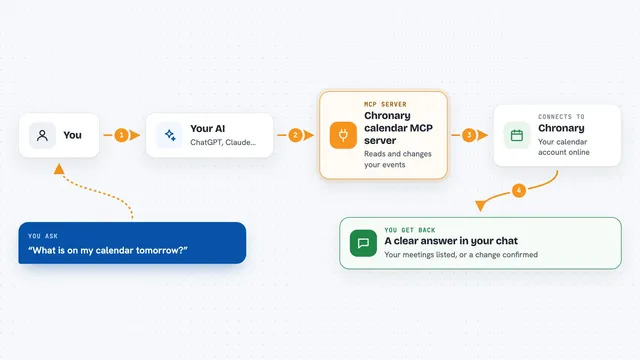
On its own, your AI can only chat. An MCP server is a small helper program that gives your AI a new skill or a connection to an app. This helper connects your AI to your Drop Spot workspace, so it can look up clients, create document requests, and review uploads for you. You just ask in normal words, and the helper does the clicking in Drop Spot.
What this MCP server does
You tell your AI what you need, for example to create a document request for a client. The AI passes that to this Drop Spot helper. The helper talks to your Drop Spot account and does the work, like building a checklist and making a secure upload link. Then it brings the result back to your chat, so you can see the link, the status, or the list of items. When a client uploads something, you can ask the AI to check it and approve or reject it with a note.
What you can do with it
- Create document intake requests with checklists and secure upload links
- List and filter active requests by status or client email
- Review uploaded files and approve or reject them with feedback
- Search your client directory by name, email, company, or tag
- Add or update client details like phone, entity type, and notes
- Import a client list from a CSV and export your roster as CSV
- Create and edit reusable checklist templates
Try asking your AI
- “Create an intake request for Sarah Jenkins using our 2026 Tax Return template.”
- “Check if Sarah uploaded her W-2 form yet.”
- “Review Sarah's uploaded W-2 and approve it.”
- “Import this CSV of 25 clients into our directory.”
What it gives back to you
You get answers in the chat: a new request with its upload link, a list of requests or clients, the status of each checklist item, or a confirmation that a file was approved or rejected. It can also give you a CSV file of your client list. File downloads come as short-lived secure links you can open.
Before you start
What you need
- A Drop Spot account at godropspot.com
- A Drop Spot API key from Settings, API / MCP Tooling (a kind of password for apps; you generate it there)
- The Claude desktop app or another AI client that supports MCP servers
- Node.js installed on your computer so the npx command can run
Good to know
It can create requests, send upload links, and approve or reject client files, so check the details before you tell your AI to go ahead.
Install it with your AI
Add Drop Spot MCP server to your AI, no technical skills needed
You don't install anything by hand. You copy one prompt, paste it into an AI that can work on your computer, and it checks, installs and connects the server for you, asking you when it needs something.
Sign in to get the install prompt
Members get a ready-made prompt that lets the Claude desktop app check Drop Spot MCP server, install it and connect it for them, step by step. You don't need any technical skills: you copy, paste and answer a few questions. Your connected AI can also find and install any of the 4,960 MCP servers here for you.
Who it's for
Accountants, law firms, and service professionals who collect documents from clients and want to manage requests and reviews with less clicking.