MCP server · Developer tools
Logs Sieve MCP server
Ask your AI about your app logs in plain English and get back the exact entries and patterns.
Logs Sieve is a small helper that connects your AI assistant to the place where your app keeps its logs. Instead of clicking around a log dashboard and guessing time windows, you just describe what you are looking for. It is handy for anyone who gets asked "why did this break?" and has to dig through log tools.
What is an MCP server? The 30-second version
On its own, your AI can only chat with you. An MCP server is a small helper program that gives your AI one new skill, in this case the ability to read logs from services like Google Cloud Logging, AWS CloudWatch, Azure Monitor, Grafana Loki and Elasticsearch. Once it is connected, you ask a question in normal words and the AI uses this helper to fetch the right log entries for you. You never have to learn the log tool's own query language.
What this MCP server does
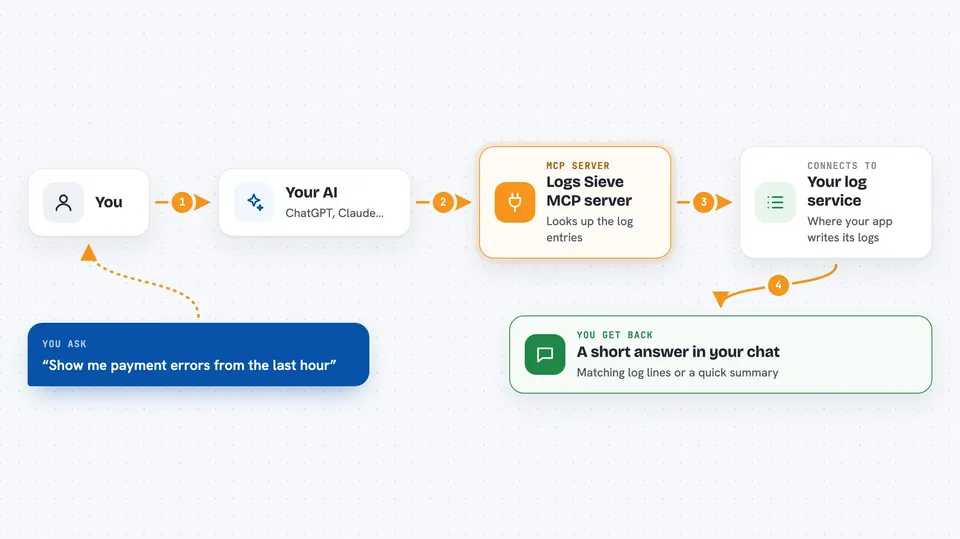
You ask your AI something like "show me payment errors from the last hour". The AI passes that request to Logs Sieve, which knows how to talk to your chosen log provider. Logs Sieve picks the right source, narrows the time window, and pulls back the matching entries. The AI then reads them and gives you a short answer, a list of entries, or a summary of what keeps going wrong. It can also follow one request across several services if you give it a trace id.
 Click to zoom
What you can do with it
- Search logs by keyword, time window and scope
- Summarize what happened in a log window in a few lines
- Trace one request across services using a trace id
- List the log sources available in your project
- Spot recurring failure patterns without reading every line
- Ask follow-up questions about the same incident in the same chat
Try asking your AI
- “Show me all payment failed errors in my project from the last hour”
- “Summarize what went wrong in the checkout service over the last 24 hours”
- “Trace request id abc-123 across all services and tell me where it slowed down”
- “What log sources do I have available in this project?”
What it gives back to you
You get back plain answers in the chat: lists of matching log lines, short summaries of what happened, or a step by step trace of one request. Numbers like counts and time windows are included when they help. Everything stays read only, so nothing in your log system is changed.
Before you start
What you need
- Node.js version 20 or newer on your computer
- An MCP client such as Claude Code, Claude Desktop, Cursor or Windsurf
- Access to one log provider (GCP, AWS, Azure, Loki or Elasticsearch) plus its credentials, set up as described in the provider docs
Good to know
It reads your logs, which can contain private data like user emails or tokens, so only connect it to projects you are allowed to share with your AI assistant.
Install it with your AI
Add Logs Sieve MCP server to your AI, no technical skills needed
You don't install anything by hand. You copy one prompt, paste it into an AI that can work on your computer, and it checks, installs and connects the server for you, asking you when it needs something.
Sign in to get the install prompt
Members get a ready-made prompt that lets the Claude desktop app check Logs Sieve MCP server, install it and connect it for them, step by step. You don't need any technical skills: you copy, paste and answer a few questions. Your connected AI can also find and install any of the 4,361 MCP servers here for you.
Who it's for
Engineers, support staff and on call people who need to look at logs during incidents but do not want to learn each log tool's query language.