MCP server · Analytics
KeyNeg MCP server
by Osseni94
Lets your AI read text and tell you how negative it is, plus pull out the main complaints.
KeyNeg is a small helper that gives your AI a new skill: reading the mood of text, especially the negative side. You paste in a review, a support ticket, or a survey answer, and your AI comes back with labels like "poor customer service" and the words that stood out. It is handy if you deal with lots of customer messages, feedback, or comments and want a quick read on how upset people are.
What is an MCP server? The 30-second version
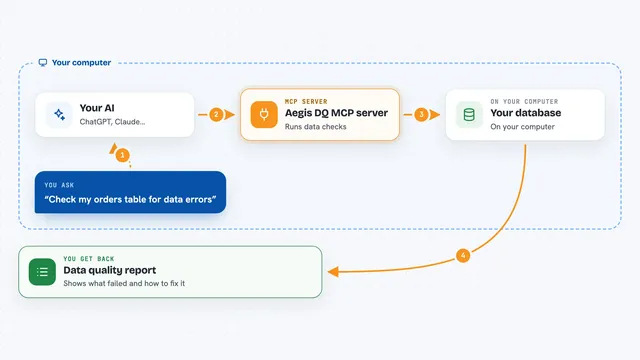
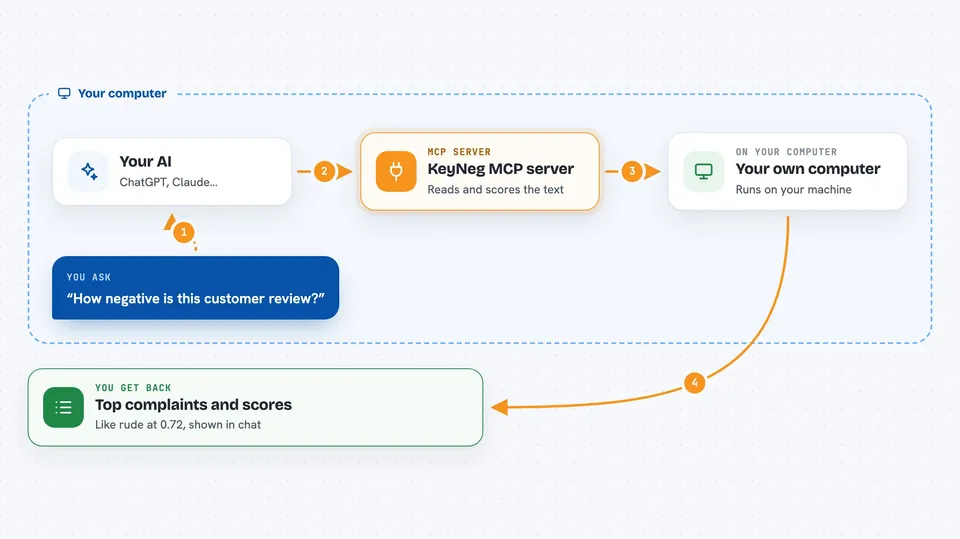
On its own, your AI can only chat with you. An MCP server is a small helper program that gives your AI a new skill or a connection to another tool. This one connects your AI to KeyNeg, a sentiment analysis engine that runs on your own computer. So when you ask your AI to check how negative a piece of text is, it quietly asks KeyNeg, and KeyNeg sends back the answer.
What this MCP server does
You paste some text into your chat and ask your AI to look at the sentiment. Your AI passes that text to the KeyNeg helper running on your machine. KeyNeg reads the text and scores it against a long list of negative sentiment labels, like "rude" or "broken product". It sends the top labels and scores back to your AI, which shows them to you in the chat. Some features, like pulling out keywords or analyzing many texts at once, need a paid tier.
 Click to zoom
What you can do with it
- Check how negative a customer review is
- Pull out the top complaint labels from a support ticket
- Extract the specific words and phrases that signal a problem
- Get an overall read like strongly negative or mildly negative
- Analyze a batch of texts in one go (paid tiers)
- Look up the full list of sentiment labels the tool knows
- Check which tier you are on and how many calls you have left
Try asking your AI
- “Analyze the sentiment of this customer review: The service was terrible and the staff was rude.”
- “What are the main complaints in these support tickets? Here they are: ...”
- “Is this feedback positive or negative? Here is the text: ...”
- “Extract the key issues from this employee survey response: ...”
What it gives back to you
You get back a short list of sentiment labels with scores, like "poor customer service" at 0.72, so you can see what the text leans toward. Some tools also return the keywords that stood out, and a full analysis adds an overall label like strongly negative. Everything shows up right in your chat as a small list or summary.
Before you start
What you need
- Python installed on your computer
- The KeyNeg sentiment engine (keyneg-enterprise-rs) installed from its own package index
- The ONNX model files downloaded to a folder on your computer
- A license key from grandnasser.com if you want keywords, batch analysis, or the full label list
Good to know
Keyword extraction and batch analysis need a paid license, and the free tier only gives you 3 sentiment labels and 100 calls per day.
Install it with your AI
Add KeyNeg MCP server to your AI, no technical skills needed
You don't install anything by hand. You copy one prompt, paste it into an AI that can work on your computer, and it checks, installs and connects the server for you, asking you when it needs something.
Sign in to get the install prompt
Members get a ready-made prompt that lets the Claude desktop app check KeyNeg MCP server, install it and connect it for them, step by step. You don't need any technical skills: you copy, paste and answer a few questions. Your connected AI can also find and install any of the 4,361 MCP servers here for you.
Who it's for
People who read a lot of customer feedback, support tickets, reviews, or survey answers and want a fast read on how negative they are.