MCP server · Analytics
Percept MCP server
by perceptdot
Lets your AI find and suggest the right add-ons for your project, then pull data from Google Analytics, Vercel, GitHub and Sentry.
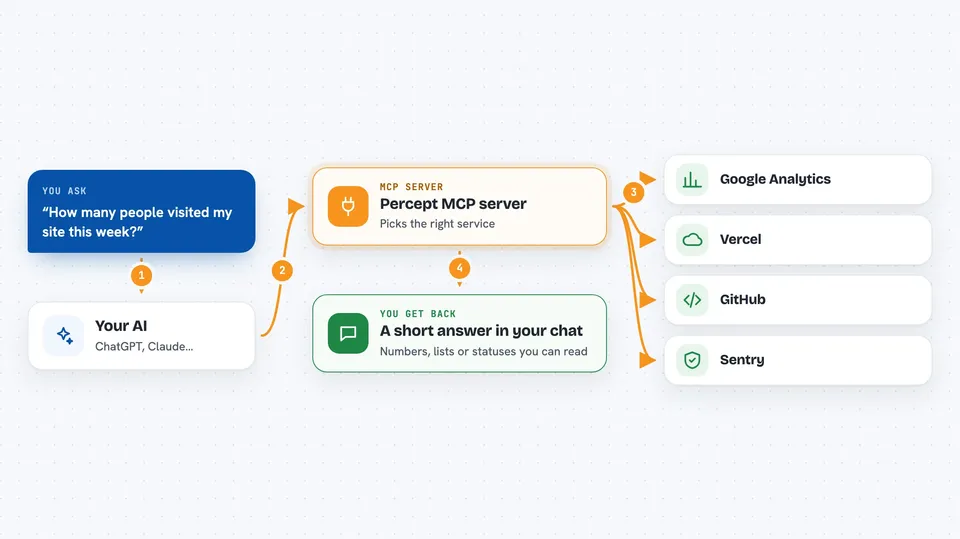
Percept is a set of small helper programs that give your AI new skills. One of them looks at your project and suggests which other helpers are worth adding. The rest connect your AI to Google Analytics, Vercel, GitHub and Sentry so it can fetch real information for you. It is handy if you work with a website or app and want your AI to check things without you leaving the chat.
What is an MCP server? The 30-second version
On its own, your AI can only chat with you. An MCP server is a small helper program that gives your AI a new skill or a connection to an app or service. This one connects your AI to services like Google Analytics, Vercel, GitHub and Sentry, plus a discovery helper that scans your project. Once connected, your AI can look things up in those services and bring the answers back to you when you ask.
What this MCP server does
You ask your AI a question, like how many people visited your site today. Your AI passes that request to one of the Percept helpers. The helper talks to the right service, such as Google Analytics or Vercel, using a key you set up once. The service sends back the numbers or status, and the helper hands them to your AI. Your AI then shows you a short, readable answer in the chat.
 Click to zoom
What you can do with it
- Scan your project and suggest which add-ons are worth installing
- Search a list of add-ons by keyword or category
- List the add-ons you already have set up
- Check your Google Analytics numbers, like visitors and top pages
- See the status of your latest Vercel deployment
- Look at open pull requests, issues and CI runs on GitHub
- Review recent errors and releases in Sentry
- Get a short report of how much time and tokens were saved
Try asking your AI
- “Discover MCP servers for this project”
- “How many people visited my site in the last 7 days?”
- “Did my last Vercel deploy succeed?”
- “Show me the open pull requests on my repo”
- “What errors showed up in Sentry this week?”
What it gives back to you
You get short, readable answers in the chat. For analytics, that means numbers like sessions, users and top pages. For Vercel, GitHub and Sentry, that means lists and statuses, like recent deployments, open pull requests or unresolved errors. At the end of a session, you can also get a small summary showing how many calls were made and roughly how much time and tokens were saved.
Before you start
What you need
- Node.js installed on your computer (the free program that runs these helpers)
- An MCP client that supports add-ons, like Claude Code, Cursor, Windsurf or Cline
- For the Google Analytics helper: a Google service account file and your property ID
- For the Vercel, GitHub and Sentry helpers: an access token from each service
Good to know
The helpers read data from your accounts using the tokens you provide, so keep those tokens private and only share the ones you are comfortable giving access to.
Install it with your AI
Add Percept MCP server to your AI, no technical skills needed
You don't install anything by hand. You copy one prompt, paste it into an AI that can work on your computer, and it checks, installs and connects the server for you, asking you when it needs something.
Sign in to get the install prompt
Members get a ready-made prompt that lets the Claude desktop app check Percept MCP server, install it and connect it for them, step by step. You don't need any technical skills: you copy, paste and answer a few questions. Your connected AI can also find and install any of the 4,361 MCP servers here for you.
Who it's for
People who work on websites or apps and want their AI to check analytics, deployments, code activity and errors without switching between many tabs.