
MCP server · Research
NewsMCP news server
by pranciskus
Lets your AI pull live world news, grouped into events and sorted by how widely they are being reported.
NewsMCP is a free helper that gives your AI assistant a live feed of world news. It gathers articles from hundreds of news sites, groups the ones about the same event, and labels them by topic and place. It is handy if you want quick, current updates without opening ten news tabs yourself.
What is an MCP server? The 30-second version
On its own, your AI can only chat with what it already knows. An MCP server is a small helper program that gives your AI one new skill or one new connection. This one connects your AI to a live news service, so when you ask about something happening in the world, it can go look it up and bring the answer back to you. You do not need to install anything complicated; it runs quietly in the background once it is set up.
What this MCP server does
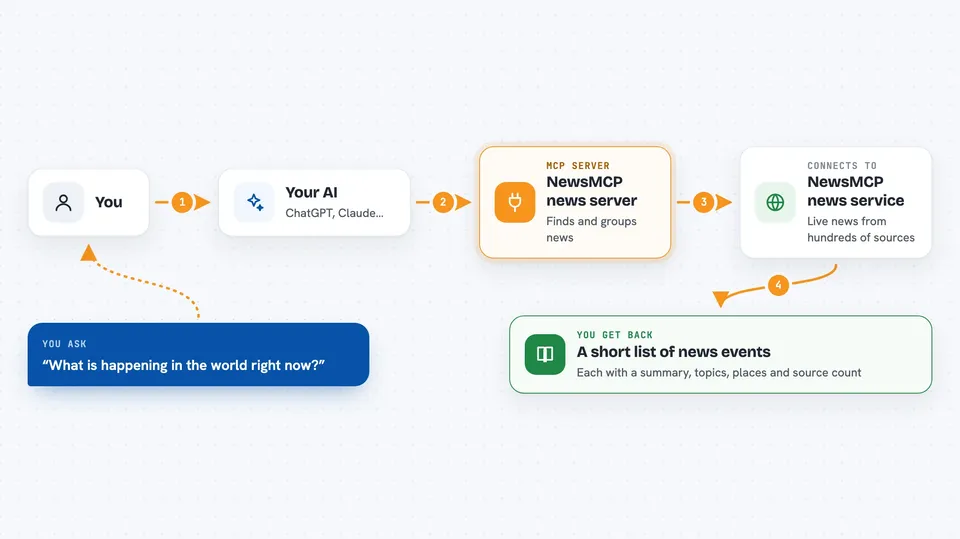
You ask your AI something like what is happening in the world today. The AI passes your question to this helper, which talks to the NewsMCP news service. That service has already collected articles from hundreds of sources and grouped the ones about the same event together. It sends back a list of events, each with a short summary, topics, places, and how many sources covered it. Your AI then reads that list and answers you in plain language.
 Click to zoom
What you can do with it
- Get the top news events happening right now
- Filter news by topic, such as technology, health, or sports
- Filter news by region, such as Europe, Asia, or a specific country
- Look back over the last few hours or up to a week
- Sort events by how many sources reported them or by impact score
- Open one event to see all the articles behind it and the AI-written context
- Ask which topics and regions are available for filtering
Try asking your AI
- “What is happening in the world right now?”
- “Any technology news from Europe in the last 24 hours?”
- “Show me news from Asia this week, sorted by impact.”
- “Tell me more about that earthquake event.”
What it gives back to you
You get back a short list of news events, each with a summary, its topics, its regions, and how many sources covered it. If you ask about one event in detail, you get the full list of source articles with their headlines and links, plus AI-written context and an impact score. In the chat this usually shows up as a tidy list or a few paragraphs your AI writes from that data. You can then ask follow-up questions about any event.
Before you start
What you need
- The Claude desktop app, Cursor, or another app that supports MCP servers
- Node.js installed on your computer (the free program that runs the helper)
Good to know
The news comes from many outside sources and is grouped and summarized by AI, so it can be incomplete or wrong; check the original articles before you rely on it for anything important.
Install it with your AI
Add NewsMCP news server to your AI, no technical skills needed
You don't install anything by hand. You copy one prompt, paste it into an AI that can work on your computer, and it checks, installs and connects the server for you, asking you when it needs something.
Sign in to get the install prompt
Members get a ready-made prompt that lets the Claude desktop app check NewsMCP news server, install it and connect it for them, step by step. You don't need any technical skills: you copy, paste and answer a few questions. Your connected AI can also find and install any of the 4,609 MCP servers here for you.
Who it's for
Anyone who wants quick, current world news inside their AI chat, like analysts, writers, researchers, and busy office workers keeping an eye on a topic or region.


