
MCP server · Finance and crypto
Easy Pay Direct MCP server
Ask your AI to look up transactions, subscriptions and vault records in your payment gateway.
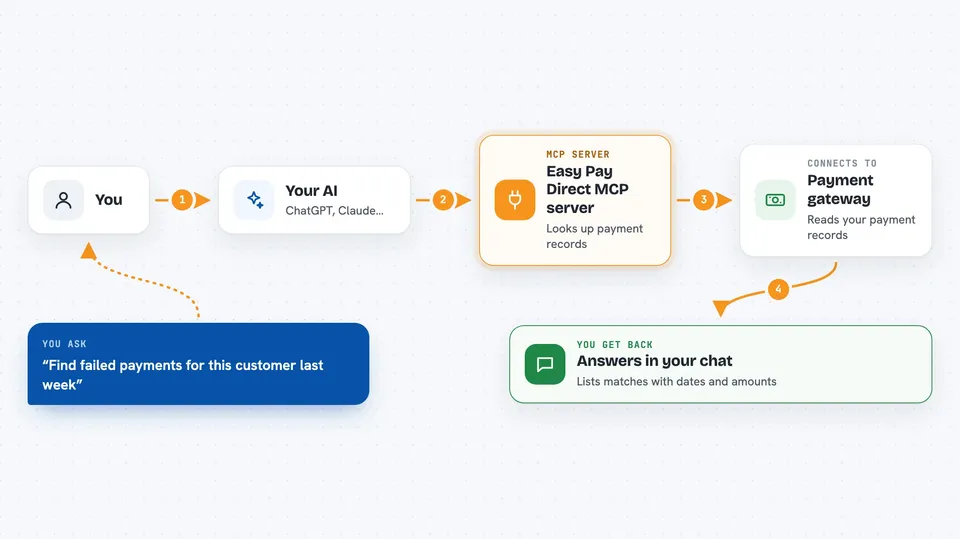
This is a small helper that lets your AI assistant read information from an Easy Pay Direct or NMI-style payment gateway. You can ask questions in plain language, like which payments failed last week or whether a subscription is still running. It is handy if you handle payments, billing or customer support and want quick answers without clicking through the gateway dashboard.
What is an MCP server? The 30-second version
On its own, your AI can only chat with you. An MCP server is a small helper program that gives your AI a new skill or a connection to an app or service. This helper connects your AI to your Easy Pay Direct or NMI payment gateway. Once it is set up, the AI can look things up there for you when you ask.
What this MCP server does
You ask your AI a question about your payments. The AI passes that request to this helper program. The helper talks to your gateway's reporting system, which is the part that only reads information. It brings back the matching transactions, subscriptions, plans or stored customer records. Then the AI explains what it found in normal words in your chat.
 Click to zoom
What you can do with it
- Look up a single transaction by its gateway ID
- Search transactions by date range and filters like payment type or customer email
- Check whether a subscription is still active
- List recurring subscriptions created or updated in a period
- List your recurring billing plans
- Look up a stored Customer Vault record by ID
- List Customer Vault records saved in a date range
Try asking your AI
- “Find the failed transactions for this customer last week”
- “Is subscription 123456 still active?”
- “Show me all subscriptions created in the last 30 days”
- “List the recurring plans we have set up”
What it gives back to you
You get answers in the chat, not files to download. The AI can show a list of matching transactions with dates, amounts and statuses, or a summary of one subscription or plan. It can also tell you what is stored in a Customer Vault record. Everything is read-only, so nothing in your gateway changes.
Before you start
What you need
- Node.js 18 or newer on your computer
- An Easy Pay Direct or NMI gateway account
- A gateway security key (a kind of password for apps; you can create a read-only one in your merchant portal under Settings, then Security Keys)
- The Claude desktop app or another tool that supports MCP
Good to know
This helper can only read your gateway data, so it cannot charge cards, issue refunds or change anything, but it can still show private payment and customer details in your chat, so keep your security key safe and use a read-only one.
Install it with your AI
Add Easy Pay Direct MCP server to your AI, no technical skills needed
You don't install anything by hand. You copy one prompt, paste it into an AI that can work on your computer, and it checks, installs and connects the server for you, asking you when it needs something.
Sign in to get the install prompt
Members get a ready-made prompt that lets the Claude desktop app check Easy Pay Direct MCP server, install it and connect it for them, step by step. You don't need any technical skills: you copy, paste and answer a few questions. Your connected AI can also find and install any of the 4,361 MCP servers here for you.
Who it's for
People who work with payments, billing or customer support at a business that uses Easy Pay Direct or an NMI-style gateway.




