MCP server · Research
Web Search MCP server
by pskill9
Lets your AI search the web through Google and bring back titles, links, and short descriptions.
This is a small helper that gives your AI the ability to search the web. It uses Google search results behind the scenes, so your AI can look things up for you instead of guessing. It is handy for anyone who wants fresh information in their chat without copying and pasting links by hand.
What is an MCP server? The 30-second version
On its own, your AI can only chat with what it already knows. An MCP server is a small helper program you connect to your AI, and it gives the AI one new skill. This helper gives your AI the skill of searching Google. Once connected, you can just ask a question and the AI will run the search for you.
What this MCP server does
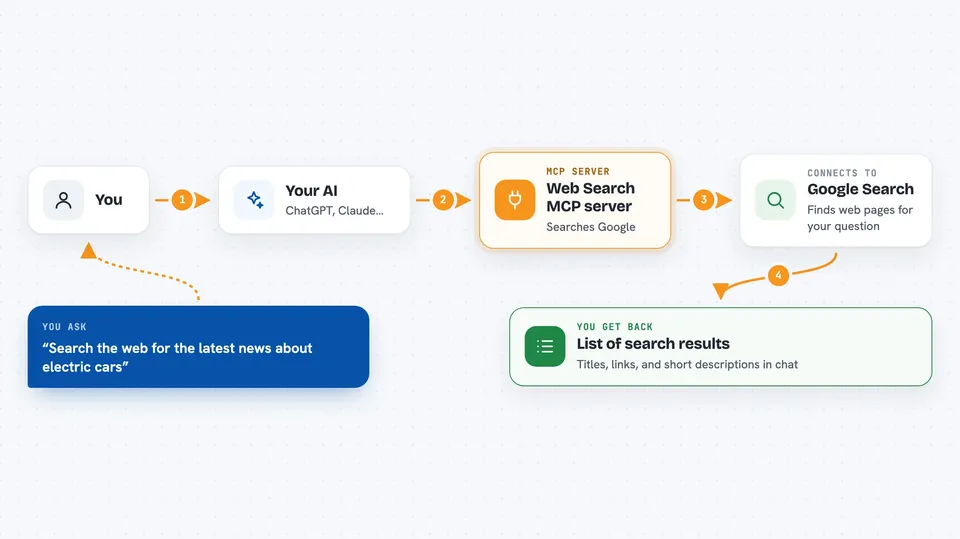
You ask your AI a question that needs a web search. The AI sends your question to this helper program. The helper goes to Google, grabs the top results, and reads the titles, links, and short descriptions. It hands those back to your AI, and your AI shows them to you in the chat. You can also say how many results you want, up to ten.
 Click to zoom
What you can do with it
- Search the web for a topic and get a short list of links
- Look up recent news or facts your AI might not know
- Find websites related to a question you are researching
- Get titles and short descriptions so you can pick which link to open
- Limit the search to a few results when you only need a quick answer
Try asking your AI
- “Search the web for the latest news about electric cars”
- “Find me three articles about beginner gardening tips”
- “Look up what time the World Cup final starts”
- “Search for reviews of the new iPhone and give me the top five links”
What it gives back to you
You get a short list back in the chat. Each item has a title, a web address, and a one or two line description. Your AI can then summarise them or help you decide which link to open.
Before you start
What you need
- Node.js installed on your computer
- The Claude desktop app or a similar AI app that supports MCP servers
- A copy of this project downloaded and built on your computer
Good to know
Google may block searches if you do them too often, and this tool is meant for personal use only.
Install it with your AI
Add Web Search MCP server to your AI, no technical skills needed
You don't install anything by hand. You copy one prompt, paste it into an AI that can work on your computer, and it checks, installs and connects the server for you, asking you when it needs something.
Sign in to get the install prompt
Members get a ready-made prompt that lets the Claude desktop app check Web Search MCP server, install it and connect it for them, step by step. You don't need any technical skills: you copy, paste and answer a few questions. Your connected AI can also find and install any of the 4,361 MCP servers here for you.
Who it's for
Anyone who wants their AI to look things up online, especially people doing research, writing, or fact-checking.