
MCP server · Productivity
Nutrient DWS MCP server
by PSPDFKit
Let your AI merge, convert, redact, sign, and read PDFs and Office documents for you.
This is a helper that connects your AI assistant to Nutrient's document service, so it can work with PDFs and Office files on your behalf. You ask in normal words, and it handles the file. It is handy for anyone who deals with contracts, invoices, scans, or reports and wishes the boring parts would do themselves.
What is an MCP server? The 30-second version
On its own, your AI can only chat. An MCP server is a small helper program that gives your AI a new skill or a connection to an app or service. This one connects your AI to Nutrient's document service, so it can open, change, and read documents for you. You still just type what you want, and the helper does the actual work behind the scenes.
What this MCP server does
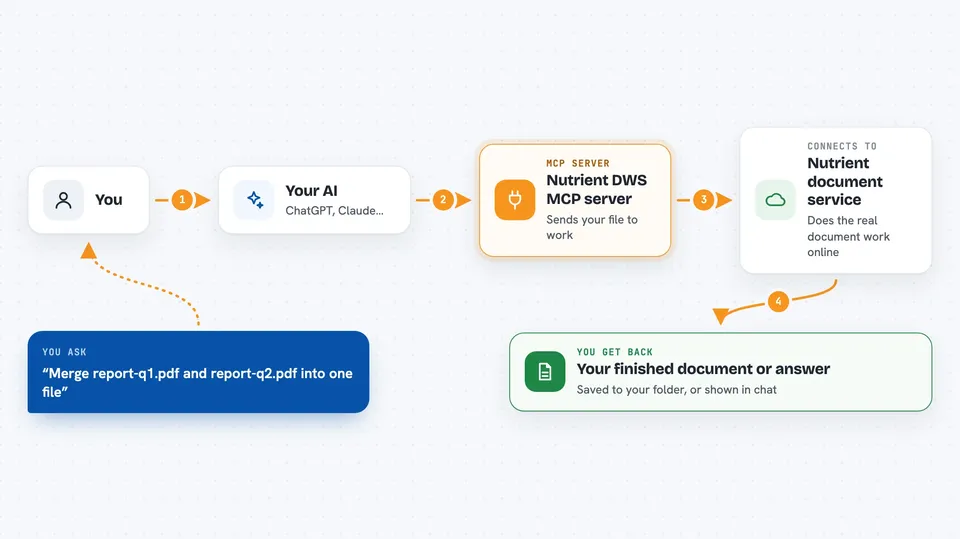
You tell your AI what you want done with a document, like merging two files or pulling out an invoice number. Your AI passes that request to this helper. The helper sends the file to Nutrient's online document service, which does the real processing. When it finishes, the result comes back to your AI, and your AI tells you what happened or shows you the answer. You never have to touch the technical parts yourself.
 Click to zoom
What you can do with it
- Merge several PDFs or Office files into one document
- Convert a PDF to Word, Markdown, or an image, and back
- Read scanned pages with OCR in many languages
- Black out sensitive details like names, emails, or card numbers
- Add a watermark and sign a PDF digitally
- Pull named fields out of invoices or forms as clean data
- Check how many service credits your account has left
Try asking your AI
- “Merge report-q1.pdf and report-q2.pdf into one file”
- “Redact all email addresses from application.pdf”
- “Convert this PDF to markdown so I can search it”
- “Pull the vendor, invoice number, total, and due date out of invoice-0341.pdf”
What it gives back to you
You get back plain answers in the chat, like a short note saying the merged file was saved, or the text pulled from a scan. For data extraction, you get the fields you asked for as a small structured result, and each value can point to the page it came from. Larger outputs, like a full list of document elements, are saved to a file and you get a short summary instead. Files it creates land in the folder you set up for it.
Before you start
What you need
- A free Nutrient account (sign up at nutrient.io/api)
- The Claude desktop app or another AI app that supports MCP servers
- Node.js installed on your computer (the setup uses a tool called npx)
- A folder on your computer to use as the working area for documents
Good to know
It can permanently change or delete content in your documents, like redactions that cannot be undone, and each processing job uses paid credits from your Nutrient account.
Install it with your AI
Add Nutrient DWS MCP server to your AI, no technical skills needed
You don't install anything by hand. You copy one prompt, paste it into an AI that can work on your computer, and it checks, installs and connects the server for you, asking you when it needs something.
Sign in to get the install prompt
Members get a ready-made prompt that lets the Claude desktop app check Nutrient DWS MCP server, install it and connect it for them, step by step. You don't need any technical skills: you copy, paste and answer a few questions. Your connected AI can also find and install any of the 4,361 MCP servers here for you.
Who it's for
Office workers who handle lots of PDFs, contracts, invoices, or scanned paperwork and want their AI to do the fiddly parts.





