
MCP server · Productivity
Cal MCP server
by pwh-pwh
Let your AI do the math for you, from simple sums to expressions with PI and E.
This is a small helper that lets your AI do maths accurately. Instead of guessing, your AI sends the sum to this little calculator and gets the exact answer back. It is handy for anyone who asks their AI to work out numbers, prices, percentages, or formulas.
What is an MCP server? The 30-second version
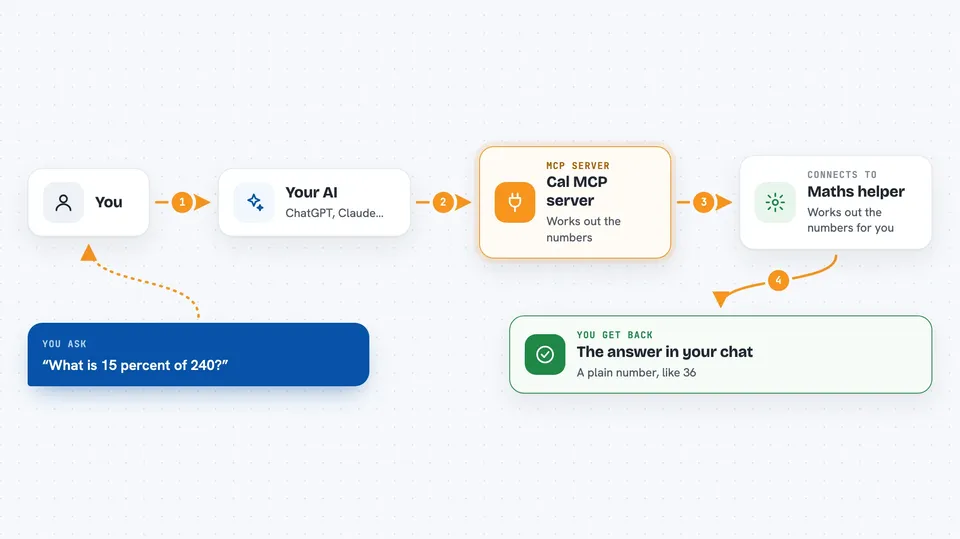
On its own, your AI can only chat. It cannot really run a calculation, it just predicts what the answer might look like. An MCP server is a small helper program that gives your AI a new skill. This one gives your AI a calculator, so when you ask for a sum, the AI passes it to this helper and reads back the real result.
What this MCP server does
You type a maths question in plain words or as an expression. Your AI takes the numbers part and sends it to this helper. The helper works out the answer using a maths library and sends it back. Your AI then tells you the result in the chat. It also knows a few built-in values like PI, E, true and false.
 Click to zoom
What you can do with it
- Add, subtract, multiply and divide numbers
- Work out expressions with brackets and powers
- Use PI and E in your calculations
- Check a percentage or a discount for you
- Turn a word problem into an exact number
Try asking your AI
- “What is 2 + 3 times PI?”
- “Calculate 15 percent of 240”
- “Work out E to the power of 2 plus 1”
- “What is (18 + 7) times 4 divided by 2?”
What it gives back to you
You get the answer as a number in the chat, written out as a normal reply. For example, if you ask for 2 + 2, you see 4. For something like PI times 2, you get the full decimal number. If the expression does not make sense, you may get an error message instead.
Before you start
What you need
- The Bun runtime installed on your computer (a small program that runs this helper)
- An MCP client like Claude Desktop or another app that supports MCP servers
Good to know
It only does maths, so if your expression is not valid you may get an error instead of an answer.
Install it with your AI
Add Cal MCP server to your AI, no technical skills needed
You don't install anything by hand. You copy one prompt, paste it into an AI that can work on your computer, and it checks, installs and connects the server for you, asking you when it needs something.
Sign in to get the install prompt
Members get a ready-made prompt that lets the Claude desktop app check Cal MCP server, install it and connect it for them, step by step. You don't need any technical skills: you copy, paste and answer a few questions. Your connected AI can also find and install any of the 4,609 MCP servers here for you.
Who it's for
Anyone who asks their AI to do sums, like people checking budgets, prices, or quick formulas at work.





