
MCP server · Productivity
bizdays MCP server
by qinisolabs
Let your AI count working days and find public holidays for over 200 countries, correctly.
bizdays is a small helper that lets your AI do business-day math properly. It knows the real public holidays and the actual weekend days for each country, so it stops guessing. It is handy for anyone who plans deadlines, schedules, or payments across countries.
What is an MCP server? The 30-second version
On its own, your AI can only chat. It has no calendar and no list of holidays, so when you ask about working days it often makes something up. An MCP server is a small helper program that gives your AI a new skill or a connection to a service. This one connects your AI to real business-day and public-holiday data for over 200 countries, so it can look up the answer instead of guessing.
What this MCP server does
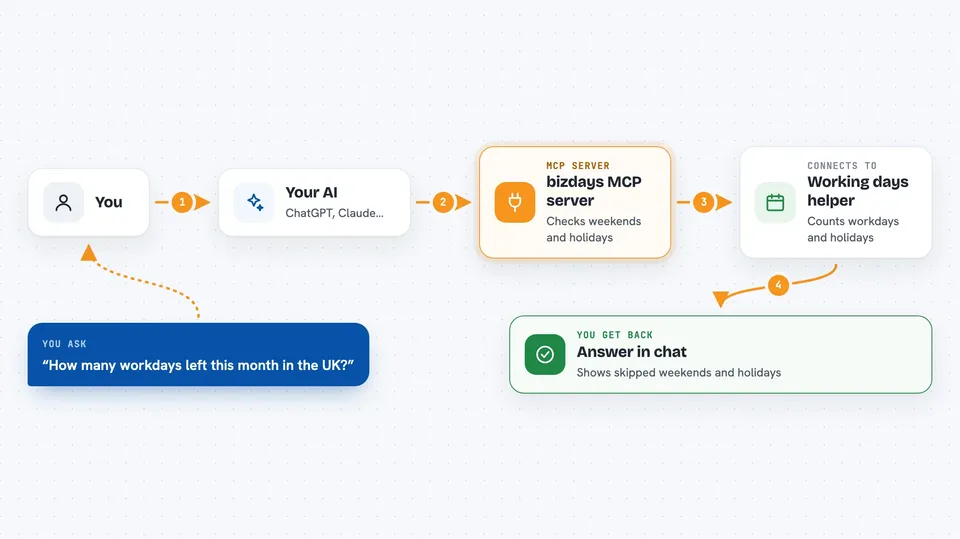
You ask your AI a question about working days, like how many workdays are left this month. Your AI passes the question to this helper. The helper checks the weekend rule for the country you named and looks up that country's public holidays. It then works out the answer and sends it back, along with which weekends and holidays it skipped. Your AI shows you the result in the chat.
 Click to zoom
What you can do with it
- Add or subtract working days from any date
- Count the working days between two dates
- Check whether a specific date is a working day
- Find the next working day after a date
- Find the previous working day before a date
- Look up a country's weekend rule and holiday setup
Try asking your AI
- “What date is 5 business days after December 22 in the UK?”
- “How many working days are in December for the US?”
- “Is Friday a working day in Saudi Arabia?”
- “What is the next business day after June 13 in Saudi Arabia?”
What it gives back to you
You get a clear answer in the chat: a date, a number of days, or a yes or no. Along with the answer, it tells you which weekends and named holidays it skipped, and which weekend rule it used. If a country's holiday data is not fully checked, it says so.
Before you start
Good to know
It only counts weekends and public holidays, not regional days or company shutdowns, so for those you would need to add them yourself.
Install it with your AI
Add bizdays MCP server to your AI, no technical skills needed
You don't install anything by hand. You copy one prompt, paste it into an AI that can work on your computer, and it checks, installs and connects the server for you, asking you when it needs something.
Sign in to get the install prompt
Members get a ready-made prompt that lets the Claude desktop app check bizdays MCP server, install it and connect it for them, step by step. You don't need any technical skills: you copy, paste and answer a few questions. Your connected AI can also find and install any of the 4,361 MCP servers here for you.
Who it's for
Anyone who plans deadlines, schedules, or payments across countries, like project managers, finance and operations staff, and admin assistants.





