
MCP server · Notes
Mind Map MCP server
by ravi-labs
Give your AI a shared memory so it can save and resume your work across Claude, Cursor and other tools.
Mind Map is a small helper that gives your AI tools a shared memory. It saves the context of a session on your own computer, and lets you pick that context back up in a different tool later. It is handy if you use more than one AI app and are tired of re-explaining your project every time.
What is an MCP server? The 30-second version
On its own, your AI can only chat with you in the moment. It forgets everything the moment you close the window. An MCP server is a small helper program that gives your AI a new skill or a connection to something. Mind Map is that helper: it gives your AI a memory that lives on your machine, so it can save what you were working on and bring it back when you ask.
What this MCP server does
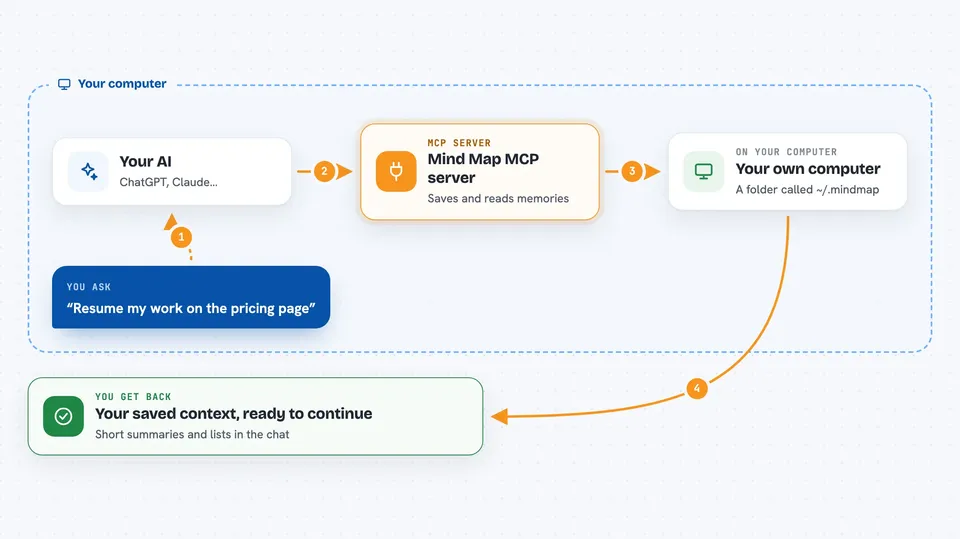
You talk to your AI in plain words, like "save this to mind map" or "resume my work on the pricing page". Your AI then calls this helper, and the helper writes or reads a small file in a folder on your computer called ~/.mindmap. When you come back in a different tool, you ask it to resume, and the helper hands your AI the saved context so you can keep going. Memories you stop using slowly fade into short one-line traces instead of piling up forever. Nothing is ever silently deleted, and nothing leaves your computer.
 Click to zoom
What you can do with it
- Save the current conversation as a memory
- Resume a past topic in a fresh session, in any connected tool
- Show what is in your mind map and how healthy it is
- Store and read a persona profile of how you like to work
- File memories into named collections like Goals or Parking Lot
- Import your past Claude Code, Copilot or Cursor sessions
- Export everything to one portable file you can carry to another machine
Try asking your AI
- “Save this to mind map”
- “Resume my work on the onboarding email”
- “What's in my mind map?”
- “What do you know about how I work?”
What it gives back to you
You get back short summaries and lists inside the chat. When you resume, your AI gets the saved context and continues where you left off. When you ask what is in your mind map, you see your memories grouped by topic, with notes on how fresh or cold each one is. Some commands also write files, like a passport export you can keep or move to another computer.
Before you start
What you need
- Node.js installed on your computer (the install command uses npx)
- The Claude desktop app, Claude Code, Cursor or Windsurf
- Nothing else: no account, no cloud, no sign-up
Good to know
It reads and writes files in your own memory folder, and the import and cleanup commands can change or remove memories, so preview with --dry-run first.
Install it with your AI
Add Mind Map MCP server to your AI, no technical skills needed
You don't install anything by hand. You copy one prompt, paste it into an AI that can work on your computer, and it checks, installs and connects the server for you, asking you when it needs something.
Sign in to get the install prompt
Members get a ready-made prompt that lets the Claude desktop app check Mind Map MCP server, install it and connect it for them, step by step. You don't need any technical skills: you copy, paste and answer a few questions. Your connected AI can also find and install any of the 4,609 MCP servers here for you.
Who it's for
People who use more than one AI tool and want their context to follow them, like developers, writers and anyone juggling several projects.





