
MCP server · Notes
Context-Keeper MCP server
by redleaves
Give your AI a long-term memory so it remembers past chats, decisions and project details.
Context-Keeper is a helper that gives your AI assistant a memory. Instead of forgetting what you talked about yesterday, your AI can look back at earlier conversations, notes and project details. It is handy for anyone who keeps re-explaining the same background to their AI, like developers, team leads and project managers.
What is an MCP server? The 30-second version
On its own, your AI can only chat about what is in front of it right now. An MCP server is a small helper program that gives your AI a new skill or a connection to something else. This one connects your AI to Context-Keeper, a memory service that stores and finds past conversations. When you ask a question, your AI can quietly check that memory and bring back what is relevant.
What this MCP server does
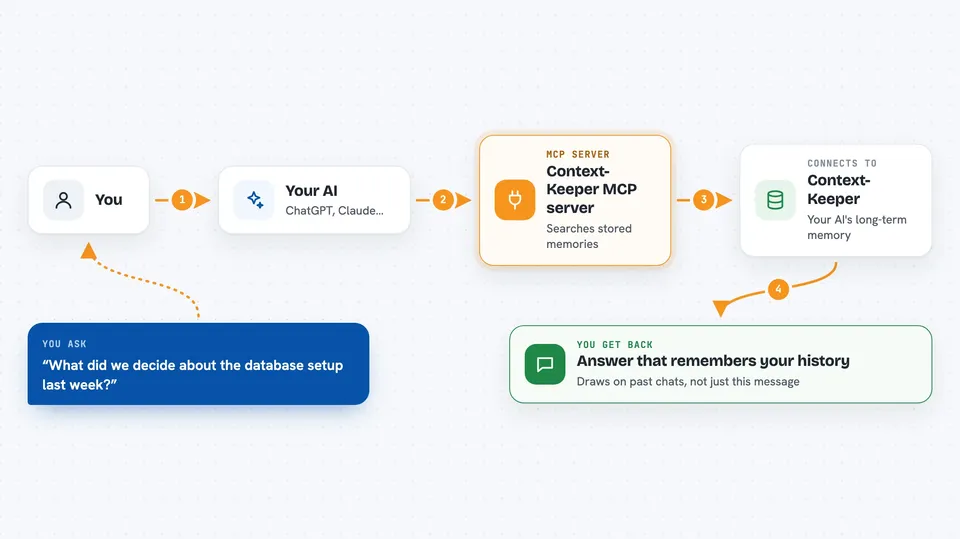
You ask your AI something, like what you decided about a project last month. Your AI passes the question to Context-Keeper through this helper. Context-Keeper searches its stored memories in several ways: by meaning, by time, and by how things are connected. It then picks the most useful pieces and hands them back. Your AI uses those pieces to give you an answer that actually remembers your history.
 Click to zoom
What you can do with it
- Recall what you discussed in earlier sessions
- Store new conversations so they are remembered later
- Search your past notes by meaning, not just keywords
- Find things by when they happened, using a timeline
- Link related topics together so your AI sees connections
- Keep different projects or workspaces separate
- Attach files to a session so their content is remembered
Try asking your AI
- “What did we decide about the database setup last week?”
- “Remind me why we chose this approach for the login page.”
- “Have we solved a problem like this before? Show me how.”
- “Save this conversation so I can find it later.”
What it gives back to you
You get answers in the chat that draw on your stored history, not just the current message. Context-Keeper can return lists of related past discussions, short summaries of earlier decisions, or the specific details you asked about. It also confirms when it has saved a new conversation. Everything shows up as normal text in your chat window.
Before you start
What you need
- A running Context-Keeper service (you or your team set it up first)
- A vector database account, like Aliyun DashVector or JD Cloud Vearch
- A PostgreSQL database with TimescaleDB for the timeline part
- A Neo4j database for the knowledge graph part
- An embedding service key (a kind of password for the service that turns text into numbers)
Good to know
This server stores your conversations and can read linked files, so be careful about what you save if it contains private or sensitive information.
Install it with your AI
Add Context-Keeper MCP server to your AI, no technical skills needed
You don't install anything by hand. You copy one prompt, paste it into an AI that can work on your computer, and it checks, installs and connects the server for you, asking you when it needs something.
Sign in to get the install prompt
Members get a ready-made prompt that lets the Claude desktop app check Context-Keeper MCP server, install it and connect it for them, step by step. You don't need any technical skills: you copy, paste and answer a few questions. Your connected AI can also find and install any of the 4,066 MCP servers here for you.
Who it's for
Developers, team leads and project managers who are tired of re-explaining the same project background to their AI every day.




