
MCP server · Research
Web Retrieval MCP server
by Role1776
Lets your AI search the web, find images, and read web pages, with no API keys needed.
This is a small helper program that gives your AI three web skills: searching the web, searching for images, and reading a web page and turning it into clean text. It is handy if you often ask your AI about something current and it says it cannot look things up. Once it is connected, your AI can go and fetch that information for you.
What is an MCP server? The 30-second version
On its own, your AI can only chat with what it already learned. An MCP server is a small helper program that gives your AI a new skill or a connection to something outside the chat. This one connects your AI to the web, so it can run searches, look for pictures, and open pages for you. You just ask in normal words, and the helper does the fetching behind the scenes.
What this MCP server does
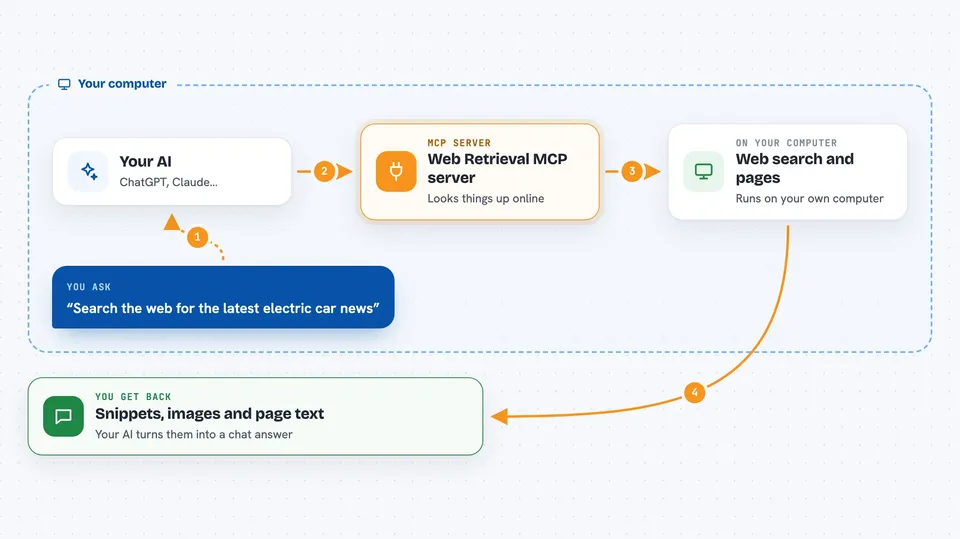
You ask your AI a question that needs fresh information, like a recent news topic or what a certain page says. The AI passes your request to this helper. The helper searches the web through DuckDuckGo Lite, looks for images through Bing Images, or downloads a page and pulls out the main article text. It hands the results back to your AI as tidy text and links, and your AI writes the answer for you in the chat. Everything it does is read-only, so it only looks, it does not change anything.
 Click to zoom
What you can do with it
- Search the web for a topic and get short snippets with links
- Run several searches at once and get results for each one
- Filter search results by freshness, like the last day or week
- Find images for a phrase and get a list of image results
- Open a web page and get its main text as clean Markdown
- Read several pages in one go and get each one separately
- Trim a long page down to a set number of characters
Try asking your AI
- “Search the web for the latest news about electric cars and give me the top five results with links”
- “Find me some images of the Eiffel Tower at night”
- “Read this page and summarize the main points for me: https://example.com/article”
- “Search for what people said this week about the new phone release”
What it gives back to you
You get back a list of results in the chat. For a search, that means short text snippets with their links. For images, a list of image results. For a page, the main article text as clean Markdown, trimmed to a sensible length. If one item in a batch fails, the others still come back, and your AI can tell you which ones worked.
Before you start
What you need
- An MCP client, like the Claude desktop app or another app that supports MCP servers
- The server itself, either the prebuilt program, the Docker container, or the MCP bundle file for your computer
- If you build it yourself: Go version 1.25.5 or newer
Good to know
It only reads the web, so it cannot change or delete anything, but image results are best-effort and can sometimes be unrelated, and pages that need JavaScript to load will come back empty.
Install it with your AI
Add Web Retrieval MCP server to your AI, no technical skills needed
You don't install anything by hand. You copy one prompt, paste it into an AI that can work on your computer, and it checks, installs and connects the server for you, asking you when it needs something.
Sign in to get the install prompt
Members get a ready-made prompt that lets the Claude desktop app check Web Retrieval MCP server, install it and connect it for them, step by step. You don't need any technical skills: you copy, paste and answer a few questions. Your connected AI can also find and install any of the 4,609 MCP servers here for you.
Who it's for
Anyone who uses an AI chat app and wants it to look things up on the web, like researchers, writers, analysts, and office workers who need current information.


