
MCP server · Notes
Mnemos MCP server
by s60yucca
Gives your coding AI a long-term memory so it remembers your project's decisions, fixes, and rules.
Mnemos is a memory helper for AI coding assistants. It quietly keeps notes about your project, like why you chose a certain approach or how you fixed a tricky bug, so your assistant does not forget them between sessions. It is handy if you use Claude Code, Cursor, or a similar coding tool and are tired of explaining the same things every morning.
What is an MCP server? The 30-second version
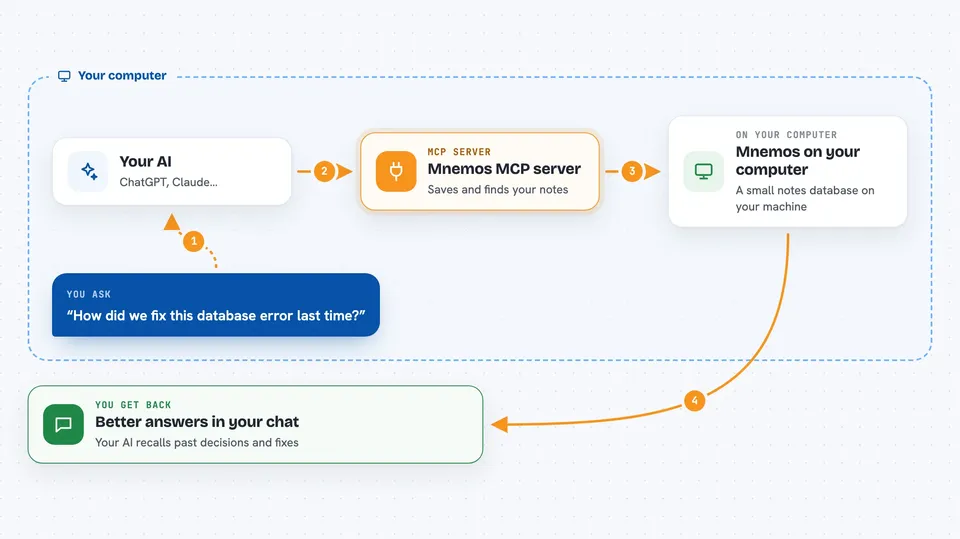
On its own, your AI assistant can only chat with what is in front of it right now. An MCP server is a small helper program that gives your assistant a new skill or a connection to something else. This one connects your assistant to a local memory store on your own computer, so it can look up past notes and save new ones when you ask. Nothing leaves your machine, and you do not need to learn any special commands.
What this MCP server does
You keep coding as usual, and your AI assistant talks to Mnemos behind the scenes. When something worth remembering comes up, like an architecture choice or a bug fix, Mnemos saves it in a small local database. Later, when you ask a question, your assistant searches that database and pulls back the most relevant notes. Mnemos also cleans things up over time, removing duplicates and flagging notes that may be outdated. You just see your assistant giving better answers with less repeating.
 Click to zoom
What you can do with it
- Remember architecture decisions and why they were made
- Recall how a bug was fixed last time it appeared
- Store project conventions and coding rules
- Search past notes by keyword or meaning
- Link related memories together, like a fix and its cause
- Clean up old or duplicate notes automatically
- Check what the memory system is doing with a status command
Try asking your AI
- “What did we decide about the JWT token expiry and where is it configured?”
- “Have we seen this database connection error before, and how did we fix it?”
- “What are the naming conventions for our API endpoints in this project?”
- “Summarize the main architecture decisions we made for the auth module.”
What it gives back to you
You get answers in your normal chat with your AI assistant, drawn from your project's saved notes. Sometimes it will be a short summary, sometimes a list of related memories, sometimes a specific fact like a file path or a setting. You will not see raw database output unless you ask for it directly.
Before you start
What you need
- A coding AI client that supports MCP, like Claude Code, Cursor, Kiro, Gemini CLI, or Codex
- A Mac or Linux computer (Homebrew or curl install), or Go 1.23+ if you build from source
Good to know
It can save and change notes about your project on your own computer, so if you share a machine or a repo, others may see those notes too.
Install it with your AI
Add Mnemos MCP server to your AI, no technical skills needed
You don't install anything by hand. You copy one prompt, paste it into an AI that can work on your computer, and it checks, installs and connects the server for you, asking you when it needs something.
Sign in to get the install prompt
Members get a ready-made prompt that lets the Claude desktop app check Mnemos MCP server, install it and connect it for them, step by step. You don't need any technical skills: you copy, paste and answer a few questions. Your connected AI can also find and install any of the 4,609 MCP servers here for you.
Who it's for
Developers and coding-agent users who want their AI assistant to remember project details across sessions without repeating themselves.





