MCP server · Developer tools
super-log MCP server
Lets your AI read and search all your local log streams on one timeline, without you switching windows.
super-log is a local tool that gathers log lines from many programs, devices and services and puts them on one shared timeline. This MCP server gives your AI a read-only window into that timeline. It is handy if you already run super-log and want to ask questions about your logs in plain chat instead of scrolling through terminals.
What is an MCP server? The 30-second version
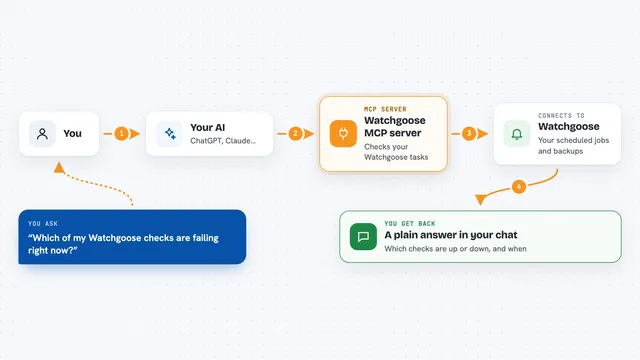
On its own, your AI can only chat with you. An MCP server is a small helper program that gives your AI a new skill or a connection to a service. This one connects your AI to your local super-log bench, so it can look at your live and saved log streams for you. You stay in the chat, and the AI does the looking.
What this MCP server does
You ask your AI something about your logs, like what happened in the last few minutes. The AI uses this helper to talk to your local super-log hub. The hub holds every stream that has been sent to it, interleaved on one timeline. The helper can tail live streams, search the saved journal on disk, wait for an event to show up, or read a short guide for a topic you do not know. Then it hands what it found back to the AI, and the AI explains it to you in the chat.
What you can do with it
- Tail a live log stream and see new lines as they arrive
- Search the on-disk journal for past events
- Wait for a specific event to happen and report it
- Read a per-topic guide when you do not know a topic
- List the topics currently on the bench
- Look at recent lines from one topic or all of them
Try asking your AI
- “What errors showed up in the last ten minutes?”
- “Tail the hello topic and tell me what comes in”
- “Search the journal for anything about a failed build”
- “Wait until something from the postgres topic appears, then summarize it”
What it gives back to you
You get answers in the chat, usually as short summaries or lists of log lines with their topic and time. If you ask for a search, it can show the matching lines it found. If you ask it to wait for an event, it tells you when the event arrived and what it said. It does not change your logs; it only reads them.
Before you start
What you need
- super-log installed and running on your machine (the hub listens on port 7333)
- Node.js installed so npx can run the MCP server
- An AI app that supports MCP servers, like Claude Desktop
Good to know
It is read-only, so it will not change or delete your logs, but it can read whatever your local super-log bench has collected, which may include private or sensitive lines.
Install it with your AI
Add super-log MCP server to your AI, no technical skills needed
You don't install anything by hand. You copy one prompt, paste it into an AI that can work on your computer, and it checks, installs and connects the server for you, asking you when it needs something.
Sign in to get the install prompt
Members get a ready-made prompt that lets the Claude desktop app check super-log MCP server, install it and connect it for them, step by step. You don't need any technical skills: you copy, paste and answer a few questions. Your connected AI can also find and install any of the 4,361 MCP servers here for you.
Who it's for
Developers and anyone who runs several programs or devices at once and wants to ask questions about their logs without hunting through many windows.