
MCP server · Notes
knowmind MCP server
Give your AI a long-term memory that remembers facts, notes and documents across chats.
knowmind is a memory service for your AI tools. You save facts, decisions and documents once, and later your AI can look them up and use them in any conversation. It is handy if you keep repeating the same background to ChatGPT or Claude and want them to just know it.
What is an MCP server? The 30-second version
On its own, your AI can only chat with what is in front of it. An MCP server is a small helper program that gives your AI a new skill or a connection to a service. This one connects your AI to knowmind, a hosted memory store. Once it is connected, your AI can save things there and search them again when you ask.
What this MCP server does
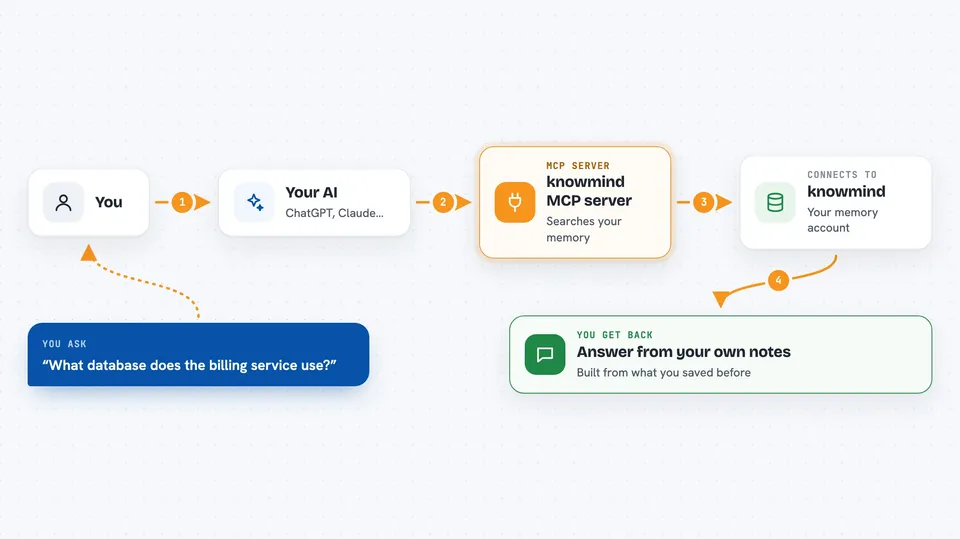
You ask your AI a question or tell it something worth remembering. The AI calls this helper, and the helper talks to your knowmind account in Germany. knowmind searches your saved facts, notes and documents and sends back the best matches. Your AI then answers you using those matches, instead of guessing.
 Click to zoom
What you can do with it
- Save a short fact, decision or note so your AI can find it later
- Upload a longer document like meeting minutes or a handbook chapter
- Search your saved memory with a plain question
- Ask what your memory said on a specific date in the past
- See the most recently added entries
- Update a fact that has changed without losing the old version
- Connect two entries with a typed link, like a contract to a client
Try asking your AI
- “Which database does the billing service use?”
- “Remember that we decided to keep the monolith until Q3.”
- “What was our pricing in March?”
- “Upload these meeting notes and make them searchable.”
What it gives back to you
You get answers in the chat, built from passages in your own memory. Searches come back as a ranked list of matching passages, and lists come back as short entries with titles and dates. When you save or update something, you get a confirmation that it was stored. Nothing is invented: if nothing matches, you get an empty result.
Before you start
What you need
- A free knowmind account at knowmind.de
- An access token from the knowmind dashboard (Dashboard, then API tokens)
- Node.js installed on your computer so the npx command can run
Good to know
Your AI can add, change and link things in your memory, so it is worth checking what it saved, and never store passwords or access keys because the service rejects them on purpose.
Install it with your AI
Add knowmind MCP server to your AI, no technical skills needed
You don't install anything by hand. You copy one prompt, paste it into an AI that can work on your computer, and it checks, installs and connects the server for you, asking you when it needs something.
Sign in to get the install prompt
Members get a ready-made prompt that lets the Claude desktop app check knowmind MCP server, install it and connect it for them, step by step. You don't need any technical skills: you copy, paste and answer a few questions. Your connected AI can also find and install any of the 4,361 MCP servers here for you.
Who it's for
People and small teams who use AI tools daily and are tired of repeating the same project background, rules and decisions in every new chat.





