
MCP server · Notes
Rekindle MCP server
by Skitchy
Your AI remembers where you left off, what you decided, and what is still open, across sessions.
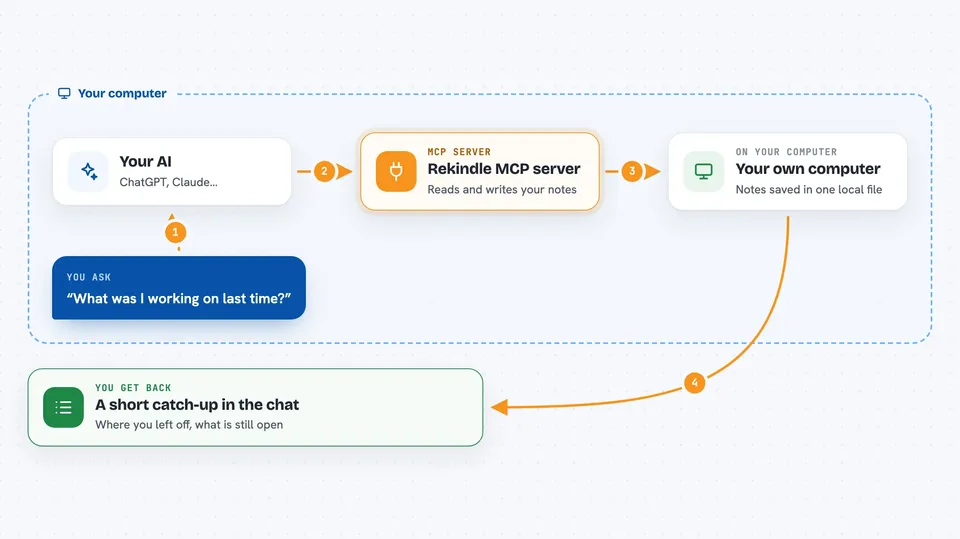
Rekindle is a small helper that gives your AI a memory between chats. It saves a short checkpoint at the end of a session and reads it back at the start of the next one, so you spend less time re-explaining your project. It is handy if you work with Claude Code or Cursor on the same project day after day.
What is an MCP server? The 30-second version
On its own, your AI can only chat. It forgets everything the moment you close the window. An MCP server is a small helper program that gives your AI a new skill or a connection to something. Rekindle is that helper here: it keeps notes about your project in a small database file on your own computer, and your AI can read and write those notes when you ask.
What this MCP server does
When a session starts, Rekindle puts together a short orientation report: who you are working with, what was decided last time, where you left off, and what still needs follow-up. Your AI reads that report and starts work already knowing the context. During a long session, if the chat gets trimmed down, Rekindle can save what would otherwise be lost. At the end, your AI writes a structured close-out: the checkpoint, decisions, open questions, and things to watch for next time. Everything lives in one local file, and nothing is sent anywhere.
 Click to zoom
What you can do with it
- Start a session with a short report of where you left off
- Save a checkpoint, decisions, and open questions at the end of a session
- Search your past notes by keyword, ranked by how important they are
- Browse and clean up stored memories by category or project
- Capture the current session on demand before the chat gets trimmed
- Read back an earlier capture as a short summary or in full
- Flag what is missing at the start of a session, like an empty profile or stale notes
What it gives back to you
You get short written answers in the chat: a boot report with a score, a list of past memories with their categories, or a summary of an earlier capture. When your AI saves a session, it confirms what was stored, like the checkpoint and the open questions. Searches come back as a ranked list of matching notes. Everything is text you can read right in the conversation.
Before you start
What you need
- Node.js 20 or newer installed on your computer
- The Claude Code or Cursor app, or another tool that supports MCP servers
- A project folder where you want Rekindle to keep its notes
Good to know
It reads and writes files in your project folder and can save parts of your conversation, so do not turn on transcript capture if your chats contain passwords or private information.
Install it with your AI
Add Rekindle MCP server to your AI, no technical skills needed
You don't install anything by hand. You copy one prompt, paste it into an AI that can work on your computer, and it checks, installs and connects the server for you, asking you when it needs something.
Sign in to get the install prompt
Members get a ready-made prompt that lets the Claude desktop app check Rekindle MCP server, install it and connect it for them, step by step. You don't need any technical skills: you copy, paste and answer a few questions. Your connected AI can also find and install any of the 4,361 MCP servers here for you.
Who it's for
People who work on the same project with an AI assistant over many days, like developers, writers, and anyone tired of repeating themselves.





