MCP server · Research
SubDownload MCP server
by SubDownload
Ask your AI about YouTube videos, get transcripts and summaries, and save them for later.
SubDownload is a helper that connects your AI assistant to YouTube. Once it is set up, you can ask your AI to summarize a video, pull the full transcript, or search a channel, and it will go get the answer for you. It is handy if you watch a lot of talks, tutorials, or interviews and want the useful parts without sitting through the whole thing.
What is an MCP server? The 30-second version
On its own, your AI can only chat with you using what it already knows. An MCP server is a small helper program that gives your AI one new skill or one new connection. This one connects your AI to YouTube through SubDownload, so when you ask about a video, your AI can look it up, read the transcript, and bring the answer back to your chat. You do not need to understand how it works underneath. You just connect it once and then talk to your AI like usual.
What this MCP server does
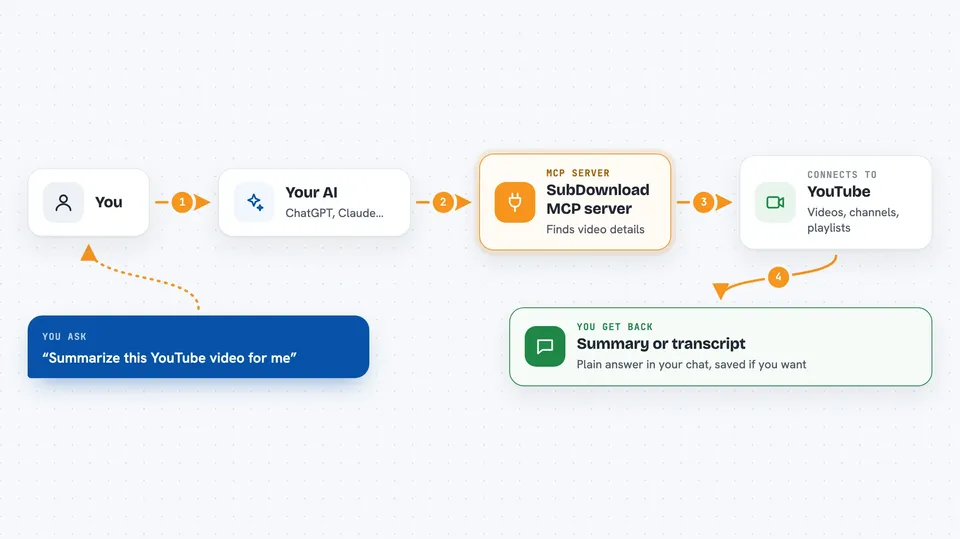
You ask your AI something about a YouTube video, channel, or playlist. Your AI passes that request to SubDownload. SubDownload talks to YouTube, finds the video, and pulls the details or the transcript you asked for. If the video has no captions, SubDownload can create a transcript with AI speech recognition. Then your AI shows you the answer in the chat, and if you want, it can save the result to your personal library so you can find it again later.
 Click to zoom
What you can do with it
- Summarize a YouTube video from its link
- Fetch the full transcript with timestamps
- Create a transcript for a video that has no captions
- Search YouTube by keyword
- Look up a channel and list its videos
- Browse the videos inside a playlist
- Save a summary or transcript to your personal library
- Browse and reopen items you saved earlier
Try asking your AI
- “Summarize this YouTube video for me and give me the main points”
- “Get the full transcript of this talk with timestamps”
- “What are the latest videos on the MKBHD channel”
- “Save this summary to my library so I can find it next week”
What it gives back to you
You get back plain answers in your chat: a short summary, a list of videos, a transcript with timestamps, or details like the title, channel, length, and view count. When you save something, it goes into your own library and you can ask for it again in a later chat. Long transcripts can be big, so your AI may shorten them or show just the parts you asked about.
Before you start
What you need
- A SubDownload account (free credits on signup, no card needed)
- An MCP client that supports OAuth, like Claude Desktop, Cursor, or Windsurf
- If your client does not support OAuth, an API key from your SubDownload account page
Good to know
It uses your SubDownload credits, and AI transcription of videos without captions can take a while and cost more credits than a normal lookup.
Install it with your AI
Add SubDownload MCP server to your AI, no technical skills needed
You don't install anything by hand. You copy one prompt, paste it into an AI that can work on your computer, and it checks, installs and connects the server for you, asking you when it needs something.
Sign in to get the install prompt
Members get a ready-made prompt that lets the Claude desktop app check SubDownload MCP server, install it and connect it for them, step by step. You don't need any technical skills: you copy, paste and answer a few questions. Your connected AI can also find and install any of the 4,361 MCP servers here for you.
Who it's for
Anyone who watches or researches YouTube a lot, like students, marketers, journalists, and people who follow tutorials or talks.