
MCP server · Notes
Aura Memory MCP server
by teolex2020
Give your AI a private, offline memory that remembers what happened in past chats.
Aura Memory is a small program that gives your AI a lasting memory. Normally your AI forgets everything the moment a chat ends. With Aura, you can save notes, decisions and facts on your own computer, and your AI can look them up again later. It is handy for anyone who keeps repeating the same background information to their AI.
What is an MCP server? The 30-second version
On its own, your AI can only chat. It has no place to keep things and no way to reach outside the conversation. An MCP server is a small helper program that gives your AI a new skill or a connection to something else. This one connects your AI to Aura Memory, a memory store that lives on your own machine, so your AI can save and recall notes for you when you ask.
What this MCP server does
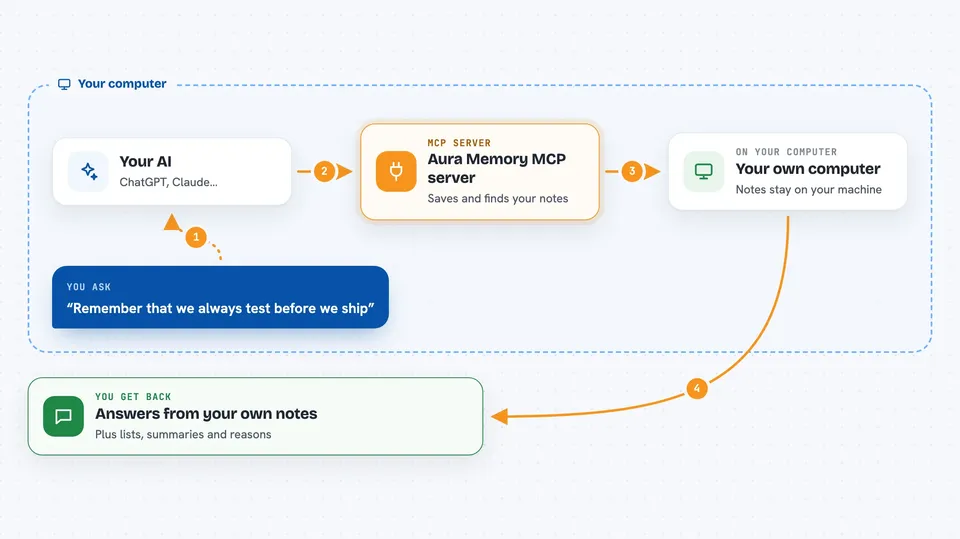
You tell your AI something worth remembering, like a rule you always follow at work. Your AI passes that to Aura Memory through this helper. Aura Memory stores it locally on your computer, in a private and encrypted form. Later, when you ask about that topic, your AI asks Aura Memory to find the relevant notes and brings them back into the chat. Over time it can also point out patterns it noticed, like a habit you repeat.
 Click to zoom
What you can do with it
- Save facts, decisions and rules your AI should remember
- Recall earlier notes when you ask about a topic
- Keep separate memory for different projects or clients
- See why a particular memory was brought back
- Correct or remove a memory that turned out to be wrong
- Spot repeated patterns across your saved notes
- Build a short summary of the most relevant context for a task
Try asking your AI
- “Remember that we always deploy to staging before production.”
- “What do you know about our deployment process?”
- “Show me the notes you saved about the Henderson account.”
- “Forget the old pricing rule, it changed last month.”
What it gives back to you
You get answers in plain chat, built from the notes your AI found. It can also show lists of saved items, short summaries, and explanations of why a memory was picked. When you ask it to correct or remove something, it tells you what changed. Everything stays on your computer, so nothing is sent to an outside service.
Before you start
What you need
- Python installed on your computer
- The aura-memory package installed with pip
- An MCP-capable AI app such as the Claude desktop app
Good to know
It stores notes about your work on your computer, so avoid saving passwords, personal data or anything confidential you would not want kept in a file.
Install it with your AI
Add Aura Memory MCP server to your AI, no technical skills needed
You don't install anything by hand. You copy one prompt, paste it into an AI that can work on your computer, and it checks, installs and connects the server for you, asking you when it needs something.
Sign in to get the install prompt
Members get a ready-made prompt that lets the Claude desktop app check Aura Memory MCP server, install it and connect it for them, step by step. You don't need any technical skills: you copy, paste and answer a few questions. Your connected AI can also find and install any of the 4,609 MCP servers here for you.
Who it's for
Anyone who uses an AI assistant for ongoing work and is tired of repeating the same background every time, especially people juggling several projects or clients.





