
MCP server · Developer tools
Bugsnag MCP server
by tgeselle
Lets your AI look up Bugsnag errors, stacktraces and events and explain them in plain words.
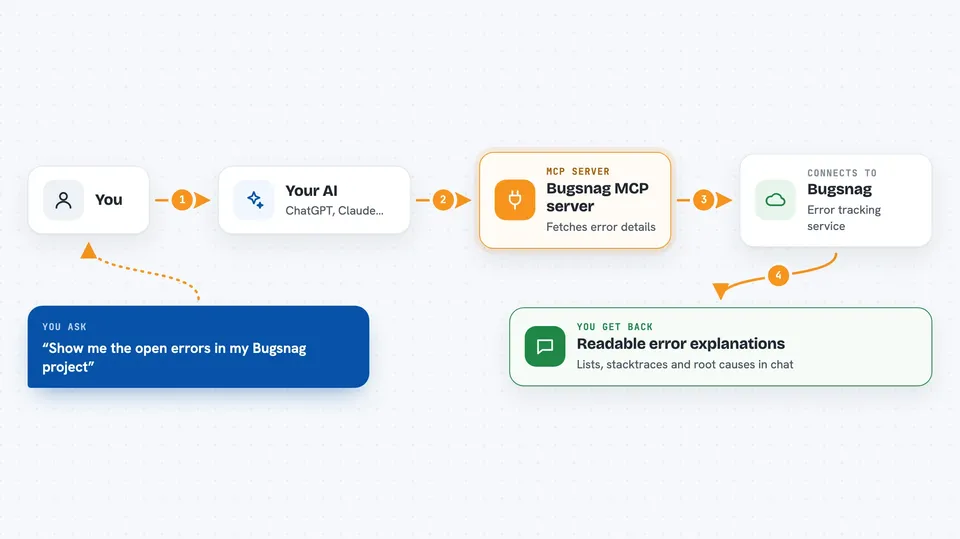
This is a small helper that connects your AI assistant to Bugsnag, the tool many teams use to collect and track errors from their apps. Once it is set up, you can ask your AI things like "show me the open errors in this project" and it will go and fetch them for you. It is handy for developers, testers and anyone who has to keep an eye on what is breaking in an app.
What is an MCP server? The 30-second version
On its own, your AI can only chat with you using what it already knows. An MCP server is a small helper program that gives your AI a new skill or a connection to another service. This one connects your AI to Bugsnag, so the AI can look up your organizations, projects, errors and events there when you ask. You do not have to copy and paste error details by hand anymore, the AI fetches them itself.
What this MCP server does
You ask your AI a question about your Bugsnag account, like which errors are open or what a specific error looks like. The AI sends that request to this helper program. The helper talks to Bugsnag using your API key and pulls back the information you asked for. Then the AI turns that raw data into a readable answer in your chat, with the error list, the stacktrace or the details you wanted. You stay in the chat the whole time and never have to open the Bugsnag website yourself.
 Click to zoom
What you can do with it
- List your Bugsnag organizations and the projects inside them
- List open, fixed or ignored errors in a project
- Show the details of one specific error
- View the latest event for an error
- View a formatted stacktrace with source code context
- View the full chain of exceptions behind an error
- Search for issues by error class, message or app version
Try asking your AI
- “List all my Bugsnag organizations”
- “Show me the open errors in my Bugsnag project project_12345”
- “Show me the detailed stacktrace for event event_12345 in project project_12345”
- “Search for Bugsnag issues in project project_12345 related to NullPointerException”
What it gives back to you
You get back answers written in the chat: lists of organizations, projects or errors, and detailed descriptions of a single error or event. For stacktraces, the AI can show the formatted trace with the surrounding source code and the error line highlighted. For exception chains, it shows the full sequence of exceptions so you can see the root cause. Everything appears as normal text in your conversation, not as files you have to open.
Before you start
What you need
- A Bugsnag account
- A Bugsnag personal access token (a kind of password for apps; you create it in Bugsnag under Settings, Organization settings, Access tokens, with read projects, read and write errors, and read and write comments permissions)
- The Claude Desktop app or Cursor, with the MCP configuration file you can edit
- Node.js installed on your computer so the npx command works
Good to know
Your API key gives read and write access to errors and comments in Bugsnag, so keep it private and only share it with tools you trust.
Install it with your AI
Add Bugsnag MCP server to your AI, no technical skills needed
You don't install anything by hand. You copy one prompt, paste it into an AI that can work on your computer, and it checks, installs and connects the server for you, asking you when it needs something.
Sign in to get the install prompt
Members get a ready-made prompt that lets the Claude desktop app check Bugsnag MCP server, install it and connect it for them, step by step. You don't need any technical skills: you copy, paste and answer a few questions. Your connected AI can also find and install any of the 4,609 MCP servers here for you.
Who it's for
Developers, QA testers and support engineers who already use Bugsnag and want to investigate errors without leaving their AI chat.



