
MCP server · Notes
Acheron memory MCP server
by timmx7
Give your AI a shared memory so it remembers decisions across Claude Chat, Code and Cowork.
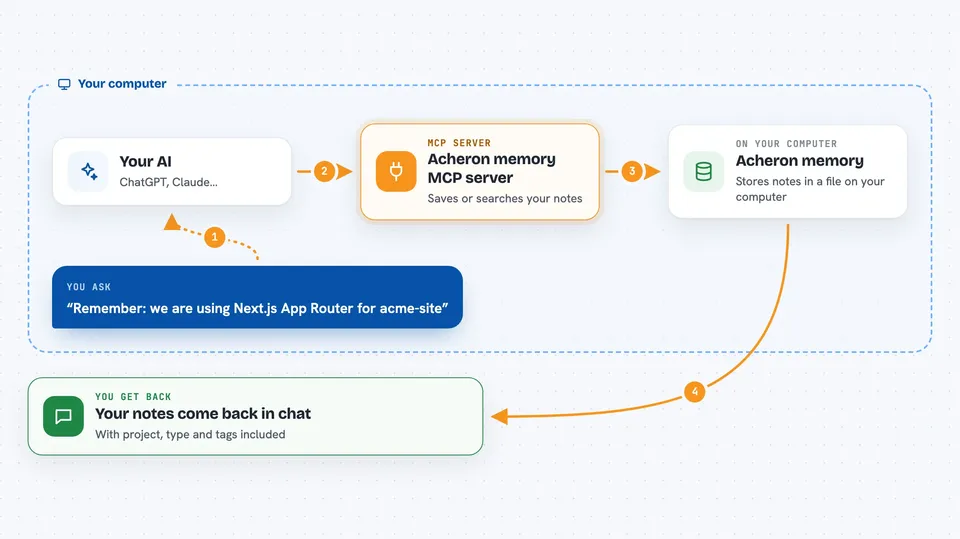
Acheron is a small helper that gives your AI a memory. You tell it something worth keeping, like a decision or a preference, and it stores that on your own computer. Later, in a different chat or in Claude Code, you can ask for it back. It is handy if you keep repeating yourself to your AI.
What is an MCP server? The 30-second version
On its own, your AI can only chat about what is in front of it. An MCP server is a small helper program that gives your AI a new skill or a connection to something. Acheron is that helper, and its skill is memory: it keeps notes in a file on your machine. When you ask your AI to remember or look something up, the AI quietly uses Acheron to do it for you.
What this MCP server does
You talk to your AI in plain words, like remember this or what did we decide about that. Your AI passes the request to Acheron. Acheron saves your note in a small database file on your computer, or searches that file for you. Then it hands the answer back to your AI, which tells you in the chat. Because the file lives on your machine, the same memory is available in Claude Chat, Claude Code and Cowork.
 Click to zoom
What you can do with it
- Save a decision or preference so you do not have to repeat it
- Search your saved notes by keyword
- List everything you saved for one project
- Filter your notes by project, type or tag
- Open a saved note to see its full details
- Delete a note you no longer need
- Check how many notes you have stored
Try asking your AI
- “Remember: we are using Next.js App Router for the acme-site project.”
- “What did we decide about the authentication approach?”
- “Show me everything saved for acme-site.”
- “Find my notes on the database choice.”
What it gives back to you
You get your own words back, plus the details Acheron stored with them, like the project name, the type and any tags. A search returns a short list of matching notes, and you can ask for the full text of any one. Saving or deleting gives you a short confirmation. It all shows up as normal text in your chat.
Before you start
What you need
- The Claude desktop app, or Claude Code
- Node.js 20 or newer
- On some computers, build tools for the database part (the README shows how)
Good to know
It can delete saved notes if you ask it to, and everything it stores sits in a plain file on your computer, so keep that in mind if others use the same machine.
Install it with your AI
Add Acheron memory MCP server to your AI, no technical skills needed
You don't install anything by hand. You copy one prompt, paste it into an AI that can work on your computer, and it checks, installs and connects the server for you, asking you when it needs something.
Sign in to get the install prompt
Members get a ready-made prompt that lets the Claude desktop app check Acheron memory MCP server, install it and connect it for them, step by step. You don't need any technical skills: you copy, paste and answer a few questions. Your connected AI can also find and install any of the 4,609 MCP servers here for you.
Who it's for
Anyone who uses Claude across more than one place and is tired of repeating the same context, especially people juggling several projects.





