
MCP server · Research
lilbee MCP server
by tobocop2
Ask your AI questions about your own files, notes, code and crawled websites, with answers that cite the exact source.
lilbee is a program that runs on your own computer. It reads your files, notes, code and websites you ask it to crawl, then lets you ask questions about all of it in plain English. It is handy if you have a lot of documents and want answers that point back to where they came from.
What is an MCP server? The 30-second version
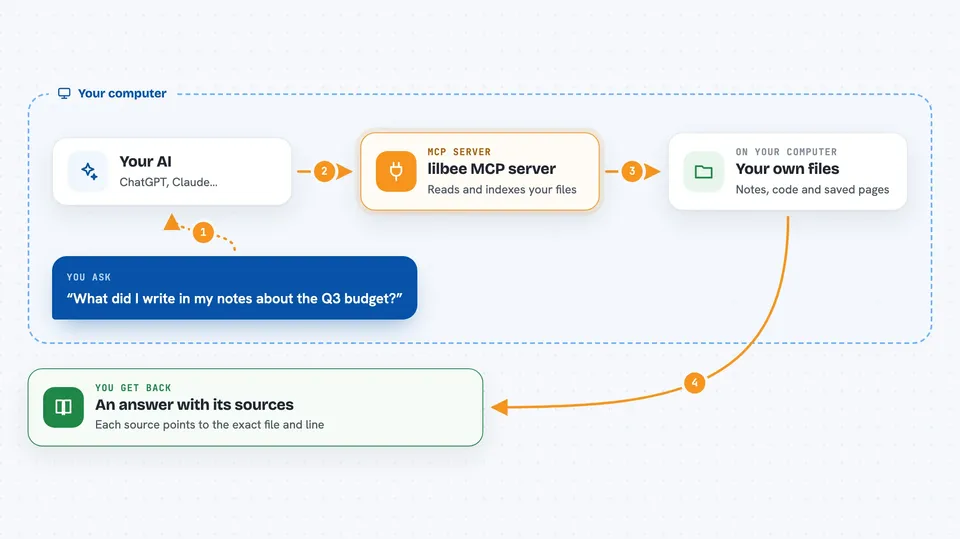
On its own, your AI can only chat with you. It does not know what is on your computer. An MCP server is a small helper program that gives your AI a new skill, and here that skill is searching everything lilbee has indexed. Once it is connected, your AI can ask lilbee for answers and lilbee sends back the text plus the exact file and line it came from.
What this MCP server does
You point lilbee at folders you care about, like a notes folder or a code project, and it reads and indexes them. When you ask your AI a question, the AI passes it to lilbee through this MCP connection. lilbee searches its index on your machine and finds the passages that match. It hands those passages back to your AI, along with where each one came from. Your AI then writes you an answer with the sources listed.
 Click to zoom
What you can do with it
- Ask questions about your own documents and get answers with file and line citations
- Search your notes, code and indexed files in plain English
- Crawl a website into your library and then ask questions about its pages
- Keep everything local so your files and questions stay on your machine
- Use your own local models, or point lilbee at an existing Ollama or LM Studio setup
- Run it as a service so the index stays warm between questions
Try asking your AI
- “What did I write in my notes about the Q3 budget?”
- “Find where in my code the login check happens and show me that part”
- “Summarize what this website says about pricing”
- “Which of my documents mention the new supplier contract?”
What it gives back to you
You get an answer written in the chat, plus the sources it used. Each source points to the exact file and line, or the page it came from. If you asked for a summary, you get a short summary with those citations attached. Nothing is changed in your files; it only reads and reports.
Before you start
What you need
- A computer that can run local AI models (a decent GPU helps but is not required)
- lilbee installed on your machine
- Folders or websites added to lilbee so it has something to search
Good to know
It reads the files and folders you point it at, so only add folders you are comfortable having indexed, and note that it is beta software where commands and formats may change.
Install it with your AI
Add lilbee MCP server to your AI, no technical skills needed
You don't install anything by hand. You copy one prompt, paste it into an AI that can work on your computer, and it checks, installs and connects the server for you, asking you when it needs something.
Sign in to get the install prompt
Members get a ready-made prompt that lets the Claude desktop app check lilbee MCP server, install it and connect it for them, step by step. You don't need any technical skills: you copy, paste and answer a few questions. Your connected AI can also find and install any of the 4,609 MCP servers here for you.
Who it's for
People with lots of notes, documents or code who want private, cited answers without sending their files to a cloud service.


