
MCP server · Analytics
Grafana Loki MCP server
by tumf
Lets your AI look up and read your Loki logs through Grafana when you ask it a question.
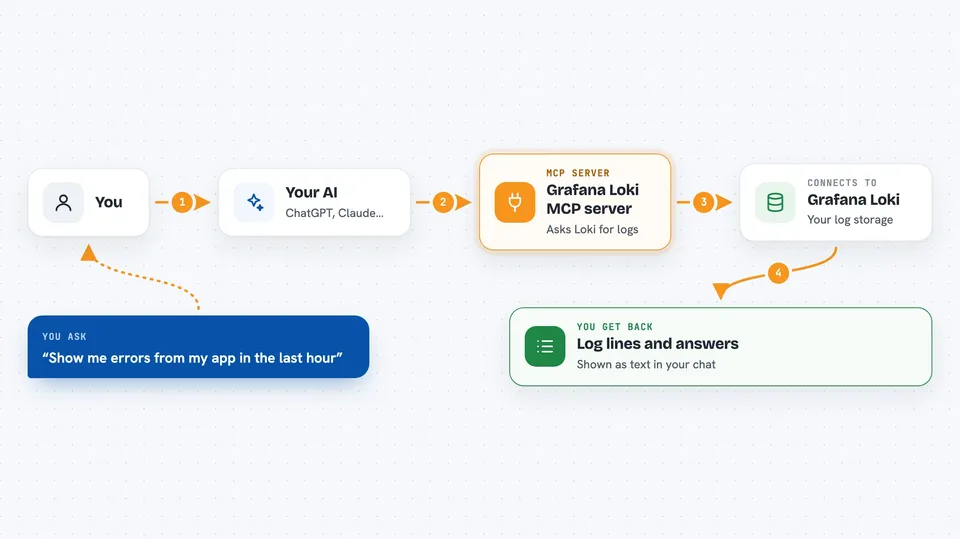
This is a small helper that connects your AI assistant to Loki, the log system you view in Grafana. Once it is set up, you can just ask your AI things like "show me the errors from the last hour" and it will go fetch the matching log lines for you. It is handy for anyone who checks logs but does not want to click around dashboards every time.
What is an MCP server? The 30-second version
On its own, your AI can only chat with you. An MCP server is a small helper program that gives your AI one new skill or one new connection. This particular helper connects your AI to Loki through Grafana, so it can look up your logs for you. You ask in plain words, and the helper quietly does the lookup behind the scenes.
What this MCP server does
You ask your AI a question about your logs, like which errors happened today. The AI uses this helper, and the helper talks to your Grafana instance and asks Loki for the matching log lines. Loki sends the results back, and the helper can tidy them into plain text, JSON, or a markdown table. Then your AI shows you the answer right in the chat.
 Click to zoom
What you can do with it
- Search your Loki logs with a query and a time range
- Find errors or specific words inside log lines
- List all the label names your logs use
- Look up the values for a specific label
- Limit how many log lines come back and how long each line is
- Format the results as text, JSON, or a markdown table
Try asking your AI
- “Show me the errors from my app in the last hour”
- “What labels does my Loki setup have?”
- “Find log lines mentioning timeout between 9am and 10am today”
- “Give me the last 50 log lines for the service checkout and format them as a table”
What it gives back to you
You get back the matching log lines, usually as a list with timestamps and messages. You can also get a simple list of label names or label values. If you ask for a table, the results come back as a neat markdown table you can read or copy. Everything shows up as text in your chat, nothing is changed in your logs.
Before you start
What you need
- A Grafana account with access to your Loki logs
- The web address of your Grafana instance
- A Grafana API key with permission to read logs (a kind of password for apps; you create it in Grafana settings)
- Python 3.10 or newer on the machine that runs the helper
Good to know
It only reads your logs, but it uses your Grafana API key, so keep that key private and give it the smallest permissions it needs.
Install it with your AI
Add Grafana Loki MCP server to your AI, no technical skills needed
You don't install anything by hand. You copy one prompt, paste it into an AI that can work on your computer, and it checks, installs and connects the server for you, asking you when it needs something.
Sign in to get the install prompt
Members get a ready-made prompt that lets the Claude desktop app check Grafana Loki MCP server, install it and connect it for them, step by step. You don't need any technical skills: you copy, paste and answer a few questions. Your connected AI can also find and install any of the 4,609 MCP servers here for you.
Who it's for
Developers, support engineers, and anyone on call who checks logs and wants quick answers without opening Grafana by hand.



