MCP server · Productivity
Procore MCP server
by TylerIlunga
Lets your AI look up and work with your Procore projects, RFIs, submittals, daily logs and budgets.
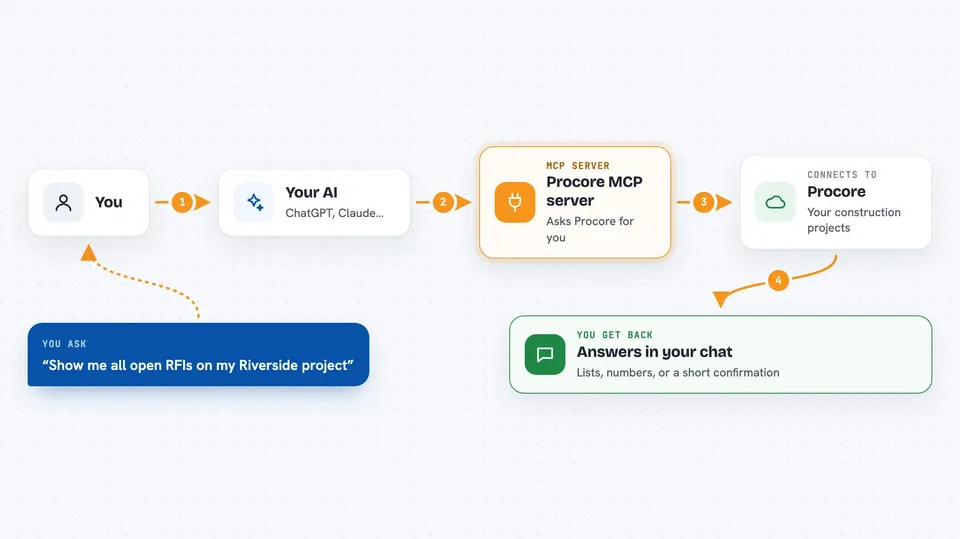
This is a helper that connects your AI assistant to Procore, the app construction teams use for project management. Once it is set up, you can ask your AI about your projects instead of clicking around Procore yourself. It is most useful if you already work in Procore every day.
What is an MCP server? The 30-second version
On its own, your AI can only chat with you. An MCP server is a small helper program that gives your AI a new skill or a connection to another app. This one connects your AI to Procore, so it can look things up and do things there when you ask. You stay in the chat, and the helper handles the talking to Procore in the background.
What this MCP server does
You ask your AI something about your Procore work, like listing open RFIs on a project. The AI uses this helper to find the right Procore action and send the request for you. The helper signs in with your Procore account, handles the back and forth, and brings the answer back. Then your AI shows you the result in plain language in the chat. You never have to open Procore or copy anything between apps.
 Click to zoom
What you can do with it
- List your Procore projects and pick one to work with
- Look up open RFIs, submittals or daily logs on a project
- Search across all Procore actions to find the one you need
- Pull budget or cost details for a project
- Check what your current Procore connection is set to
- Run a Procore action and see the result right in the chat
Try asking your AI
- “Show me all open RFIs on my Riverside project”
- “What submittals are still waiting for review this week?”
- “List the daily logs from last month on the Oak Street job”
- “What is the current budget for my downtown project?”
What it gives back to you
You get answers in the chat: lists of projects, RFIs, submittals, daily logs or budget numbers, depending on what you asked. Your AI usually summarizes the result in plain words, and you can ask follow-up questions. If you ran an action that changes something in Procore, you get a short confirmation of what was done.
Before you start
What you need
- Node.js 18 or newer on your computer
- A Procore Developer Portal account
- A Procore OAuth app with a client ID and secret (a kind of app password; the developer portal gives you these)
- Your Procore company ID
Good to know
It can change things in your real Procore account, not just read them, so be careful with requests that create, edit or delete records.
Install it with your AI
Add Procore MCP server to your AI, no technical skills needed
You don't install anything by hand. You copy one prompt, paste it into an AI that can work on your computer, and it checks, installs and connects the server for you, asking you when it needs something.
Sign in to get the install prompt
Members get a ready-made prompt that lets the Claude desktop app check Procore MCP server, install it and connect it for them, step by step. You don't need any technical skills: you copy, paste and answer a few questions. Your connected AI can also find and install any of the 4,609 MCP servers here for you.
Who it's for
Construction engineers, project managers and coordinators who already use Procore daily and want to ask questions in plain language instead of clicking through the app.