
MCP server · Privacy
Vaulted MCP server
by vaulted-fyi
Share encrypted, self-destructing secret links from your AI without the secret ever passing through the chat.
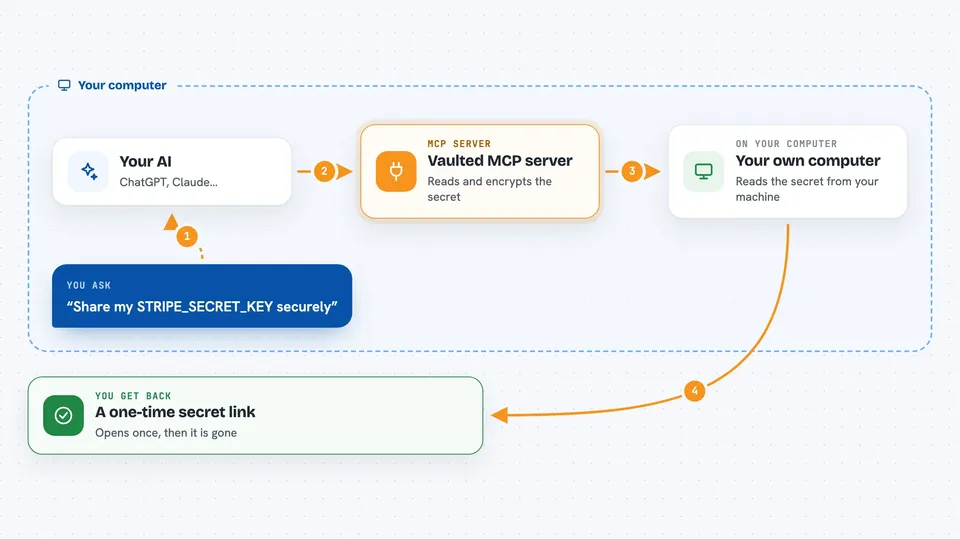
Vaulted is a helper that lets your AI create secure, self-destructing links for passwords, keys and other secrets. You ask your assistant to share something, and it hands back a link you can send by email or chat. It is handy for anyone who has to pass a password or key to a colleague without leaving it lying around in a message thread.
What is an MCP server? The 30-second version
On its own, your AI can only chat. An MCP server is a small helper program that gives your AI a new skill or a connection to another service. This one connects your AI to Vaulted, a service for sharing secrets that delete themselves after being read. Once it is connected, you can ask your AI to make a secret link, check if it has been opened, or open one you received.
What this MCP server does
You ask your AI something like "share my GITHUB_TOKEN securely". The AI passes a short instruction to this helper, and the helper reads the value straight from your computer, encrypts it, and uploads only the scrambled version. You get back a link in the chat. When the other person opens the link, the secret is shown once and then deleted. Your AI never sees the actual secret, so it never ends up in your chat history.
 Click to zoom
What you can do with it
- Create a self-destructing link for a password or key
- Share an environment variable without the value entering the chat
- Share the contents of a file, like an SSH key
- Pull one value out of a .env file and share just that
- Open a secret link in your browser, clipboard or a file
- Check whether a secret has been viewed yet
- List the secrets you have shared recently
Try asking your AI
- “Share my STRIPE_SECRET_KEY env var securely”
- “Create a one-time link for this password: hunter2”
- “Has my secret been viewed yet?”
- “Save this secret to /tmp/creds.txt: https://vaulted.fyi/s/abc123#key...”
What it gives back to you
For a new secret you get a link, plus how long it lasts and how many views it allows. For a status check you get the number of views, the maximum, and the expiry time. When you open a secret, you can choose to have it go to your browser, your clipboard or a file, so the value stays out of the chat. Only if you ask for it directly does the value appear in the conversation.
Before you start
What you need
- Node.js version 18 or newer
- An MCP-compatible app like Claude Desktop, Cursor, Windsurf, Claude Code or VS Code
- No account or API key needed
Good to know
If you ask for a secret to be returned directly, the value will appear in your chat history, so use the browser, clipboard or file option when you want to keep it out.
Install it with your AI
Add Vaulted MCP server to your AI, no technical skills needed
You don't install anything by hand. You copy one prompt, paste it into an AI that can work on your computer, and it checks, installs and connects the server for you, asking you when it needs something.
Sign in to get the install prompt
Members get a ready-made prompt that lets the Claude desktop app check Vaulted MCP server, install it and connect it for them, step by step. You don't need any technical skills: you copy, paste and answer a few questions. Your connected AI can also find and install any of the 4,361 MCP servers here for you.
Who it's for
Developers, IT staff and anyone who has to pass passwords or keys around at work without leaving them in a chat log.





