
MCP server · Analytics · official
VictoriaLogs MCP server
by VictoriaMetrics-Community · official
Lets your AI search and explore your VictoriaLogs log data and its documentation for you.
This is a small helper program made by VictoriaMetrics, the company behind VictoriaLogs. It connects your AI assistant to your own VictoriaLogs instance so it can look at your logs and answer questions about them. It is handy for anyone who works with logs and wants to stop clicking around a web interface.
What is an MCP server? The 30-second version
On its own, your AI can only chat with you. An MCP server is a small helper program that gives your AI a new skill or a connection to another app. This one connects your AI to VictoriaLogs, a system that stores and searches logs. Once it is connected, your AI can look things up in your logs and read the VictoriaLogs documentation for you when you ask.
What this MCP server does
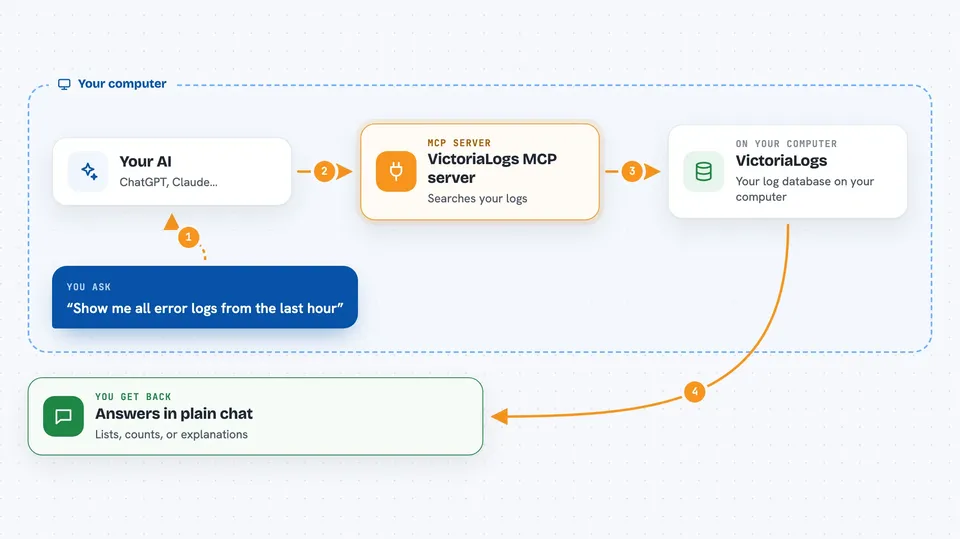
You ask your AI a question about your logs, like which errors happened today. The AI uses this helper to send a read-only query to your VictoriaLogs instance. VictoriaLogs searches its stored logs and sends back the matching entries. The helper hands those results to your AI, and your AI explains them to you in the chat. It can also look up the built-in VictoriaLogs documentation, even without internet access.
 Click to zoom
What you can do with it
- Search your logs for specific words, errors, or time ranges
- List the streams, fields, and field values available in your logs
- Show the settings and parameters of your VictoriaLogs instance
- Turn log counts into numbers and simple statistics
- Look up answers in the built-in VictoriaLogs documentation
- Explore log data without opening the web interface
Try asking your AI
- “Show me all error logs from the last hour”
- “Which services produced the most log entries today?”
- “List the fields available in my logs”
- “How do I set up a query in VictoriaLogs? Check the docs.”
What it gives back to you
You get answers in plain chat text: lists of log entries, counts, field names, or short explanations. When you ask for statistics, it gives you numbers and simple summaries. When you ask about the documentation, it quotes the relevant part. Nothing in your logs is changed, because this helper only reads.
Before you start
What you need
- A VictoriaLogs instance (single-node or cluster) that you can reach
- The address of that instance, like a web link
- An access token if your instance requires one (a kind of password for apps)
- Go 1.26 or newer only if you want to build it from source
Good to know
This helper only reads your logs, so it will not change or delete anything, but it can see whatever is stored in your VictoriaLogs instance, so only connect it to logs you are allowed to share with your AI.
Install it with your AI
Add VictoriaLogs MCP server to your AI, no technical skills needed
You don't install anything by hand. You copy one prompt, paste it into an AI that can work on your computer, and it checks, installs and connects the server for you, asking you when it needs something.
Sign in to get the install prompt
Members get a ready-made prompt that lets the Claude desktop app check VictoriaLogs MCP server, install it and connect it for them, step by step. You don't need any technical skills: you copy, paste and answer a few questions. Your connected AI can also find and install any of the 4,609 MCP servers here for you.
Who it's for
Engineers, support teams, and anyone who works with logs and wants to ask questions about them in plain language.


