
MCP server · Research
NCBI PubMed MCP server
Search PubMed's millions of research articles and get summaries, authors, and related papers through your AI.
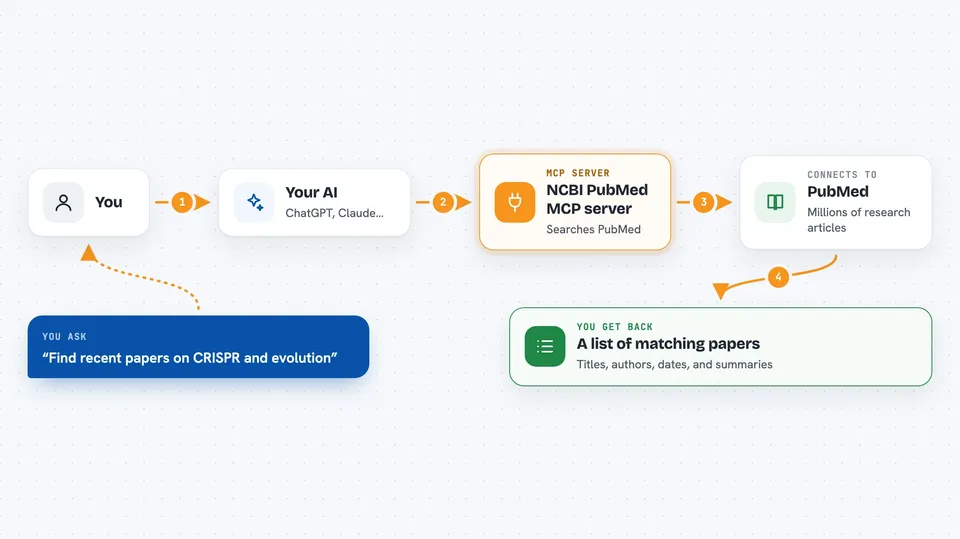
This is a helper for your AI that connects it to PubMed, the huge public library of medical and life sciences research articles. You ask questions in normal words, and your AI goes off and searches that library for you. It is handy for anyone who reads scientific papers, like students, researchers, and analysts.
What is an MCP server? The 30-second version
On its own, your AI can only chat with you using what it already learned. An MCP server is a small helper program that gives your AI a new skill or a connection to an outside service. This one connects your AI to NCBI and PubMed, the online databases of scientific articles. Once it is set up, your AI can look things up there and bring answers back to you when you ask.
What this MCP server does
You type a request in plain words, like asking for recent papers on a topic. Your AI passes that request to this helper program. The helper talks to PubMed and NCBI over the internet and searches their article collections. It brings back matching papers with titles, authors, dates, and abstracts. Then your AI shows you the results in the chat, often as a tidy list or summary.
 Click to zoom
What you can do with it
- Search PubMed for articles on any life sciences or medical topic
- Get full details for specific papers, including abstracts and author lists
- Find papers related to a paper you already know
- Look up standardized medical terms (MeSH) to sharpen your search
- Run advanced searches by author, journal, publication type, or date
- Limit results to recent articles, like the last 30 or 90 days
- See simple usage and performance stats about your searches
Try asking your AI
- “Search PubMed for recent papers on CRISPR and evolution”
- “Find review articles about machine learning in genomics from the last two years”
- “Get the full details for these PubMed IDs: 12345678 and 23456789”
- “Show me papers related to this one, PMID 34567890”
What it gives back to you
You get back a list of matching articles, usually with titles, authors, journals, dates, and short summaries. If you ask for details on specific papers, you get fuller abstracts and author lists. Related article searches give you a fresh list of papers connected to the one you started with. Everything shows up right in your chat as text you can read or copy.
Before you start
What you need
- Python 3.8 or newer installed on your computer
- Poetry (a tool that installs the pieces this server needs)
- The Claude desktop app, if you want to use it there
- An NCBI email and API key (optional, but it makes searches faster)
Good to know
The reset analytics tool permanently clears your collected stats, so only use it if you are sure you want to wipe that data.
Install it with your AI
Add NCBI PubMed MCP server to your AI, no technical skills needed
You don't install anything by hand. You copy one prompt, paste it into an AI that can work on your computer, and it checks, installs and connects the server for you, asking you when it needs something.
Sign in to get the install prompt
Members get a ready-made prompt that lets the Claude desktop app check NCBI PubMed MCP server, install it and connect it for them, step by step. You don't need any technical skills: you copy, paste and answer a few questions. Your connected AI can also find and install any of the 4,361 MCP servers here for you.
Who it's for
Researchers, students, and analysts in biology, medicine, and related life sciences who read a lot of scientific papers.


