
MCP server · Notes
Context-First MCP server
by XJTLUmedia
Keeps your AI grounded and honest during long chats by tracking facts, spotting contradictions, and saving memory.
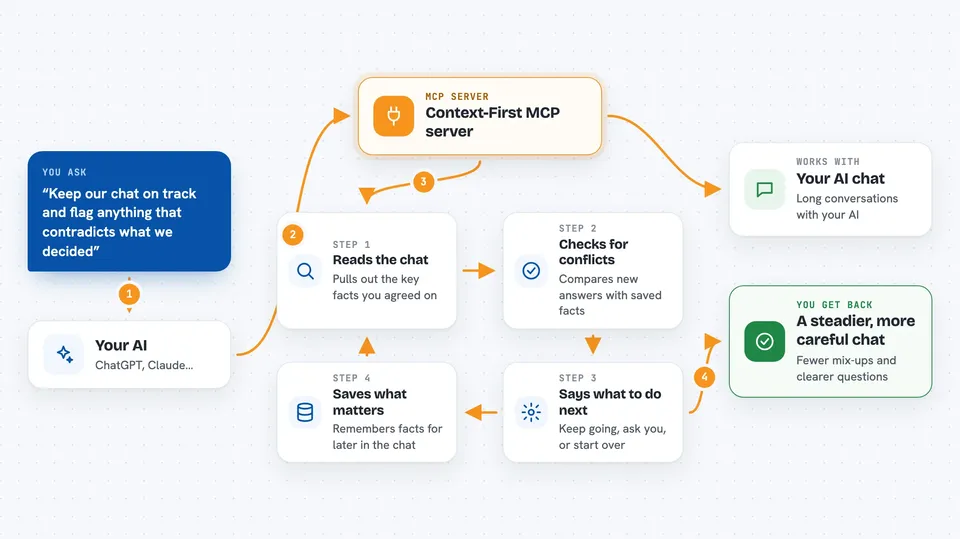
Context-First MCP is a helper that watches over long conversations with your AI. It remembers what you decided earlier, notices when new answers clash with old ones, and asks you to clarify instead of guessing. It is handy if you use ChatGPT or Claude for long, messy projects and want fewer mistakes.
What is an MCP server? The 30-second version
On its own, your AI can only chat. An MCP server is a small helper program that gives your AI a new skill or a connection. This one gives your AI a memory and a fact-checker for the conversation. When you ask something, your AI can call this helper to remember earlier decisions, spot contradictions, and check its own confidence before answering.
What this MCP server does
You talk to your AI as usual. Behind the scenes, the AI calls this helper every few turns. The helper looks at the conversation, pulls out key facts, compares new statements against locked-in facts, and checks if anything is vague or shaky. Then it tells your AI what to do next: keep going, ask you a question, or start over. You just see a smoother, more careful conversation.
 Click to zoom
What you can do with it
- Remember key decisions and facts across a long chat
- Spot when a new answer contradicts something you said earlier
- Ask you clarifying questions when your request is too vague
- Save findings to a memory store and recall them later
- Check whether the AI's own output actually matched your goal
- Run a structured research pipeline that writes files to disk
- Suggest which tools the AI should use next
Try asking your AI
- “Remember that we chose React and deploy to Vercel, then check if anything I say later conflicts with that.”
- “I feel like you are drifting off topic. Recap what we decided so far and flag any contradictions.”
- “Before you answer, check if my request is clear enough or if you need to ask me something first.”
- “Run a research pipeline on this topic and save the verified report to my output folder.”
What it gives back to you
You get a short directive in the chat: an action like proceed, clarify, reset, or abstain, plus a health score from 0 to 1. If something is unclear, you get a list of questions to answer. It can also write research files to your disk and show you a summary of what it saved.
Before you start
What you need
- An MCP client like Claude Desktop, Cursor, or VS Code
- Node.js installed on your computer if you run it locally
- Nothing else: no API keys are needed
Good to know
It can write files to your disk and change its stored memory, so point it at a folder you are happy for it to use.
Install it with your AI
Add Context-First MCP server to your AI, no technical skills needed
You don't install anything by hand. You copy one prompt, paste it into an AI that can work on your computer, and it checks, installs and connects the server for you, asking you when it needs something.
Sign in to get the install prompt
Members get a ready-made prompt that lets the Claude desktop app check Context-First MCP server, install it and connect it for them, step by step. You don't need any technical skills: you copy, paste and answer a few questions. Your connected AI can also find and install any of the 4,066 MCP servers here for you.
Who it's for
People who use AI for long writing, coding, or research projects and want fewer forgotten details and contradictions.




